

You probably already know the workaround. Your Mac wakes from sleep, iCloud Drive stops syncing and sits stuck on Uploading, and a full restart brings it back, until the next time the Mac sleeps.
The reboot works, but it is far more than you need. On macOS Tahoe the sync runs through one background process, and restarting only that process clears the jam in seconds without closing a single app.
Let me give you the proper fix rather than the workaround, because you should not have to keep doing that by hand.
Restart the sync engine, not the Mac
macOS handles iCloud Drive sync through a background daemon named bird. When it wedges after sleep, you can relaunch just that one process and leave everything else running.
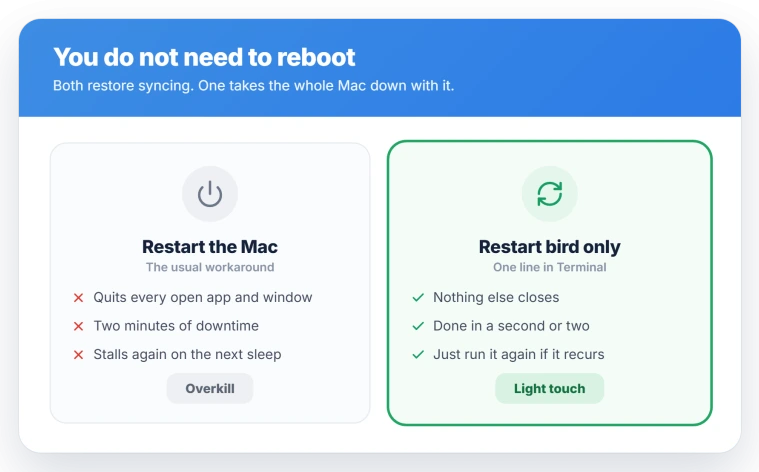
The fastest way is one line in Terminal, which you will find in Applications, then Utilities:
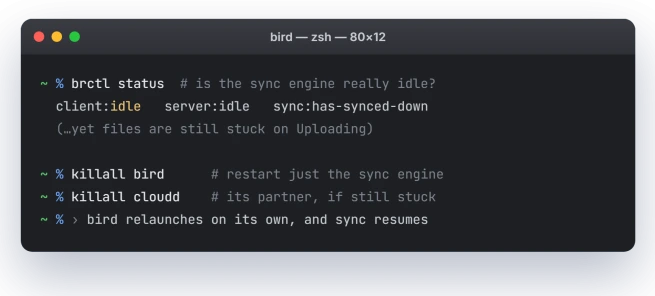
killall birdNothing is deleted and you do not need sudo. macOS relaunches bird within a second or two, and the fresh process usually pushes the stalled files through. If sync is still slow to move, restart its partner too:
killall clouddPrefer to avoid Terminal? Open Activity Monitor, type bird into the search box, select the process, click the Stop button in the toolbar, and choose Force Quit.
It relaunches on its own, and syncing picks up a few moments later.
A caveat on this particular bug: relaunching bird reliably saves you the reboot, but it treats the symptom.
The sync can stall again the next time your Mac sleeps, so keep the command handy rather than expecting one run to cure it for good.
How to tell this is the bug
Try that restart only once you have matched the pattern, since plenty of unrelated things stop iCloud Drive.
This bug has a clear fingerprint. Sync works right after a restart, runs fine for a while, then dies specifically after the Mac sleeps and wakes.
Finder shows Uploading or Waiting and the little progress pie next to iCloud Drive never fills.
The giveaway is your other devices. The same files sync normally on your iPhone or iPad, which proves your account and Apple's servers are fine and the stall is local to the Mac.
If you want to confirm it from the inside, this line prints the sync state:
brctl statusSeeing client:idle while files are clearly still waiting is the tell that the local daemon wrongly thinks it has finished, which is exactly the process a restart of bird kicks back to life.
Two look-alikes are worth ruling out first.
If macOS instead moved your files into iCloud and freed the local copies, that is the Optimize Storage change in Tahoe, not this.
If it is your photo library rather than iCloud Drive, that is iCloud Photos stuck syncing, a different service.
A sync that never finishes can also block Finder copies, which then stop with error -8062; the Finder copy error page covers that symptom.
Why it dies after the Mac sleeps
iCloud Drive is meant to pause syncing when the Mac sleeps and pick it back up on wake. On macOS Tahoe the resume half is what fails.
The daemon that coordinates the transfers, bird, appears to come back from sleep in an idle state while uploads and downloads are still queued.
Its priority can fall so low that it parks instead of finishing, and only a relaunch gets it moving.
This is the best read from the reports rather than something Apple has documented, so treat it as the likely cause, not an official one.
The timing lines up with the update. Users started seeing it on macOS 26.0.1, it was absent on Sequoia, and it was still being reported at 26.2 with no release note naming a fix.
One thing this is not: the separate CloudKit bug from iOS 26.4, where iPhone and iPad apps stopped being told about new iCloud data. Apple fixed that one in 26.4.1, and it was not a Mac problem.
It has nothing to do with the after-sleep stall covered here.
Status: still present on macOS Tahoe through 26.2; the 26.4.1 CloudKit fix was an iPhone/iPad bug, not this one. Restart bird to skip a reboot, though it can stall again on the next sleep.
If it keeps coming back
A relaunch is a quick kick. If you are tired of repeating it, work through the causes that make the stall stick.
- Toggle Wi-Fi off and on. One user had sync resume immediately this way, which fits a network link that does not fully wake. Click the Wi-Fi icon in the menu bar, turn it off, wait a few seconds, and turn it back on.
- Check your firewall. The Tahoe update can leave a firewall switched back on and quietly blocking sync. Open System Settings, click Network, then Firewall, and test with it off. Check any third-party firewall or VPN app too. Apple explains the built-in one in Change Firewall settings on Mac.
- Turn iCloud Drive off, then on. In System Settings, click your name at the top, tap iCloud, then iCloud Drive, and switch it off. Choose Keep a Copy on This Mac, wait, then switch it back on. Know the cost first: with Optimize Mac Storage on, this can trigger a full re-download of everything, so make sure you have the free space.
- Keep the Mac awake for a big sync. As a stopgap while a large batch finishes, stop the Mac sleeping with a Terminal command:
caffeinate -t 3600That holds it awake for an hour, long enough for the queue to clear before sleep can wedge it again.
What will not fix it
A few common moves waste your time on this one.
- Booting into Safe Mode. It does not clear the stall, and the underlying file provider issue rides along into Safe Mode too.
- Restarting your router. The problem is local to the Mac after wake, so the network gear is rarely the cause.
- The Restart Data Sync button. On the banner some builds show, that button does nothing for this bug.
- Signing out of iCloud and back in. It is disruptive, it re-authorises every iCloud service, and users report it did not fix the stall anyway. Keep it as a true last resort.
How do I force iCloud Drive to sync on a Mac?
Open Terminal and run killall bird, adding killall cloudd if needed. macOS relaunches the sync daemon in a second and usually pushes the stuck transfer through, with no reboot and nothing deleted.
If that does not move it, toggle iCloud Drive off and back on in System Settings.
Is it safe to kill the bird process?
Yes. bird is a system sync agent that macOS manages, so force quitting it, from Terminal or Activity Monitor, does not delete any files or settings.
The system relaunches it automatically within seconds, and the fresh copy normally resumes syncing. It is a standard, non-destructive way to unstick iCloud Drive.
Why does iCloud Drive stop syncing after my Mac sleeps?
On macOS Tahoe the sync daemon often fails to resume cleanly on wake. It sits idle while uploads and downloads stay queued, so progress bars stall.
A firewall reset by the update or a network link that does not fully wake can add to it. Relaunching the daemon usually revives it.
How do I restart iCloud on a Mac without rebooting?
You do not have to. bird is one background process, so quitting it, with killall bird in Terminal or Force Quit in Activity Monitor, restarts only the sync engine.
macOS brings it back on its own, your apps stay open, and nothing is lost, which is why it beats a full reboot.
If sync crawls all day rather than stalling after sleep, fileproviderd's database can be the cause, and two cache files clear it.
The Short Version
- The sync engine, not your Mac, is what wedged. Restarting the whole machine is overkill for it.
- Fastest fix: run killall bird in Terminal, or Force Quit bird in Activity Monitor. It relaunches on its own, no reboot and nothing deleted.
- Confirm it first: sync works until the Mac sleeps, stalls on Uploading after wake, but the same files still sync on your iPhone.
- It is a Tahoe bug that started on 26.0.1 and was still around at 26.2. The 26.4.1 iCloud fix was an iPhone and iPad bug, not this Mac one.
- If it keeps returning, toggle Wi-Fi, check a firewall the update may have switched on, or turn iCloud Drive off and on.
Where to Next
- macOS moved your files into iCloud and freed local space: Optimize Storage change in Tahoe
- Desktop and Documents folders gone after the update: Desktop files missing on Tahoe
- Photos rather than Drive stuck syncing: iCloud Photos stuck syncing
- Backblaze leaving iCloud Drive out of your backup: Backblaze and iCloud Drive

Isaac Smith is the founder and editor of PC Glance, a website that covers computers, laptops, and technology. He is a tech enthusiast and a computer geek who loves to share his insights and help his readers make smart choices when buying tech gadgets or laptops. He is always curious and updated about the latest tech trends.