
You type something into Safari and the results come back from a search engine you did not choose. Having your own phone quietly overrule a preference is unsettling, and the first thought is usually that something got in.
Let me point you at the one control that decides it, because on iOS 26 it has moved.
One setting decides this. Where it moved to, what changes it without you, and how to tell a dull cause from a worrying one.
The setting is under Search, not under Safari
Start here, because this is why the usual instructions fail.
Apple gives the route in two steps on its default search engine page: "Tap Search, then tap Search Engine."
Search is its own entry in Settings now. Not inside Safari.
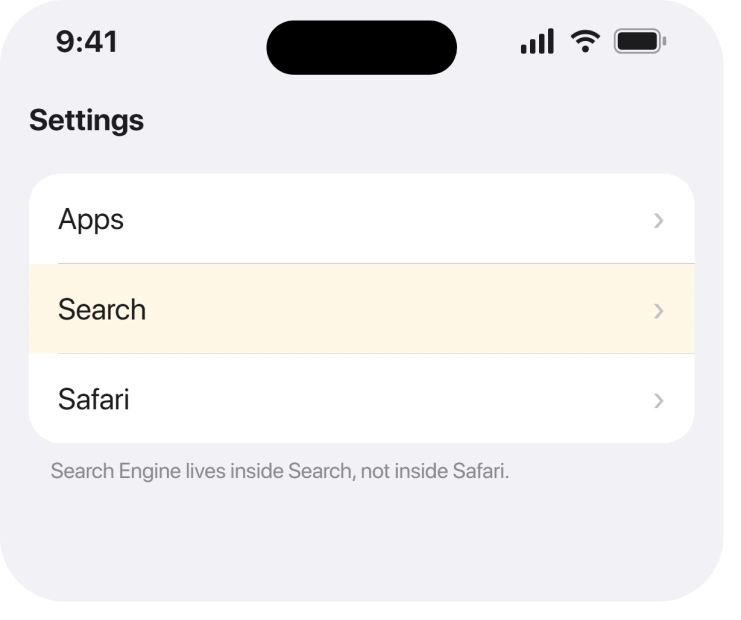
So open Settings, scroll to Search, then tap Search Engine. Apple: "Tap the search engine you want to set as the default" and it applies from then on.
That route was Settings, Safari, Search Engine for years. If you went looking there and found nothing, this move is the whole reason.
What that setting actually governs
Worth being precise, because it is broader than people expect.
Apple describes it as choosing "an alternative search engine as the default to search for content on the web." Since it lives under Search rather than under Safari, it is a system-level preference rather than a browser one.
That has a practical consequence. Changing it in one place changes it everywhere iOS searches the web on your behalf, which is usually what you wanted anyway.
It also means a third-party browser you installed does not read this setting. Chrome and the rest carry their own.
An update can reset it, and that is the likeliest cause
Now the reason it changed without you touching it.
Apple never publishes anything about search preferences changing during an upgrade. What follows is timing rather than documentation.
A default that survives for years and then flips the week you updated is almost always the update. Preferences held in system configuration get rewritten during an upgrade, and a regional default can be reapplied.
That is the boring explanation and it is usually the right one.
Ours, and marked as ours: if the change landed alongside an update, set it back and think no more of it.
Apple publishes nothing about search preferences being reset during an upgrade, so this is our reading of the timing rather than a documented behaviour.
The cause that is worth taking seriously
Fourth, and this is the one to rule out properly.
A configuration profile can set a search engine and hold it there. Profiles are legitimate on a managed phone, and they are also how an unwanted change is made to stick.
Look under Settings, General, then VPN & Device Management.
We could not find a single owner report describing this, which is worth saying plainly rather than inventing one. What we can say is mechanical: a profile you did not install would explain a setting that reverts every time you change it.
Remove it, then set the search engine again.
Ours: we would treat a setting that reverts within minutes as a profile until proved otherwise. A one-off change after an update behaves nothing like that.
What this is not
Last, and it saves people a lot of worry.
A changed search engine is not a virus. iOS does not let a website alter a system setting, and a page telling you otherwise is selling something. The fake virus detected popup covers that racket in full.
Nor is it your Apple Account being used elsewhere. This preference does not sync as an account setting you would see change on another device.
And if the complaint is really that links keep leaving Safari altogether, that is a different mechanism. Links opening in an app instead of Safari explains why there is no switch for it.
What does not help
- Clearing history and website data. It removes your browsing history and does nothing to a system preference.
- Reinstalling Safari. It is built in, and the setting lives outside it under Search.
- Resetting all settings. It restores the search engine and wipes every other preference you ever chose, which is a heavy price for one dropdown.
- Looking under Settings, Safari. The Search Engine row is not there on iOS 26, however many guides say it is.
Status: iOS 26.6.1, checked 19 August 2026. The setting is documented and lives under Search. Apple publishes nothing about it being reset by an update, so that part is our reading.
Where is the Safari search engine setting on iOS 26?
Settings, then Search, then Search Engine. It is a top-level entry rather than something inside Safari, which is why older instructions pointing at Settings, Safari, Search Engine lead nowhere.
Why did my iPhone search engine change to Bing on its own?
Usually an iOS update rewriting a system preference, particularly when the change showed up the same week you upgraded. Set it back under Settings, Search, Search Engine. If it reverts again within minutes, look for a configuration profile instead.
Can a virus change my Safari search engine?
No. iOS does not allow a website to alter a system setting. A configuration profile can, which is a legitimate mechanism used on managed phones, so check Settings, General, VPN & Device Management rather than installing anything.
Does the search engine setting affect Chrome as well?
No. Third-party browsers carry their own search engine preference and do not read this one. The setting under Search governs Safari and the places iOS searches the web for you.
Chrome on a Windows PC or a Mac that keeps switching to Yahoo is a different fault, usually a program, an extension or a policy.
The Short Version
- The route is Settings, Search, Search Engine. Not Settings, Safari.
- It is a system-level preference, not a browser one.
- A one-off change alongside an update is almost certainly the update.
- A change that reverts within minutes points at a configuration profile.
- Check VPN & Device Management for a profile you did not install.
- It is not a virus, and clearing history will not touch it.
Where to Next
The part I would hold on to is the difference between a setting that changed once and a setting that will not stay changed. The first is an update and takes ten seconds. The second is a profile and is worth investigating properly.
If yours keeps reverting and no profile is listed, say below how the phone is used. Nobody has explained that combination anywhere I can find, and I would rather add a real answer than guess.

Isaac Smith is the founder and editor of PC Glance, a website that covers computers, laptops, and technology. He is a tech enthusiast and a computer geek who loves to share his insights and help his readers make smart choices when buying tech gadgets or laptops. He is always curious and updated about the latest tech trends.