
You tap a link and an app snatches it before Safari gets a look in. Then the advice you find names a setting that is not on your phone, which I know is maddening. Let me tell you what is actually there and what genuinely works.
The short version is that iOS 26 gives you no switch for this, so this is a list of workarounds rather than a fix.
1. Touch and hold the link, which is the reliable one
Start here, because it works every time and costs you nothing.
Do not tap the link. Press and hold it until a menu appears. Then choose Open in New Tab or Open in Background.
The page loads in Safari and the app stays out of it.
That is the answer a Level 9 member gave the owner on the Apple Community thread this page draws on, and it is the only route in the whole thread with nothing arguing against it.
Owners report it as the one thing that always works. It is a habit rather than a setting, which is annoying, and it is instant. And it works in Messages, Mail and Notes, not just inside Safari.
2. The setting everyone tells you about is gone
Read this before you spend any time hunting for it.
Plenty of instructions, old and current, tell you to open Settings and turn off something called Open Links in Apps. Apple's own default apps page lists what you can actually change, and that is not on it.
The owner who raised the thread had already looked: the instructions "reference an 'Open Links in Apps' setting that no longer exists in current iOS", with no list of apps to switch off.
I looked for it too, across Settings and the iPhone User Guide, and there is no such control on iOS 26. So I would stop searching.
So if you have searched Settings and found nothing, you are not missing it. There is nothing to find.
3. Why iOS does this, which decides what can work
Now the mechanism. It explains why most suggested fixes cannot work at all.
Apple never publishes a consumer explanation of this. What follows is assembled from behavior.
An app can register itself to handle a website's addresses. When it has, iOS hands that address to the app rather than the browser. Apple built that on purpose, so a YouTube link opens YouTube.
Two consequences follow, and both are worth knowing before you try anything else.
There is no single switch that turns it off across the phone. And the choice belongs to the app and the website together, not to a browser preference you can set.
Ours, and marked as ours: that is our reading of the behavior owners describe, assembled from the thread and from Apple's own default-app settings.
Apple publishes no consumer page explaining it, which is a large part of why this question keeps being asked.
4. Set your default browser, and know what it will not do
Worth doing. And worth understanding first.
Apple does give you a real default-app control.
Apple: "You can select alternative, third-party apps, for email, messaging, calling, call filtering, web browsing, passwords, or keyboards, as defaults to launch instead of the built-in Apple apps."
The route is Settings, Apps, Default Apps, then Browsing.
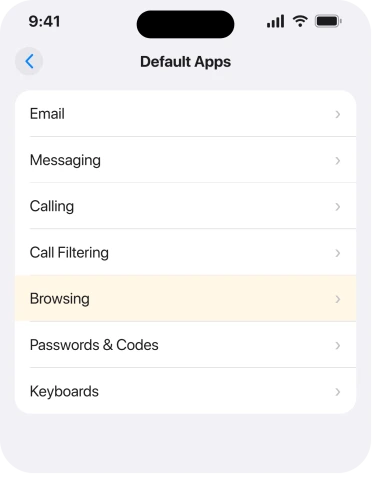
That decides which browser opens when a link reaches a browser at all. It does not stop an app claiming the link first.
So it is worth setting. It is not the answer to this question, and the two get run together constantly.
5. Removing the app works, and it is a big price
Narrower. The only route that genuinely stops it.
With the app gone, nothing is registered to claim its addresses. The link then falls through to your browser.
A senior member suggested exactly that: remove the app, set your preferred default, then decide whether to reinstall.
The owner tried the gentler half first. They closed the app before tapping the link and reported that it made no difference: "I already had the Google Maps app closed when I tapped on the link, and the app opened".
So closing an app is not the same as removing it. Only deleting it changes anything, and for most people that is too high a price for a browsing preference.
6. Three things that sound right and do not work
Last, and the most useful part of the page. These are evenings you can skip.
The same owner tried the app's own visibility switches. Their result: "Turning them both off didn't prevent the Google Maps app from opening." Show App in Search and Show Content in Search have nothing to do with link handling.
A member offered a URL trick, appending a parameter to force the web version. Another owner tested it and reported back: "Mine still goes to Maps app because that is how Google works."
And there is no per-app list to switch off. Several people looked. Nobody found one.
If the trouble is Safari itself misbehaving rather than an app stealing links, Safari showing blank white pages and Safari tabs disappearing are the pages for those.
What does not help
- Hunting for Open Links in Apps. It is not in iOS 26, whatever the instructions say.
- Force closing the app first. Tested by the owner who raised this and reported as no help.
- Turning off Show App in Search. Tested and reported as no help.
- Changing your default browser. Worth doing for other reasons, and it does not stop an app claiming a link.
Status: iOS 26.6.1, checked 19 August 2026. Apple publishes no switch and no explanation, so everything you have here is a workaround. Touch and hold is the only reliable one.
How do I stop links opening in apps on my iPhone?
There is no setting for it on iOS 26. The reliable workaround is to press and hold the link instead of tapping it, then choose Open in New Tab. Deleting the app that claims the link is the only thing that stops it happening at all.
Where is the Open Links in Apps setting?
It does not exist on current iOS, so you are not missing it. Owners who search for it after reading older instructions find nothing, and there is no such control in Settings or the iPhone User Guide.
Does changing my default browser fix this?
No. Settings, Apps, Default Apps decides which browser opens your link once it reaches a browser at all. It does not stop an app intercepting it first.
Why does a link open the app even when the app is closed?
Because the handling is registered on your phone rather than held by the running app. One owner confirmed it directly, reporting that the app opened even though they had closed it first.
The Short Version
- Press and hold the link and choose Open in New Tab. That is the reliable route.
- The Open Links in Apps setting no longer exists on iOS 26.
- iOS gives the address to a registered app before any browser sees it.
- Settings, Apps, Default Apps sets your browser but does not stop the interception.
- Deleting the app is the only thing that stops it, and it is a real cost.
- Closing the app, turning off Show App in Search and URL tricks were all tested and all failed.
Where to Next
I would rather hand you one workaround that always works than five settings that owners have already proved do nothing. Press and hold, every time, and it stops being a problem.
Where the Mac refuses to open an app at all and the usual button is missing, Tahoe moved it.
If Apple brings the switch back, or you find a per-app control I have missed, tell me and I will change this page. It is the kind of thing that could reappear in a point release without anybody announcing it.

Isaac Smith is the founder and editor of PC Glance, a website that covers computers, laptops, and technology. He is a tech enthusiast and a computer geek who loves to share his insights and help his readers make smart choices when buying tech gadgets or laptops. He is always curious and updated about the latest tech trends.