
You set Google as the search engine in Chrome, and a day or a restart later your searches land on Yahoo again, or on Bing. Setting it back holds for a while. Then it flips.
I would hunt for whatever keeps flipping it before resetting anything, because a reset alone gets undone. A 2023 Microsoft Q&A question about Yahoo taking over every week has 40+ Same question clicks.
Something on your computer is changing it
Chrome does not switch engines on its own. Google's list of malware signs starts with "Your Chrome homepage or search engine keeps changing without your permission".
A reply on Google's Chrome forum sums up the usual suspects: a policy from work or school, "some software on your system (possibly McAfee) changing your default search engine", or malware. Extensions belong on that list too.
Status: checked 9 October 2026 against Google's Chrome help and McAfee's Web Store listing, on Chrome 154.0.8037.98. McAfee says its Secure Search changes Chrome's default engine.
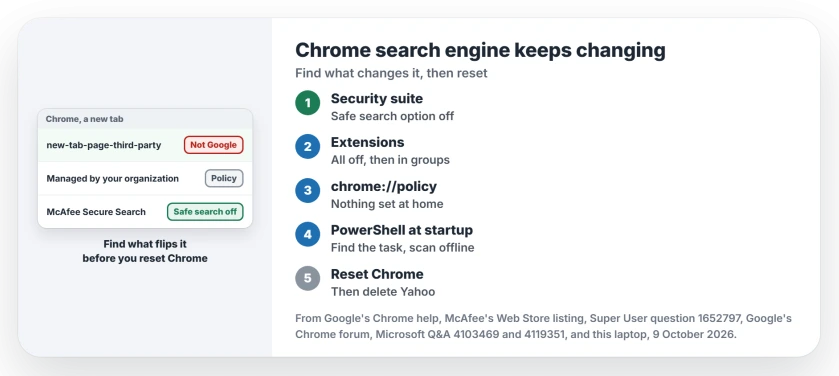
Ours: this laptop has no Chrome policy in the registry. Of its 217 scheduled tasks, 2 start PowerShell, and both are Microsoft's own SMB cleanup tasks. That is what a clean PC shows for steps 3 and 4.
1. A program that switches it on purpose
Some security suites do it openly: McAfee's own Chrome Web Store listing says its "Secure Search powered by Yahoo" extension "updates your default search provider in Chrome", and the listing counts 1,000,000 users.
On Google's forum, an owner saw the switch every time McAfee ran a scan, and a reply pointed to McAfee's own article: "To prevent the unwanted change, un-tick the safe search box". The owner wrote back "That kind of answers my question".
So open McAfee's settings, or its WebAdvisor icon in Chrome, and turn the safe search option off. Or remove McAfee Secure Search under chrome://extensions.
I would do that rather than uninstall the whole suite. On Super User, an owner found McAfee removed but "it left a search hijacker behind" that kept setting Chrome back to Yahoo.
2. Turn every extension off
Type chrome://extensions in the address bar and switch every extension off. Set Google again under Settings, Search engine. Does it hold for a day? Then turn your extensions on again in small groups. Stop when it flips.
Google's malware page gives the other sign as "Unwanted Chrome extensions or toolbars keep coming back". An extension that returns after you remove it is being put back by a program. Go on to step 4.
3. Managed by your organization on a home PC?
Open Chrome's menu and look at the bottom line. Google says that if it reads Managed by your organization, your browser is managed. chrome://policy then lists what was set.
Google adds that "your network admin may choose a default search engine or manage your search engines for you". At work, that is expected.
At home, it is how a hijacker locks the setting. An owner on Q&A had an engine called Custom Search that Chrome would not let them change. Chrome also called their PC managed.
A policy can also hide Chrome's Always allow box, which is why some apps ask to open on every single link.
On Windows, these show whether any Chrome policy exists. An error saying the key cannot be found means there is none:
reg query HKLM\SOFTWARE\Policies\Google\Chrome
reg query HKCU\SOFTWARE\Policies\Google\Chrome
Removing those keys by hand only lasts once the program that wrote them is gone.
On a Mac, the same lock arrives as a configuration profile. Apple says you "use Device Management settings to install, view, or remove configuration profiles", under System Settings, General.
For a Mac with unfamiliar apps as well as browser changes, check its other unwanted-software entry points.
4. A PowerShell window at startup
An owner on Microsoft Q&A saw PowerShell flash open after every restart, just before Yahoo came back, and asked about it twice in 2023. They wrote that "if i can close the program quickly enough, my settings don't get changed".
That points at a scheduled task or a startup entry, so check the Startup apps page in Task Manager. Then list the tasks that start PowerShell:
Get-ScheduledTask | Where-Object { $_.Actions.Execute -match 'powershell' } | Select-Object TaskPath, TaskNameAnything outside the Microsoft folders deserves a closer look, and our page on Command Prompt popping up shows how to trace a task back to the program that made it.
Disabling the startup entry was not enough for that owner. They also cleared Chrome's cache and reinstalled it. Yahoo still returned. At that point I would run a full offline scan, which our virus scan page walks through.
5. Reset Chrome, then delete the engine
Once the cause is gone, reset. Google's reset page says you might need it "if apps or extensions you installed changed your settings without your knowledge", and your bookmarks and passwords stay.
Then open Settings, Search engine, Manage search engines and site search, make Google the default and delete the Yahoo entry. An owner on Google's forum did that in 2022 and wrote "I was able to get rid of Yahoo".
The new tab page with a strange address
Open a new tab and look at the address bar. Does it read chrome://new-tab-page-third-party? That is the page Chrome shows when your default engine is not Google.
A Chromium change in March 2021 built it for "third-party search providers that do not have their own NTP define".
On Super User, an owner called that page the warning sign: it "was the red flag that clued me in to the search modifications". Another saw the same address while a user agent switcher extension was on. Step 2 catches that one.
Is Yahoo itself the problem?
No. Yahoo is a real search engine. The program that keeps choosing it for you is what has to go.
On Mac, the default-browser setting chooses which application opens links; it does not choose Chrome's search engine.
The Short Version
- McAfee or another suite: turn off its safe search option, or remove its search extension.
- Turn every extension off, then on again in small groups.
- Managed by your organization at home: check chrome://policy and the two registry keys.
- PowerShell flashing at startup: look for the task that starts it, then scan offline.
- Reset Chrome last, make Google the default, and delete Yahoo.
Where to Next
What was switching your search engine? Name it in a comment. It could save another reader an evening of resets.

Isaac Smith is the founder and editor of PC Glance, a website that covers computers, laptops, and technology. He is a tech enthusiast and a computer geek who loves to share his insights and help his readers make smart choices when buying tech gadgets or laptops. He is always curious and updated about the latest tech trends.