
You finished the iOS 26 update and the signal never came back. No bars, no calls, and a Cellular screen that either sits empty or refuses to respond.
Losing your phone line the moment you did what Apple told you to do is a genuinely worrying way to start a day, and I do not blame anyone for being furious about it.
Everything below came from owners who got their service back, roughly in the order they are worth trying.
Nothing here erases your phone. The last two involve your carrier rather than your handset.
If it started with iOS 27
A newer thread, now with 204 Me too clicks, has the same symptom after iOS 27, often on phones with two lines.
The first owner wrote: "Everything was working perfectly before update but when I updated my phone to iOS 27 days ago straight away I started getting network problems".
One owner found a quick fix in Voice & Data: switching it to LTE brought their service straight back, a find they announced in capitals.
Apple's 5G page describes that choice: "LTE: Uses only LTE network, even when 5G is available". Open Settings, Cellular, Cellular Data Options, then Voice & Data. With two lines, pick the number first.
Another owner traced it to a VPN: "Turn off your VPN or Delete your VPN app. Works perfectly fine after. Then you can reinstall the VPN app".
A Level 9 volunteer added the timing to expect for a proper fix: "Typically the next update from Apple is 4 to 6 weeks after the initial release".
Install the point release, because Apple already fixed this
Apple shipped a repair for this within days of iOS 26 landing, so check for an update before you try anything clever.
Go to Settings, General, then Software Update.
Owners report it working plainly. One member of the huge Apple Community thread behind this page wrote: "I updated to 26.0.1, restarted my phone and now I have cell signal again."
Another added a wrinkle worth knowing on an iPhone 14 Pro Max: "Update to 26.0.2, remove the SIM card before the phone restarts. Fixed."
That second one is doing two things at once, and the SIM half matters later on this page.
Toggle the line itself, not the Cellular Data switch
The switch most people reach for is Cellular Data. The one that fixed this for several owners is a level deeper, on the line itself.
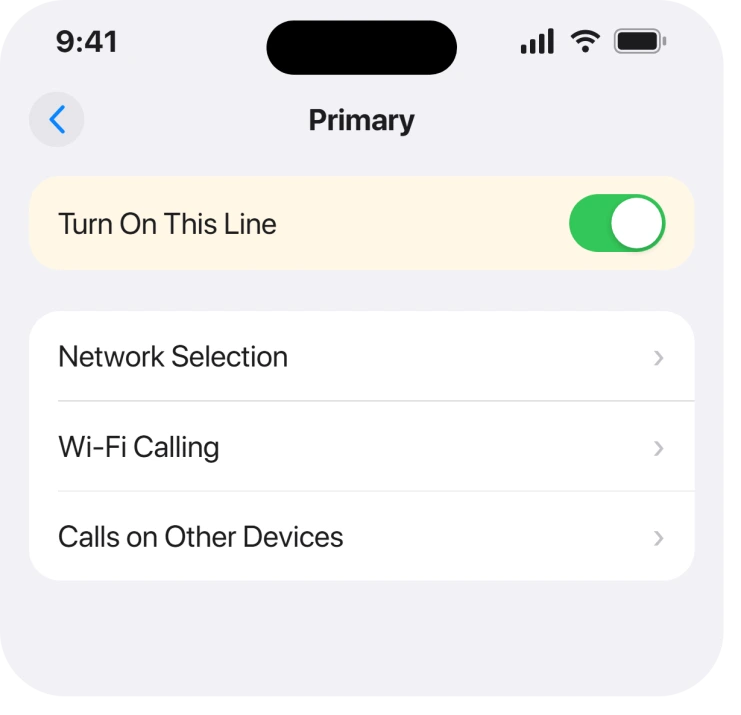
Open Settings, tap Cellular, then tap your line under SIMs.
Switch Turn On This Line off. Give it a few seconds, then switch it back.
Owners report this working. A Verizon customer landed on precisely that: they "Toggled 'Turn On This Line' Off/On" and service returned. Another member independently landed on toggling the SIM in the same place.
Reset network settings, knowing what it costs
This one has a confirmation behind it, and a real price, so read the price first.
It clears every saved Wi-Fi password, every VPN configuration and your cellular settings. Nothing else is touched, and no photos or messages go anywhere.
The route is Settings, General, Transfer or Reset iPhone, Reset, then Reset Network Settings.
One member on the thread named that exact path as what resolved it for them.
Ours, and marked as ours: we would put this third rather than first, because the two steps above are free and this one costs you an afternoon of retyping Wi-Fi passwords.
Physically reseat the SIM, which sounds mad and worked twice
Two owners fixed this by moving a physical SIM card, and the reports are specific enough to repeat.
One wrote: "I flipped the sim from the top to the bottom of the sim tray and it worked." Another bought a dual SIM tray and moved the card to the other side, and their service came back.
We have no explanation for that and neither did they. It is printed because two separate people reported it working, not because it makes sense.
If you have a physical SIM, power the phone off, take the tray out, and put the card back seated properly. That costs nothing.
Phones sold in the US since the iPhone 14 have no tray at all, so skip this if yours is eSIM only.
Check carrier settings before you blame the phone
An update can leave the carrier profile behind, and the check takes ten seconds.
Go to Settings, General, then About. If a carrier settings update is waiting, a prompt appears within about a minute of opening that screen. Apple's cellular settings page covers what else lives on that screen.
Nothing on the thread confirms this as the fix, so it sits here as a cheap check rather than a reported cure. Apple never ties carrier settings to this particular break in anything it publishes.
Ask the carrier for a new SIM or a fresh eSIM
One member got their service back only after their provider issued a new SIM card.
That is worth knowing before you spend a day on resets: if the profile was damaged, nothing you do on the handset rebuilds it.
For an eSIM the equivalent is asking the carrier to reissue the plan, then adding it again.
Add eSIM missing from your Settings covers the case where the option to do that has itself disappeared, and an eSIM stuck on Activating covers the reinstall stalling.
When the Cellular screen is greyed rather than empty
There is a version of this that looks identical and is not this problem at all.
If the Cellular row is dimmed and will not open, that is a restriction rather than a broken profile, and iPhone cellular greyed out is the page for it.
And if you are seeing the words Cellular Issue Detected, that is a specific alert with its own answer in what Cellular Issue Detected really means.
What does not help
- Airplane mode on and off. Widely suggested, and nobody on a 246-reply thread reported it fixing this.
- Restarting on its own. Restarts appear in the reports only alongside an update or a SIM change, never by themselves.
- Erasing the iPhone. No report needed it, and two of the confirmed fixes are a settings toggle away.
- Waiting it out. This did not resolve itself for anyone. The people who got service back did something.
Status: iOS 26.6.1, checked 19 August 2026. Apple addressed this in 26.0.1 and again in 26.0.2, and owners on later builds still report it. Several fixes here are confirmed by named owners.
Why did my cellular stop working after updating to iOS 26?
The update could leave the SIM profile in a broken state, which is why Apple shipped a repair in 26.0.1. Owners describe no bars, an unresponsive Cellular screen and a missing phone number, all appearing the moment the update finished.
Does updating to iOS 26.0.1 fix no service?
It did for at least one owner, who reported cell signal returning after updating and restarting. Another reported success on 26.0.2 while also removing the SIM card before the restart, so the two are often done together.
Will resetting network settings delete my data?
No. It clears saved Wi-Fi passwords, VPN configurations and cellular settings only. Your photos, messages and apps are untouched, which is why it is safe, though retyping every Wi-Fi password is a genuine cost.
Is a new SIM card worth asking for?
If updates, toggles and a network reset have all failed, yes. One owner on the thread only got service back after their provider issued a replacement, which points at a damaged profile that no handset step can rebuild.
The Short Version
- Update first. Apple fixed this in 26.0.1 and again in 26.0.2.
- Toggle Turn On This Line under Settings, Cellular, SIMs.
- Reset Network Settings works, and costs you every Wi-Fi password.
- Two owners fixed it by reseating a physical SIM, with no explanation.
- A carrier settings prompt appears on the About screen if one is waiting.
- A replacement SIM was the only thing that worked for one owner.
Where to Next
What makes this page different from most is that every fix on it has a named person behind it who said it worked. That is unusual, and it is only possible because people kept talking on one 246-reply thread until answers appeared.
If the phone is asking for a code rather than a signal, that is a different request. What a PUK code is and where to get yours.
If the status bar says SOS rather than nothing at all, that word means something specific. Apple states emergency calls still work through other carriers.
If you got your service back another way, add it in the comments with your carrier and your model. Carrier turns out to matter here more than anyone expected.
If cellular data fails on its own rather than after an update, the cellular data guide covers the everyday causes.

Isaac Smith is the founder and editor of PC Glance, a website that covers computers, laptops, and technology. He is a tech enthusiast and a computer geek who loves to share his insights and help his readers make smart choices when buying tech gadgets or laptops. He is always curious and updated about the latest tech trends.