
Every page says the same thing. Open Device Manager, find your Wi-Fi adapter, go to the Power Management tab, untick the box that lets Windows switch it off. So you look. There is no Power Management tab.
You are not being blind and your machine is not broken. Microsoft moved this on newer laptops, and where it went explains the drops as well.
What changed, in Microsoft's own words
Newer machines sleep differently. They use what Microsoft calls modern standby, staying partly awake and managing their own radios.
Documented by Microsoft on its own Q&A, answering exactly this question: "Newer computers support modern standby and the OS (Windows 10, 11, etc.) will enable it when present and supported in computer firmware. The Power management under network adapters is no longer present when your computer is running in modern standby mode (S0 sleep mode) because it no longer applies in that mode for those particular devices."
Read that twice, because it tells you two things.
Your tab is missing on purpose. And it is missing because Windows itself now decides when to power down the Wi-Fi radio. That is exactly the behavior you were trying to stop.
So do this instead
The control still exists. It moved into the power plan, where nobody thinks to look.
Open Control Panel, then Hardware and Sound, then Power Options. Click Change plan settings beside your active plan. Then Change advanced power settings.
Expand Wireless Adapter Settings, then Power Saving Mode.
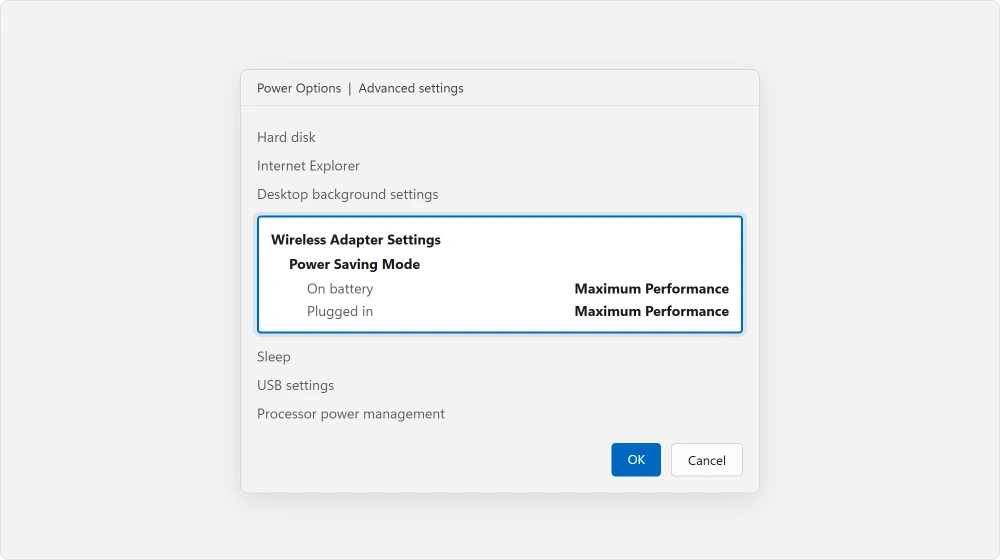
Set it to Maximum Performance for both On battery and Plugged in.
That is the same instruction every article is fumbling for, in the place it actually lives on a modern laptop. On battery it costs you some runtime.
If your machine still has the old tab
Plenty of desktops and older laptops do. On those the original advice is correct.
Press Windows + X and open Device Manager. Expand Network adapters. Right-click your Wi-Fi adapter and choose Properties. If a Power Management tab is there, clear the box about letting the computer switch the device off to save power.
Do both this and the power plan setting if you have both. They are separate controls, and either one can drop your connection.
Forcing the old tab back, and why I would not
There is a way to make the tab reappear. I want to describe it accurately rather than recommend it to you.
Documented in the same Microsoft answer, a registry change disables modern standby and drops the machine back to the older sleep mode. The tab returns with it:
reg add HKLM\System\CurrentControlSet\Control\Power /v PlatformAoAcOverride /t REG_DWORD /d 0And to undo it:
reg delete "HKLM\System\CurrentControlSet\Control\Power" /v PlatformAoAcOverride /fOurs, and marked as ours: this changes how your entire machine sleeps, to reach one checkbox the power plan already gives you. On a laptop it can affect how fast it wakes and what happens when you shut the lid.
The power plan route does the same job and touches none of that. Try that first. Leave this one alone unless nothing else works.
When it drops on one network and not others
Test this. It takes no time and it decides everything else.
Does your phone stay connected while only this machine drops? Then the machine is your problem. Does everything drop together? Then it is the router or the line.
And a laptop that is fine everywhere else but misbehaves at home is telling you the router is at fault. However much it looks like Windows from where you are sitting, it is not.
Ours, and marked as ours: Windows settings fix the first case and do very little for the third. If yours only ever happens on your own network, what a modem and a router each do is the more useful page, because the fix lives at that end.
The router side, in a sensible order
Restart the router properly first. Unplugged for thirty seconds, not switched off and on.
Then look at the band. Many machines drop because they keep hopping between the 2.4 GHz and 5 GHz halves of a network that share one name. Split them into two names in the router settings, join the one you want, and the hopping stops.
No access to that in your provider's app? Ask them. On a rented gateway they can often change it from their end, and if yours is offline as well then a printer that has gone offline shares the same root.
What owners tried that did not work
Read this list before you repeat any of it yourself.
Reported as failing by an owner on Microsoft's Q&A, 3 September 2024. A Lenovo IdeaPad Gaming 3 with a MediaTek MT7921 adapter, dropping every five to ten minutes.
They had already reinstalled the adapter drivers, flushed DNS, removed and rescanned the adapter, changed DNS servers, and forgotten and rejoined the network.
Then they tried a full network reset. Their result: "Unfortunately the wifi worked for about 20 minutes before it stopped working again. It didn't disconnect, but the connection wasn't there and I had to once again manually connect everything :("
Nobody confirmed a fix on that thread, and it closed without one.
Two further details from that thread matter to you. Their provider gave them no way to change the Wi-Fi channel, which is normal on a rented gateway.
And they could not find the option to disable 802.11ax, because that setting simply is not on every adapter.
I would rather tell you now than have you hunt for something your hardware does not have.
The driver, and the direction to move it
Updating a Wi-Fi driver is standard advice. Rolling one back is the half that gets left out.
Did the drops start after an update? Then the newer driver is a suspect, not the cure. In Device Manager, open the adapter's Properties, then the Driver tab. Use Roll Back Driver if it is offered.
Reported by an owner on the same Microsoft thread, as a daily workaround rather than a fix: "The thing I do now is whenever I start my laptop and the Wi-Fi is active. I immediately go to device manager and update the driver to the previous version or the newer version then it says driver successfully installed."
That is somebody living with a fault rather than solving one. I include it because it tells you the driver is genuinely involved, even when nothing sticks.
Status: written 21 August 2026. On any machine using modern standby, the Power Management tab is absent by design and the equivalent control lives in the power plan instead.
Why is there no Power Management tab on my Wi-Fi adapter?
Because your machine uses modern standby. Microsoft states that the tab is no longer present in that mode because it no longer applies. The equivalent setting is in Control Panel, Power Options, advanced settings, under Wireless Adapter Settings.
How do I stop Windows turning off my Wi-Fi adapter?
Set Power Saving Mode to Maximum Performance under Wireless Adapter Settings in your power plan's advanced settings. On older machines that still show it, also clear the box in the adapter's Power Management tab in Device Manager.
Why does my Wi-Fi drop only on my home network?
The router, almost certainly. A machine that behaves everywhere else and only drops at home has told you where the fault sits, and no Windows setting will reach it.
Should I disable modern standby to get the old setting back?
I would not. It changes how the whole machine sleeps to reach one checkbox that the power plan already offers. Try the power plan route first, and keep the registry change as a last resort.
The Short Version
- The Power Management tab is missing by design on machines using modern standby.
- The same control lives under Wireless Adapter Settings in the power plan.
- Set Power Saving Mode to Maximum Performance on battery and plugged in.
- Dropping only at home means the router, whatever it looks like from the laptop.
- Two bands sharing one name makes machines hop, and splitting the names stops it.
- If drops began after an update, roll the driver back rather than forward.
Where to Next
Settle one question before anything else: do your other devices drop at the same moment? That single observation decides whether you are fixing Windows or fixing the router. A great many people spend an evening on the wrong one.
A connection that holds while nothing loads needs a completely different answer.
And if the whole machine has felt sluggish, rule out the two numbers behind a slow PC, because a machine under strain drops connections it would otherwise hold.
Say in the comments whether it drops on every network or only yours, and whether the Power Management tab exists on your adapter. Those two answers put you in one of two completely different articles.

Isaac Smith is the founder and editor of PC Glance, a website that covers computers, laptops, and technology. He is a tech enthusiast and a computer geek who loves to share his insights and help his readers make smart choices when buying tech gadgets or laptops. He is always curious and updated about the latest tech trends.