
You press Shift and a big arrow appears on your Mac's screen. It comes back every time, and it looks like something has taken over your Mac.
It is a built-in feature, not an intruder. I matched one owner's description against Apple's own Accessibility pages, and three features can put a large arrow on your screen.
What one owner saw
The first post was in capitals, and the original title said it all: "GIANT ARROW IN MY INTERFACE THAT KEEPS REAPPEARING AS I PRESS THE SHIFT KEY". They added: "IT IS UNNERVING AND APPEARS TO BE AN INTRUDER???"
Later they described it more calmly: "When I pressed my Shift key, a straight white arrow outlined in black appear in my upper LH side of the screen."
The fix sat in the Accessibility settings. In their words: "In Accessibility, the feature that allows key choices to migrate from app to app defaulted to be ON. I clicked it off."
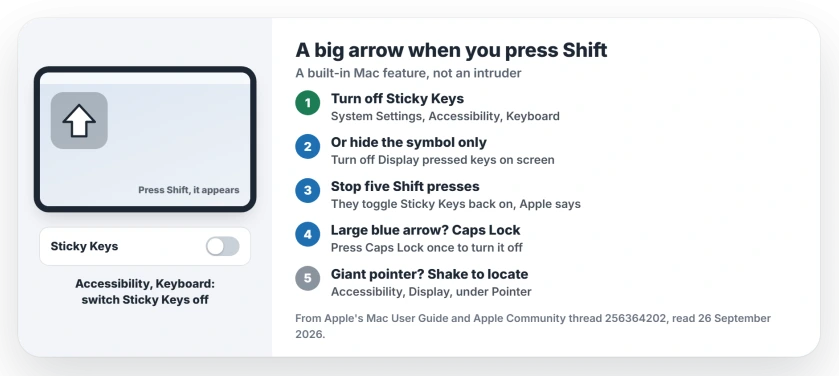
Status: macOS 26, checked 26 September 2026. An arrow that appears as you press Shift matches Sticky Keys showing the keys you press. One owner cleared it with an Accessibility switch.
1. Turn off Sticky Keys
Open System Settings, click Accessibility, then Keyboard, where Apple's keyboard accessibility guide lists Sticky Keys.
Apple's description: Sticky Keys lets you "Press a set of modifier keys one at a time in sequence, instead of all at once." Shift is one of those modifier keys.
Its display option is the likely arrow, since Apple says it can "Display symbols to indicate which modifier keys you press." The Shift symbol is an outlined arrow pointing up.
That match is our reading, since the owner never named the switch. Turn Sticky Keys off, press Shift, and the arrow should stay away.
2. Or keep Sticky Keys and hide the symbol
If you use Sticky Keys on purpose, click the small button next to it to customize, and turn off "Display pressed keys on screen".
Apple also lets you pick the "Screen area for display", so the symbol can move somewhere less distracting.
3. Stop five Shift presses turning it back on
Sticky Keys can switch on while you type. Apple's own option reads "Press the Shift key five times to toggle Sticky Keys", so five quick presses flip it.
If that keeps catching you, turn the option off in the same Sticky Keys settings, and it only changes when you choose.
4. A large blue arrow means Caps Lock
A different arrow shows up when Caps Lock is on. A Level 7 volunteer put it plainly: when "caps lock is on a large blue arrow appears".
Press Caps Lock once to turn it off. The blue arrow should vanish along with your capitals.
5. A pointer that grows when you shake the mouse
Maybe the arrow is your pointer, and it balloons when you move fast. That is "Shake mouse pointer to locate", which Apple says makes "the pointer larger when you quickly move your finger on the trackpad or quickly move the mouse".
Turn it off in System Settings, Accessibility, Display, under Pointer. A Level 10 volunteer added: "Despite the language, it applies to Trackpads too."
Other Mac keyboard problems
If your keys stop typing in every window instead, the phantom focus page gets typing back. On a Windows PC, the Sticky Keys page covers the same feature there.
What is the arrow on my Mac screen when I press Shift?
Most likely Sticky Keys showing the modifier key you pressed. Apple says it can display symbols for those keys in an area of the screen you choose.
Where is the Sticky Keys switch on a Mac?
Open System Settings, click Accessibility, then Keyboard, and turn Sticky Keys off.
Why did Sticky Keys turn on by itself?
Apple's option to press the Shift key five times toggles Sticky Keys. Turn that option off if it keeps happening.
Is the arrow a virus or an intruder?
Nothing in this case pointed to one: the owner cleared it with an Accessibility setting, and each arrow here traces back to a built-in macOS feature.
The Short Version
- The arrow is a feature, not an intruder.
- Sticky Keys can show a Shift symbol.
- Turn it off in Accessibility, Keyboard.
- Five Shift presses can turn it back on.
- A large blue arrow means Caps Lock.
- A giant pointer is Shake to locate.
Where to Next
Press Shift once now and watch your screen. If the arrow appears, go straight to Accessibility, Keyboard.
Which arrow was yours? Leave a comment with its shape and where on the screen it appeared. I will add any new ones to this page.

Isaac Smith is the founder and editor of PC Glance, a website that covers computers, laptops, and technology. He is a tech enthusiast and a computer geek who loves to share his insights and help his readers make smart choices when buying tech gadgets or laptops. He is always curious and updated about the latest tech trends.