
You open Mail after a macOS update, and the window is there but your mailboxes are empty. No error, no warning, just nothing where your inbox used to be.
Your emails are most likely still on the server, and one step brought them back for a Mac mini owner on Apple's forum. I checked that fix against Apple's Mail guide for the safe way to do it.
What happened to one owner
The report was short: "Mail is not working after the Golden Gate Mac OS Update." Then the detail that matters: "Mail opens… But my eMails are not there!!!"
A Level 10 volunteer replied with one line: "Try delete account and set it up again."
About an hour later the owner was back, and in their words: "I did, & my Inboxes etc. are back!!!" Three other people have pressed Me too since then.
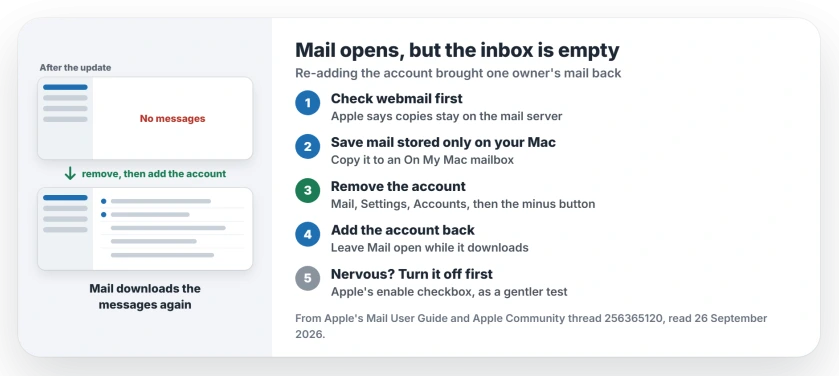
Status: Mail after the macOS 27 update, checked 26 September 2026. Removing the email account and adding it again brought the inboxes back for one owner. Check webmail first.
1. Look for your messages in webmail
Before you remove anything, open your email provider's site in a browser and log in. If your messages are there, removing the account from Mail is safe.
Apple's Mail guide explains why: "Copies of messages remain on the account's mail server and are still available (from webmail, for example)."
2. Save anything that lives only on your Mac
Some mail may exist only on your Mac, especially with older POP accounts, and Apple's own warning covers that case.
In Apple's words: "If you're unsure whether messages you want to keep are still on the mail server, move or copy them to a mailbox stored on your Mac". Those mailboxes sit under On My Mac in the sidebar.
3. Remove the account from Mail
Apple says removing an account clears its messages from your Mac, and that is the point here, because Mail throws away its broken local copy.
In Mail, choose Mail, then Settings, then click Accounts, select the account and click the minus button.
If other apps use that account, Apple says you're asked to remove it in Internet Accounts settings instead, where you can turn Mail off for it.
4. Add the account back
Add the same account again from Mail's menu and sign in. Mail then pulls your messages down from the server again.
A large mailbox can take a while to come back, so leave Mail open on a fast connection; that advice is ours.
5. If you would rather not remove it yet
Apple also offers a gentler switch. In Mail's Accounts settings, you can turn an account off with its enable checkbox and turn it back on later.
Nobody in the thread tried that route, so try it first if you are nervous about removing anything; that suggestion is ours.
Other Mac Mail problems
If Mail will not send since the Tahoe update, the Mail sending page covers the outgoing server. And a Yahoo account stuck offline has its own fix on the Yahoo Mail page.
Why are my emails missing in Mail after a macOS update?
Mail's local copy of the account can break during an update, even though the messages are still on the server. Removing and re-adding the account made Mail download them again for one owner.
Will I lose my emails if I remove the account from Mail?
Not if they are on the server, where Apple says copies remain. Copy anything stored only on your Mac to an On My Mac mailbox first.
How do I remove an email account from Mail on a Mac?
Choose Mail, then Settings, then Accounts. Select the account and click the minus button.
Can I turn an email account off instead of removing it?
Yes. Apple lets you turn an account off in Mail's Accounts settings and turn it back on when you are ready.
The Short Version
- Your emails are likely still on the server.
- Check them in webmail first.
- Copy anything stored only on your Mac.
- Remove the account in Mail Settings.
- Add it again and let it download.
- One owner got every inbox back this way.
Where to Next
Open your provider's webmail now and confirm your messages are there. Then remove and re-add the account in Mail.
Did re-adding the account bring your mail back too? Tell me your email provider in the comments. I will note which ones need it.

Isaac Smith is the founder and editor of PC Glance, a website that covers computers, laptops, and technology. He is a tech enthusiast and a computer geek who loves to share his insights and help his readers make smart choices when buying tech gadgets or laptops. He is always curious and updated about the latest tech trends.