
You put your camera's card in, open Photos, and the RAW files will not import. Finder shows blank icons, and Quick Look hangs on the same files.
Your camera and card are almost certainly fine, since the trouble started with the update itself. I read three Apple Community threads on 15.8 and pulled out what owners and volunteers found.
What owners report
A Panasonic user opened the first thread: "RW2 photos not importing after upgrade to Sequoia 15.8. I used to be able to import from the SD card to Photos app".
It is not one brand, as a Canon owner wrote: "This issue is a general one affecting all RAW formats."
A photographer with eight Macs reported the same on every one of them: no RAW files showing in Finder, and none importing from SD cards.
Editing breaks too: in a second thread, Photos froze on RAW files, while "When editing a jpeg file there is no problem."
Another owner there saw "No image thumbnails in finder for at least 98% of my files."
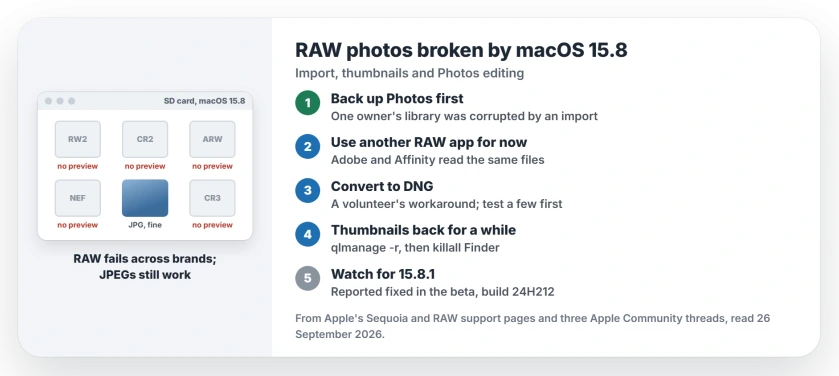
Status: macOS Sequoia 15.8, checked 26 September 2026. RAW import, thumbnails and Photos editing broke across brands. A volunteer reports a fix in the 15.8.1 beta; Apple's list still ends at 15.8.
1. Back up your Photos library before any RAW import
This matters more than any fix, because one owner warned that the bug "will corrupt your Photos Library".
Their recovery depended on luck: "the only way to fix it is if you happen to be lucky enough to have a backup of your previous Photos Library.photoslibrary before the import". So run a Time Machine backup before you try again.
2. Use another app for RAW until the fix
Your RAW files themselves are fine, and the same Canon owner found "There is no problem with other RAW engines - e.g. Adobe or the one in Affinity."
So import and edit RAW in the app you already own, and leave Photos for your JPEGs for now. That split is our suggestion.
3. Convert to DNG as a workaround
A Level 7 volunteer's answer was that "a workaround is to use Adobe Digital Negative Converter". That free Adobe tool turns camera RAW files into DNG files.
Apple's own RAW support page says macOS includes "basic support for RAW files in DNG (Digital Negative) format". Nobody in the threads has confirmed that DNG files dodge this bug, so test a few before you convert a whole shoot.
4. Bring thumbnails back for a while
One owner's Terminal trick: "Open Terminal and run: qlmanage -r then: killall Finder". In their words, "This may restore the thumbnails temporarily, although it doesn't seem to fix the underlying 15.8 problem."
Treat it as a stopgap for browsing your folders. The thumbnails can break again.
5. Wait for 15.8.1, or join the beta
The Canon owner came back with news: "The bug is fixed in macOS 15.8.1 (24H212). It is a beta version, so you will need to sign up for beta updates."
Apple's Sequoia update list still ends at 15.8, which it calls important security fixes. If you rely on RAW for work, the beta may be your fastest route. Back up first, as with any beta; that advice is ours.
What did not help
A Level 10 volunteer asked whether RAW support had installed properly: "Is the support for your camera listed as installed?" The problem turned out to cover all formats, so camera support was not the cause.
On the thumbnail thread, turning on icon previews in Finder's View Options did not bring them back.
Other Photos and Mac problems
If photos from your iPhone will not import to your Mac, the iPhone import page covers the cable and trust steps. And if Photos will not open at all on Tahoe, the Photos and Passwords page has that fix.
Why won't my RAW photos import after macOS 15.8?
Owners across Canon, Panasonic, Nikon and Sony report the same failure since the 15.8 update. JPEGs still work, and a volunteer reports the fix in the 15.8.1 beta.
Has Apple fixed the macOS Sequoia 15.8 RAW bug?
Not in a public release yet. A volunteer reports it fixed in macOS 15.8.1, build 24H212, which is in beta, so use another RAW app and keep a Photos backup until then.
How do I get RAW thumbnails back in Finder?
Run qlmanage -r in Terminal, then killall Finder. One owner says this brings thumbnails back for a while, not for good.
Can I still edit RAW files in Photos on macOS 15.8?
Owners report freezes when they click Edit on a RAW file. Edit RAW in another app until 15.8.1 is out.
The Short Version
- macOS 15.8 broke RAW import and thumbnails.
- It affects many brands, not one camera.
- Back up Photos before any RAW import.
- Use Adobe or Affinity for RAW for now.
- qlmanage -r restores thumbnails for a while.
- A fix is reported in the 15.8.1 beta.
Where to Next
Run a Time Machine backup today, before your next card goes in. Then import that shoot with another RAW app.
Did 15.8.1 fix RAW for your camera? Tell me the camera model in the comments. I will add each confirmed one here.

Isaac Smith is the founder and editor of PC Glance, a website that covers computers, laptops, and technology. He is a tech enthusiast and a computer geek who loves to share his insights and help his readers make smart choices when buying tech gadgets or laptops. He is always curious and updated about the latest tech trends.