
You turn your iPhone off for the night, and in the morning it has lost a big chunk of charge. It also runs warm in your hand, even with light use.
That is not how a switched-off phone should behave. I read one iPhone 17 Pro owner's thread from start to finish, and a fresh install from a Mac ended it for them after a reset on the phone did not.
What one owner measured
The owner noticed it after updating to iOS 27. In their words, "the battery had dropped by more than 20% even though the iPhone had been completely powered off".
The heat came with it: "the phone began staying noticeably warm during normal/light use". The battery itself looked healthy, at 99% with 92 charge cycles.
They tried a force restart and a complete factory reset on the phone. Neither helped, and "the battery continues to drain significantly even when the iPhone is completely shut down."
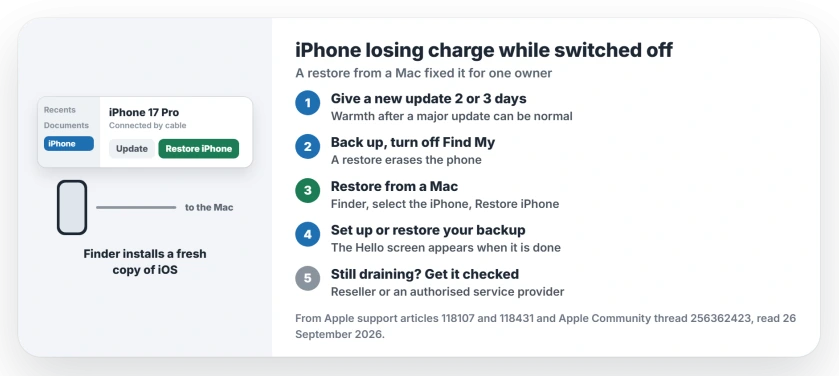
Status: iPhone 17 Pro on iOS 27, checked 26 September 2026. It lost charge while powered off and ran warm. A restore from a Mac fixed both for the owner; a reset on the phone did not.
1. Give a fresh update a couple of days
Some warmth after an update is normal. Apple lists completing "a software update, particularly to a major release" among the times your device may feel warmer.
The owner's own advice, after the fact, was to wait before updating at all: "NEVER UPDATE AS SOON AS THE UPDATE ARRIVES! AT LEAST WAIT 2, 3 DAYS LOL". If you already updated, give it that long before you act.
2. Back up before anything else
A restore wipes the phone. Apple's restore guide is plain about it: "This factory restore removes all information and settings from your iPhone, iPad, or iPod."
So make an iCloud or computer backup first. Then turn off Find My in Settings, under your name, which Apple's steps ask for before a restore.
3. Restore it from a Mac
This is what worked: "i just connected it to my macbook pro and restored to install fresh IOS." Apple describes the same thing as a way to "Erase your device and install the latest software using a computer."
Connect the iPhone, open Finder, and select it when it appears. Click Restore iPhone, then Restore to confirm. On a Windows PC, Apple uses the Apple Devices app instead.
Apple says "Your computer erases your device and installs the latest iOS, iPadOS, or iPod software." When it finishes, you see the Hello screen and can set up or restore your backup.
4. Why a computer restore, not the reset on the phone
The owner had already reset the phone from its own settings, and the drain stayed. Only the restore from the Mac cleared it.
Our reading is that a restore puts a fresh copy of iOS on the phone, while the on-phone reset keeps the installed one. Apple's wording, installing the latest software through a computer, fits that.
5. Still draining? Get it checked
If the restore does not help, it may be the hardware. A Level 10 volunteer's advice: "You should contact either the reseller or find an Authorised Apple Service Provider next to your place".
I would take your battery health reading along. It helps show that the drain is not simple battery wear.
Other iPhone battery and heat problems
If the drain happens while the phone is on and in use, the battery drain page walks through what drains a phone in use. And if it runs hot rather than draining, the overheating page covers heat after an update.
Why does my iPhone lose battery when it is turned off?
A switched-off iPhone should hold its charge far better than that. One owner lost over 20% while powered off after iOS 27, and a fresh restore from a Mac fixed it.
Does restoring an iPhone from a Mac fix battery drain?
It did for one iPhone 17 Pro owner, after a factory reset on the phone had not helped. Back up first, because a restore erases the phone.
Is a reset on the iPhone the same as a restore from a computer?
Not quite. Apple says a computer restore installs the latest iOS as it erases the phone, and only that route fixed the owner's drain.
Will restoring from a Mac delete my eSIM?
No. Apple says "Restoring an iPhone doesn't delete your eSIM."
The Short Version
- A switched-off iPhone should not lose 20%.
- Give a new update two or three days.
- Back up and turn off Find My.
- Restore from a Mac with Finder.
- An on-phone reset did not fix it.
- Still draining? Get the phone checked.
Where to Next
Charge your iPhone to full, switch it off for a few hours, and note the percentage before and after. That number tells you whether you need the restore.
Did a restore from a computer stop your drain? Tell me in a comment which iPhone it was. I will add each confirmed case here.

Isaac Smith is the founder and editor of PC Glance, a website that covers computers, laptops, and technology. He is a tech enthusiast and a computer geek who loves to share his insights and help his readers make smart choices when buying tech gadgets or laptops. He is always curious and updated about the latest tech trends.