
You type a song name into Spotlight on your Mac, it finds the track in your library, and you click it. Apple Music opens, but on its front page, not on the song you picked.
The fix turned out to be small. A Level 10 volunteer upgraded their own Mac, hit the same fault, and found what cleared it. I checked each step against Apple's Music and Spotlight guides.
What the owner saw
Working on a MacBook Air with macOS 27, they liked the new song search at first. Then the problem: "When search results are clicked it just opens the Apple Music window not the song".
Siri was not the problem. In their words: "if I ask Siri to play a song, it does that fine". Rebuilding the Spotlight index, the first suggestion, changed nothing for them.
Status: macOS 27, checked 27 September 2026. Signing out of Apple Music and back in made it go away for a Level 10 volunteer who reproduced it.
1. Sign out of Apple Music, then back in
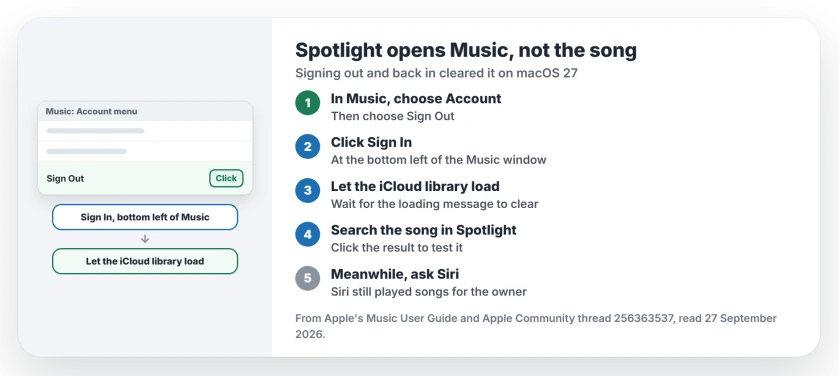
This is the fix from the thread. The volunteer signed out through the Account menu in Apple Music, signed back in, and said it "made this all go away".
Apple says how to do both halves in its Music guide for Mac. To sign out: "Choose Account > Sign Out". To sign back in: "Click Sign In at the bottom-left corner of the Music window".
2. Let the library finish loading
The same volunteer spotted a clue before the fix: the bottom-left corner of the Music window showed the iCloud Library still loading.
After you sign back in, give that message time to clear before you test Spotlight again. A half-loaded library is a likely reason the song link had nowhere to land. That reading is ours.
3. Rebuilding Spotlight did not help here
A partial rebuild of the index is documented by Apple on its Spotlight page for stubborn searches, by adding a disk or folder to Spotlight's privacy list and then removing it again.
The owner tried that first, and it did not change the Music results. Keep the rebuild for files Spotlight cannot find at all.
4. Use Siri or Music's own search meanwhile
Until you have signed out and in again, the owner's other route still works: ask Siri to play the song. Or search inside the Music app itself, which goes straight to the track.
Other Mac search and Music problems
If Spotlight cannot find files on an external drive, the external SSD page walks through the reindex. And if your star ratings vanished in Music, the star ratings page shows how to bring the column back.
Why does Spotlight open Apple Music but not the song?
On macOS 27, the Spotlight result opened Music's main window for one owner instead of the track. Signing out of Apple Music and back in fixed it for a volunteer who reproduced it.
How do I sign out of Apple Music on a Mac?
Open the Music app and choose Account, then Sign Out. Sign back in with the Sign In button at the bottom left of the window.
Does rebuilding the Spotlight index fix it?
Not for this fault. The owner rebuilt it and the song links still opened only the Music window.
Can Siri play the song instead?
Yes. The owner said Siri played songs fine while Spotlight did not.
The Short Version
- Spotlight opened Music, not the song.
- Sign out: Account, then Sign Out.
- Sign back in at the bottom left.
- Let the iCloud library finish loading.
- A Spotlight rebuild did not help.
- Siri still plays the song meanwhile.
Where to Next
Open Music now, sign out and back in, then search a song in Spotlight once the library has loaded. Click the result to check it lands on the track.
If it still opens only the Music window, say so in a comment with your macOS version, and I will follow the thread for the next fix.

Isaac Smith is the founder and editor of PC Glance, a website that covers computers, laptops, and technology. He is a tech enthusiast and a computer geek who loves to share his insights and help his readers make smart choices when buying tech gadgets or laptops. He is always curious and updated about the latest tech trends.