
You sort a playlist on your iPhone with the newest songs first, get in the car, and CarPlay shows it oldest first again. Your latest songs sit at the bottom of a long scroll.
It has been like this since iOS 26, and the thread about it has 282 Me too clicks and nearly 7,500 views. Owners found two ways round it that still work on iOS 27. I checked the sorting steps against Apple's own iPhone guide.
What owners see
The thread's first poster asked the question plainly: "Why will the sorting sequence of playlists made on Apple Music not reflect on CarPlay?"
In their words, the order is always the same: "Now, no matter which way I sort a playlist, CarPlay will ONLY display the playlist in oldest to newest date added order".
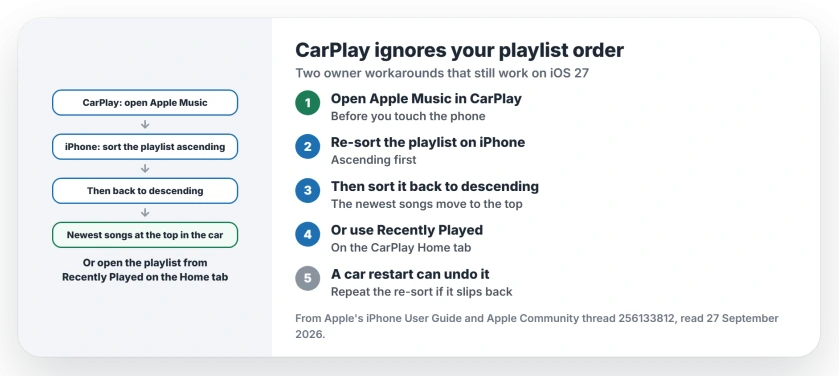
Status: iOS 26 and iOS 27, checked 27 September 2026. CarPlay ignores the playlist sort order. Re-sorting on the phone, or opening the playlist from Recently Played, works around it.
1. Re-sort the playlist on your iPhone
The first workaround came in November: sort the playlist another way, then "Sort it again in the desired order", and the change "should apply instantly" in the car.
Apple's playlist guide shows where the setting sits. Open your playlist in Music and tap the More button. Apple says to then "Tap Sort By, then choose an option".
2. Do it with CarPlay already open
An owner on iOS 27.0 added the order that works for them this month: open Apple Music in CarPlay first, then pick up your phone.
On your phone, open the playlist and "change the sorting ascending", then go back into sorting and "change it back to descending (reverse)". Your newest songs then show at the top in the car.
3. Or open the playlist from Recently Played
This route skips the re-sort altogether, and another owner described it this way: "Way around it is if you go to recently played and pick your playlist from there the order is sorted correctly".
The thread's first poster confirmed it later: "If you select your desired playlist from the recently played section under the 'Home' tab in CarPlay it should display how it's sorted".
4. Expect it to slip back
The re-sort does not always hold, as the owner who found Recently Played warned: "Works until you restart the car and the sorting order goes back".
So keep both routes in mind, which is our suggestion rather than a fix. When the order resets, open the playlist from Recently Played, or repeat the re-sort from step 2.
Other CarPlay and Apple Music problems
If CarPlay itself keeps dropping out, the wireless CarPlay page covers the connection. And if Apple Music crashes the moment it opens on iOS 27, the Apple Music crash page has the tab trick that stops it.
Why does CarPlay not show my playlist sort order?
Since iOS 26, CarPlay shows playlists oldest first by date added, whatever order you set on the iPhone. Owners report it on iOS 27 as well.
How do I get the newest songs first in CarPlay?
With CarPlay open, re-sort the playlist on your iPhone to ascending, then back to descending. Or open the playlist from Recently Played on CarPlay's Home tab.
Does the sort order stay fixed?
Not always. One owner found it goes back when the car restarts, so you may need to repeat the re-sort.
Is this fixed in iOS 27?
Not going by the thread. An owner on iOS 27.0 still needed the re-sort trick in September 2026.
The Short Version
- CarPlay ignores the playlist sort order.
- Open Apple Music in CarPlay first.
- Re-sort on the phone, then sort back.
- Or use Recently Played on the Home tab.
- A car restart can undo the re-sort.
- Still happening on iOS 27.0.
Where to Next
Next time you drive, open Apple Music in CarPlay, then re-sort the playlist on your phone once. Check that the newest song now sits at the top.
Found a way that holds after the car restarts? Share it in a comment so the other drivers in that thread can try it too.

Isaac Smith is the founder and editor of PC Glance, a website that covers computers, laptops, and technology. He is a tech enthusiast and a computer geek who loves to share his insights and help his readers make smart choices when buying tech gadgets or laptops. He is always curious and updated about the latest tech trends.