
You open Settings on your iPad to see how the battery is holding up, tap Battery, and find no Battery Health line. On an older iPad, nothing is broken. Apple only puts that menu on recent models.
I checked Apple's list of models from March 2026 and read a thread where two Level 10 volunteers explained the other options. What you can do depends on which iPad you have.
Why the menu is not there
An owner with a fourth generation iPad Air asked this week why the option "doesn't appear in Settings". Apple's battery page answers it with a short list. Only these iPads show battery health and history:
- iPad Pro (M4 and M5)
- iPad Air (M2, M3, and M4)
- iPad mini (A17 Pro)
- iPad (A16)
The fourth generation iPad Air is older than every model there. Apple does not list the M1 iPad Air or the M1 and M2 iPad Pro either, so those miss out too.
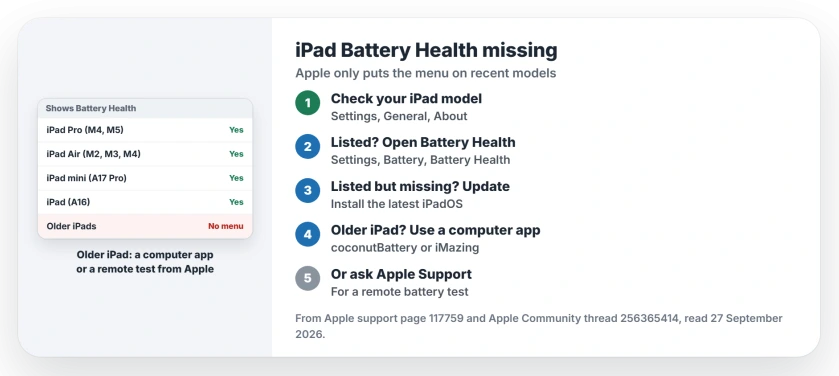
Status: Apple's battery health page from March 2026, read 27 September 2026, lists the only iPads that show Battery Health. Older ones need a computer app or Apple Support.
1. Check which iPad you have
Open Settings, then General, then About, and read the model name. If you are unsure, Apple has a page for identifying your iPad model.
On a model from the list, Apple's battery health page gives the path: "Open Settings, tap Battery, then tap Battery Health."
2. Listed model? Update iPadOS
If your iPad is on the list and the menu is still missing, look at the iPadOS version. One volunteer asked that first: "Older iPadOS versions may not have that info."
On their own iPad (A16), running iPadOS 27.0, it was all there. So install the latest update, then look again.
3. Older iPad? Read it from a computer
For iPads without the menu, a Level 10 volunteer named apps that read the battery's cycle count over the cable. On a Mac they suggested coconutBattery or iMazing, and on a Windows PC, iMazing.
The maker of coconutBattery says it shows "live information about the battery quality in your Mac, iPhone and iPad". Both are third-party apps, not Apple's.
4. Or ask Apple Support to test it
The same volunteer pointed to Apple Support. When you contact them and explain the problem, "you can request a remote battery diagnostic".
In their words, "The tests will confirm the status of your battery". A Genius Bar visit gets a similar test in person. I would start here if the battery already drains fast.
5. Skip the battery shortcuts
Shortcut scripts that estimate battery health from the iPad's analytics files do exist. The volunteer warned that they may not work, may be malicious, or may send private data off your iPad.
I would leave them alone, and that advice is ours.
Other iPad and battery problems
If your iPad battery started draining after an update, the iPad battery drain page goes through what to check. And if it is your iPhone that shows no Battery Health, the iPhone battery health page covers that model list.
Why does my iPad have no Battery Health menu?
Apple only lists it for iPad Pro (M4 and M5), iPad Air (M2, M3, and M4), iPad mini (A17 Pro) and iPad (A16). Other iPads do not get the menu.
Where is Battery Health on an iPad?
On a listed model, open Settings, tap Battery, then tap Battery Health. It also shows the cycle count and when the battery was made.
Can I check battery health on an older iPad?
Not in Settings. A Mac or PC app can read the cycle count, or Apple Support can run a remote battery test.
What is a charge cycle on an iPad?
Apple says you complete one when you have used an amount equal to 100 percent of the battery's capacity. That can take more than one charge.
The Short Version
- Battery Health only shows on newer iPads.
- Check your model in Settings, General, About.
- Listed model: Settings, Battery, Battery Health.
- Listed but missing: update iPadOS.
- Older iPad: a Mac or PC battery app.
- Or ask Apple Support for a remote test.
Where to Next
Open Settings, General, About on your iPad now and compare the model name with Apple's list. If it is not there, book a remote battery test with Apple Support.
If your iPad is on the list and still has no Battery Health after an update, tell me the model in a comment, and I will look into it.

Isaac Smith is the founder and editor of PC Glance, a website that covers computers, laptops, and technology. He is a tech enthusiast and a computer geek who loves to share his insights and help his readers make smart choices when buying tech gadgets or laptops. He is always curious and updated about the latest tech trends.