
An email from Apple says your recovery contact has been removed, and you changed nothing. It could be genuine, a glitch, or a phishing attempt, and one look in Settings shows whether anything really changed.
I read Apple's recovery contact page and its phishing advice. I also followed a thread where two owners got the same email nine days apart.
Two owners, the same surprise
On 18 September, one owner got an email from apple.com saying the "Recovery contact has been removed". They signed in to their account the safe way and found nothing had changed.
They also noticed the email carried no links in its main text and matched earlier Apple emails. On 27 September, a parent posted that their daughter got the same message overnight.
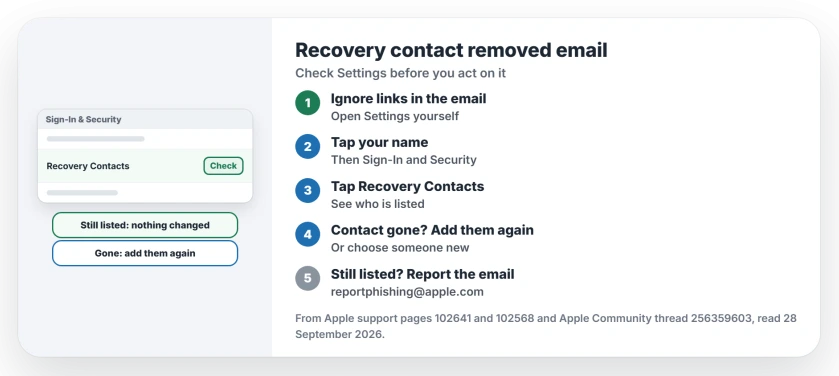
Status: checked 28 September 2026. Apple sends a notification when a recovery contact removes themself. Two owners got this email with nothing changed, so check Settings before you act on it.
1. Check Recovery Contacts in Settings
Leave the email alone and open Settings yourself. Apple's phishing advice is blunt: never follow links in a message you did not expect.
On your iPhone, open Settings and tap your name. Apple's recovery contact page gives the next step: "Tap Sign-In & Security, then tap Recovery Contacts."
On a Mac, choose Apple menu, System Settings, then your name, and click Sign-In & Security, then Recovery Contacts. The list there is what counts, whatever the email says.
2. Contact gone? The email was right
Apple documents this notification. Its page says: "If your friend or family member declines or removes themself as your recovery contact, you'll receive a notification."
If your contact has vanished from the list, ask them what happened, then add them again or choose someone new. Apple says: "You can select a new account recovery contact."
3. Contact still there? Report the email
If your list has not changed, the email does not match your account. A Level 9 volunteer read it as "a sophisticated phishing attempt designed to look legitimate".
The owner disagreed, since it had no links and looked like Apple's usual mail. Either way, Apple asks you to forward suspicious mail: "please forward it to reportphishing@apple.com".
4. Change your password if it still bothers you
The first owner's own advice was to change passwords and passcodes when the reason for an email stays unclear. That is a cautious step, not a required one.
I would do it only if something else looks wrong too, such as a sign-in alert you did not expect. That judgment is ours.
More Apple Account email and recovery help
If you cannot add a recovery contact at all, the recovery contact page goes through the seven blockers. And if an email from no_reply@email.apple.com worries you, the Apple email check page shows how to test it.
Is the recovery contact removed email real?
It can be. Apple says you get a notification when a recovery contact removes themself. Two owners got one with nothing changed, so check Settings before you trust it.
How do I check my recovery contacts?
On an iPhone, open Settings, tap your name, then Sign-In & Security, then Recovery Contacts. On a Mac, the same items sit in System Settings.
What if my recovery contact is still listed?
Then nothing changed on your account. Forward the email to reportphishing@apple.com if you think it was fake.
Should I tap anything in the email?
No. Apple advises against following links in suspicious messages, so open Settings yourself instead.
The Short Version
- Do not use links in the email.
- Open Settings and tap your name.
- Sign-In & Security, then Recovery Contacts.
- Contact gone? Add them or pick someone new.
- Still listed? Nothing changed.
- Forward doubtful mail to reportphishing@apple.com.
Where to Next
Go to Settings now, tap your name, then Sign-In & Security and Recovery Contacts, and see who is listed. That answers the email in under a minute.
If your contact really did disappear without a reason, leave a comment with what the email said, and I will set it beside the owners' reports.

Isaac Smith is the founder and editor of PC Glance, a website that covers computers, laptops, and technology. He is a tech enthusiast and a computer geek who loves to share his insights and help his readers make smart choices when buying tech gadgets or laptops. He is always curious and updated about the latest tech trends.