
You open Contacts on your Mac after the macOS 27 update and get the spinning beach ball. The window never fills, and you end up forcing the app to quit.
Apple Support fixed this for one owner by removing a single preferences file. I checked the steps around it against Apple's own pages, so you can do it safely.
A beach ball the usual steps did not clear
The owner runs macOS 27.0 on a 14-inch MacBook Pro. A Level 9 volunteer suggested the standard first steps, including a restart and safe mode, and the owner said they had not solved it.
The same volunteer said Contacts worked normally on their own macOS 27 Mac, so the fault is not on every Mac.
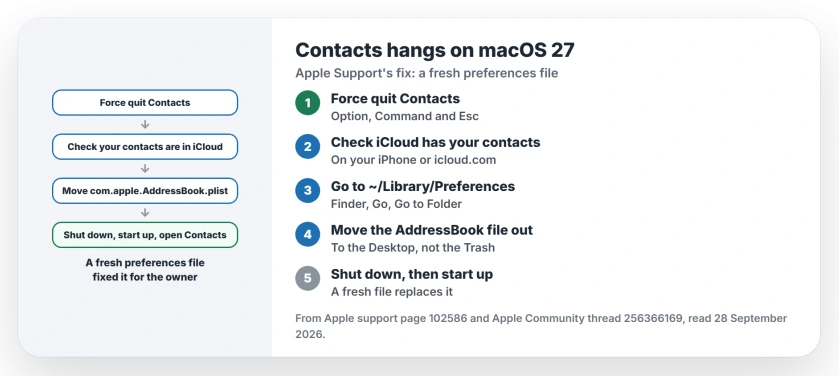
Status: macOS 27.0, checked 28 September 2026. Apple Support fixed a hanging Contacts app for one owner by deleting its preferences file, then restarting. A fresh file replaced it.
1. Force Contacts to quit
Start by closing the stuck app. Apple says on its force quit page: "Press these three keys together: Option (or Alt), Command, and Esc."
In the Force Quit window, select Contacts and click Force Quit.
For the keyboard route, Finder Relaunch and cases where the app will not close, use the Mac app-closing instructions.
2. Check your contacts are in iCloud
Apple Support confirmed the owner's contacts were backed up in iCloud before touching anything. Do the same: open Contacts on your iPhone, or sign in at icloud.com, and check they are all there.
A preferences file holds the app's settings, not the cards themselves, in our understanding. The check costs a minute, so do it anyway.
3. Move the preferences file out
In Finder, choose Go, then Go to Folder, and type ~/Library/Preferences. Look for the file named com.apple.AddressBook.plist.
I would drag it to your Desktop rather than into the Trash, which keeps a copy to restore if anything looks wrong afterwards. Moving it is our suggestion; the owner deleted it.
4. Shut down, then start again
The owner's Mac was shut down and started up again after the file went. In their words: "This implemented a new 'com.apple.AddressBook.plist' file to be installed on my MBP resolving the issue".
Open Contacts once the Mac is back, and if it loads your cards, delete the old file from your Desktop. The fix is user-reported, from one owner and Apple Support.
Other contacts and Mac problems
If it is Contacts search on your iPhone that crawls, the iOS 27 contacts search page has the fix. And if Mac Mail opens with your emails gone after an update, the Mac Mail page walks through re-adding the account.
Why does Contacts hang after macOS 27?
In one owner's case, the Contacts preferences file was at fault. Apple Support removed it, and a restart made a fresh one.
Will deleting com.apple.AddressBook.plist delete my contacts?
We understand it holds settings, not your contacts. Apple Support still checked the owner's contacts were in iCloud first, and you should do the same.
Where is com.apple.AddressBook.plist?
In the Preferences folder of your user Library. In Finder, choose Go, then Go to Folder, and type ~/Library/Preferences. That path is ours; the owner did not give one.
What if Contacts still hangs?
Contact Apple Support, as the owner did. A Level 9 volunteer also suggested testing Contacts in a new user account, which shows whether your own account is the problem.
The Short Version
- Contacts can hang after macOS 27.
- Force it to quit first.
- Check your contacts are in iCloud.
- Move com.apple.AddressBook.plist out.
- Shut down, then start up again.
- A fresh file fixed it for the owner.
Where to Next
Force Contacts to quit, check iCloud has your contacts, then move the preferences file to your Desktop and restart. Open Contacts once more afterwards.
If it still spins after that, leave your Mac's model as a comment. I will add Apple Support's next step here.

Isaac Smith is the founder and editor of PC Glance, a website that covers computers, laptops, and technology. He is a tech enthusiast and a computer geek who loves to share his insights and help his readers make smart choices when buying tech gadgets or laptops. He is always curious and updated about the latest tech trends.