

On your Surface Pro 11, Surface Laptop 7 or another Snapdragon PC, Teams flashes white and closes, and the new Outlook refuses to start. Word, Excel and classic Outlook still work.
An August Windows update caused it, and Microsoft has fixed it two ways.
I read Microsoft's release health notes for all three Windows 11 versions involved. Owners of three different Snapdragon laptops compared notes in one Microsoft Q&A thread, and I read all of it.
Teams and the new Outlook, and nothing else
An administrator looking after a Surface Laptop 7 saw it straight after KB5121003 went on. "New Teams would not stay open." And: "New Outlook would not start." Nothing else broke.
If your logs show the same thing, they read "0x80073CFC: Cannot create the process for package Microsoft.OutlookForWindows".
An Omnibook 3 owner saw Teams fail another way: "It will have a white screen on teams and it will close right after it open."
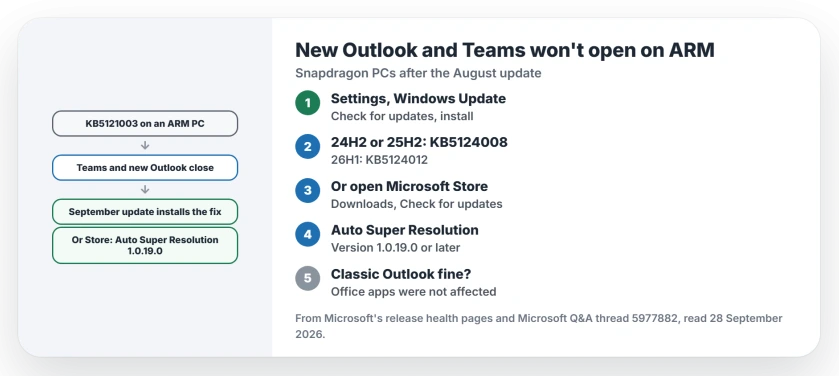
Status: Windows 11 on ARM, checked 28 September 2026. The August update KB5121003 broke Teams and the new Outlook. Microsoft fixed it in the 8 September update; a Store package update also works.
1. Install the September Windows update
Microsoft says your Teams and new Outlook "might fail to launch or might close unexpectedly on ARM-based devices". It also notes: "Classic Outlook, Word, Excel, and other applications are not known to be affected."
Its release health entry marks the fault resolved by the September updates. On 24H2 and 25H2 that is KB5124008. On 26H1, which comes preinstalled on some new devices, it is KB5124012.
Run Check for updates in Windows Update. Install everything offered, then restart your PC. Microsoft says anyone on the September update or later does not need the workaround.
2. Or update one Microsoft Store package
If Windows Update is paused or managed by work, Microsoft gives a second route. Open Microsoft Store, go to Downloads, and check for updates.
Its instruction: "Install the latest update for the Auto Super Resolution Package (version 1.0.19.0 or later)." You can also open the package's Store page directly.
Who gets hit? Microsoft explains: "This issue is most likely to occur on new or freshly imaged PCs that have not yet installed any Microsoft Store updates." That fits the owners' stories.
3. What did not work for owners
A factory reset looked like a cure. It was not. The Omnibook owner had Teams back after a reset, until Windows updated itself and broke it again. That fits Microsoft's note about freshly imaged PCs; the link is ours.
A new Windows profile helped one Surface Pro 11 owner, but "that only fixed the issue temporarily until the PC was rebooted". DISM and SFC found nothing either: "Neither reported Windows corruption."
Rolling KB5121003 back did fix it for the Surface Laptop 7 owner. I would skip that now. You no longer need it, since the September update fixes it and keeps your security fixes.
4. On an x64 PC, look elsewhere
This fault is limited to ARM-based devices. This PC is an x64 machine, so the fault cannot reach it; that check is ours.
On a PC like that, look elsewhere. The Outlook won't open page sorts it by what Outlook does when it fails.
Other Microsoft 365 app problems
If Outlook opens but search finds nothing, the Outlook search page starts by working out which Outlook you have. And if Teams opens but your camera does not, the Teams camera page covers that.
Why won't new Outlook open on my Surface Laptop 7?
The August Windows update KB5121003 broke Teams and the new Outlook on ARM-based PCs. Microsoft fixed it in the September update.
Is classic Outlook affected?
No. Microsoft says classic Outlook, Word and Excel are not known to be affected.
Do I still need the Store workaround?
Not if the September update or later is installed. Microsoft offers the Store package only for PCs that do not have it yet.
Which Snapdragon PCs does this hit?
Microsoft names the Surface Pro 11 and Surface Laptop 7, and owners report an Omnibook 3 as well. Any ARM-based PC on the August update can have it.
The Short Version
- KB5121003 broke Teams and new Outlook on ARM.
- Classic Outlook and Office were fine.
- The September update fixes it.
- KB5124008 on 25H2, KB5124012 on 26H1.
- Or update the Auto Super Resolution Package.
- New profiles and resets only helped briefly.
Where to Next
Open Windows Update and install the September update, or open Microsoft Store and update the package. Then launch Teams and the new Outlook once each.
If either still closes on a fully updated ARM PC, post the laptop model as a comment. That would be a new report, and it belongs here.

Isaac Smith is the founder and editor of PC Glance, a website that covers computers, laptops, and technology. He is a tech enthusiast and a computer geek who loves to share his insights and help his readers make smart choices when buying tech gadgets or laptops. He is always curious and updated about the latest tech trends.