
Your photo or slideshow is gone, the desktop shows plain black, and setting the picture again does nothing at all. The August preview update, KB5120998, caused it, and Microsoft fixed it on 8 September.
Microsoft's release health entry explains it, and a Microsoft Q&A owner saw the wallpaper and the cursor change together. I also checked which build this PC is on, since that decides everything here.
A background you cannot set back
The owner described it after installing KB5120998: "my desktop wallpaper turned into a solid color!" Their mouse cursor had switched to an older Windows style at the same time.
Microsoft documents the cause: "some Windows Desktop settings fail to load, resulting in desktop backgrounds displaying as a solid black color." It adds that slideshows and contrast themes can go the same way.
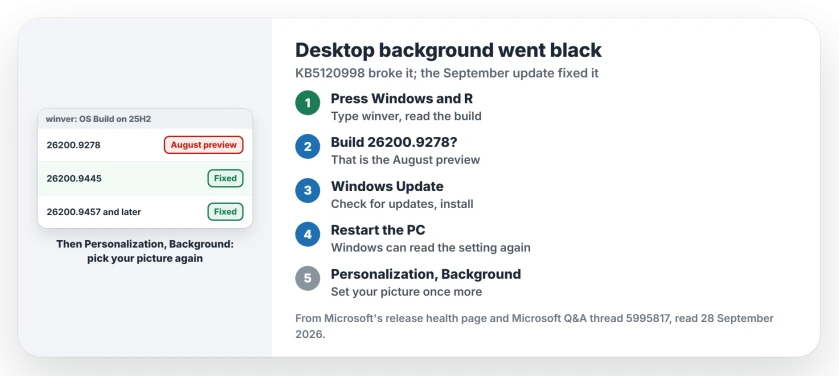
Status: Windows 11, checked 28 September 2026. The August preview update KB5120998 caused it. Microsoft marks it resolved by KB5124008 on 8 September and by every update since.
1. Why picking the picture again fails
Microsoft says that "attempting to manually restore customized settings does not work". The reason is in the same note: the fault "prevents the correct loading of settings, regardless of their value."
So Windows is not forgetting your choice. It simply cannot read it back, and no amount of reselecting helps until the update underneath is replaced.
2. Check which build you are on
Press Windows and R, type winver, and press Return, and the window that opens shows your OS build.
On 25H2, build 26200.9278 is KB5120998 itself, while 26200.9445 is the September update with the fix, and anything higher includes it too. On 24H2 the same numbers start with 26100.
This PC reads 26200.9457, the 14 September update, so it is past the fix. That reading is ours.
3. Install the September update or later
Microsoft's release health page marks it resolved: "This issue was resolved by Windows updates released September 8, 2026". That was KB5124008, and every later update carries the fix too.
In Windows Update, select Check for updates. Install what it offers, and restart.
One caution before you do: the 8 September update brought faults of its own for USB audio 1.0 devices and for File History. The 22 September preview fixes File History; USB audio is still open.
4. Then set the picture once more
After the restart, open Settings, then Personalization, then Background, and check your picture. If black is still selected, choose your photo or slideshow again.
It should now stick, because Windows can load the setting again. That last step is ours, based on Microsoft's explanation of the fault. I would check a slideshow too, since Microsoft says those can reset as well.
A slideshow that will not even stay selected in Settings is a separate fault, and the old Desktop Background panel still sets one.
5. Stuck on the August update? Remove it
An Independent Advisor on Microsoft Q&A answered the owner: "Uninstalling the update should fix the problems." That only applies if KB5120998 is still your newest update.
The same adviser suggested switching off the Windows Update option they called "Get the latest updates as soon as they are released", which stops preview updates arriving early. Microsoft's fix is the better route, though.
Other Windows desktop problems
The same August update also reset custom mouse cursors, and the cursor page covers that half. If the whole screen goes black rather than just the background, the black screen page is the one to read.
Why did my desktop background turn black?
The August preview update, KB5120998, stopped Windows from loading desktop settings, so it fell back to black, as Microsoft has confirmed.
Why won't Windows keep my wallpaper?
On KB5120998, Windows cannot read the saved setting, so any picture you pick is ignored until you update and set it again.
Which update fixes the black background?
KB5124008, released on 8 September 2026, and every Windows update after it.
Did the same update change my mouse cursor?
Yes, on some PCs, mainly non-English installs. Microsoft lists a cursor reset from the same update, also fixed on 8 September.
The Short Version
- KB5120998 turned backgrounds black.
- Reselecting the picture does not help.
- winver shows your build.
- 26200.9445 or later has the fix.
- Install the latest update, then restart.
- Set your picture once more.
Where to Next
Run winver now. If the build is 26200.9278, open Windows Update and install what it offers, then set your background.
If the desktop stays black on a newer build, post the build number in a comment. That would be a new case, so I would chase it and add the answer here.

Isaac Smith is the founder and editor of PC Glance, a website that covers computers, laptops, and technology. He is a tech enthusiast and a computer geek who loves to share his insights and help his readers make smart choices when buying tech gadgets or laptops. He is always curious and updated about the latest tech trends.