
You are wearing your Apple Watch, and it still asks for the passcode again and again. One Series 12 owner even had it lock during the night, which spoiled their sleep score.
Try a few checks before you return it. I read Apple's guide on how the watch locks itself, then a week of MacRumors posts from Series 12 owners chasing the same prompt.
Why a watch on your wrist locks itself
Apple explains the rule in one line: "With Wrist Detection, your Apple Watch locks automatically when you're not wearing it."
A lock on your wrist has a meaning. The watch thought it left your wrist, even for a moment. Apple's fit page says the back "needs skin contact for features like Wrist Detect", along with the heart sensors.
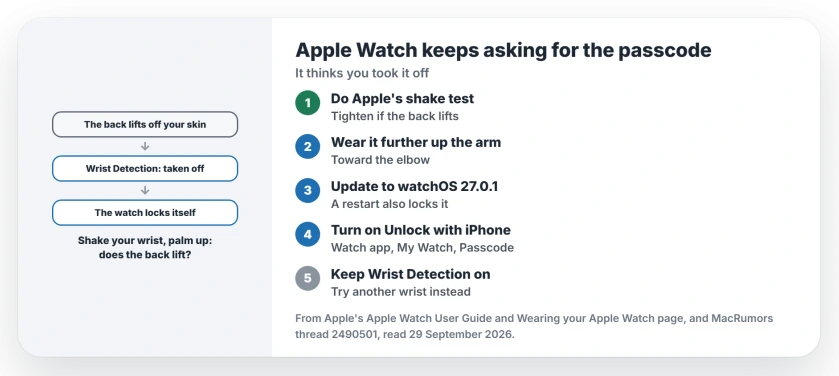
Status: watchOS 27.0.1, checked 29 September 2026. Apple says the watch locks when it thinks you took it off. A tighter band helped one owner, but another Series 12 locked on three watches.
1. Do Apple's shake test
Apple's fit guide has a quick check: "To test whether your watch is too loose, shake your wrist and then turn your palm face up."
If the back lifts off your skin, Apple says "you should tighten your watch band." It also says to wear it a little further up your arm, toward the elbow, rather than on the wrist bone.
One owner proved the point by accident. Driving with an arm out of the car window, their watch locked again and again until they tightened it "to the point where it is uncomfortable to put a finger under the band".
Skin matters too. Apple warns that some tattoos block the light its heart sensor relies on. An owner with wrist tattoos said the watch locks "with every movement".
2. Update to watchOS 27.0.1
A watch that restarts comes back locked. One owner asked the first poster to rule that out: "A locked watch is exactly what you will be met with if this happens and it went unnoticed."
watchOS 27.0.1 includes Apple's fix for unexpected restarts, and our Series 12 restart page has the details. Another owner's advice was blunt: make sure it is "updated with 27.0.1".
It is not a cure-all, though. The first poster wrote: "Mine locked again, once, after installing the update."
3. Turn on Unlock with iPhone
This makes each lock cheap to clear. Apple's lock and unlock guide says to "tap My Watch, tap Passcode, then turn on Unlock with iPhone" in the Apple Watch app.
Then your iPhone unlocks the watch too. Your phone has to stay within normal Bluetooth range, which Apple puts at "about 33 feet or 10 meters".
4. Keep Wrist Detection on
Two owners in the thread suggested switching Wrist Detection off. The first poster looked it up and wrote that "it basically disables everything".
Apple's list agrees. With it off, Apple Pay asks for your passcode every time, and heart rate tracking and its alerts stop. The watch also "doesn't automatically make an emergency call" after a hard fall.
I would only use that switch as a short test. It is not a fix.
5. Test it on another wrist, then swap it
A reply suggested someone you trust wear it for a while. In their words: "This would see if it's a defect with the watch itself or something else."
The first poster's Series 12 Ceramic and two replacements all locked, including one from a different Apple Store. A fourth arrived on 28 September. Apple Store staff told them it is usually a loose strap.
Owners report mixed luck, though, and another Series 12 Ceramic owner has had no locking at all.
Still locking after all of this? Go back to Apple with a list of what you tried. If you forgot the passcode along the way, our passcode reset page has Apple's steps.
Why does my Apple Watch ask for a passcode when I'm wearing it?
Wrist Detection decided the watch left your wrist, or the watch restarted. Apple says it locks automatically whenever you are not wearing it.
Should I turn off Wrist Detection to stop the passcode prompts?
Not for long. Apple lists what you lose, including heart rate tracking and the automatic emergency call after a hard fall.
Does the Series 12 Ceramic lock more often?
There is no proof of that. One owner wondered whether the ceramic back plays a part, while another owner's blue ceramic Series 12 works fine.
The Short Version
- Apple locks the watch when it thinks you took it off.
- Shake your wrist, palm up, and tighten if the back lifts.
- Wear it a little further up your arm.
- Update to watchOS 27.0.1, since a restart also locks it.
- Turn on Unlock with iPhone to clear locks fast.
- Keep Wrist Detection on.
- Test it on another wrist before you swap it.
Where to Next
Do the shake test now, palm up, and tighten one notch if the back lifts. Then turn on Unlock with iPhone so any lock clears itself.
If your watch keeps locking with a snug band on 27.0.1, post your model as a comment. I track which Series 12 versions this hits.

Isaac Smith is the founder and editor of PC Glance, a website that covers computers, laptops, and technology. He is a tech enthusiast and a computer geek who loves to share his insights and help his readers make smart choices when buying tech gadgets or laptops. He is always curious and updated about the latest tech trends.