
You connect your two-drive enclosure after updating to macOS 27, and only one drive appears. The other has vanished from Finder, and even from Disk Utility.
That is worrying when those drives hold your backups. Before you open the case, one change brought every drive back for owners. I went through a MacRumors thread in which OWC answered one of them, plus Apple's Disk Utility page.
Which enclosures lose a drive
The first poster uses an OWC Mercury Elite Pro Dual over Thunderbolt 2 on a Mac mini. In their words: "After the update to macOS 27, I only see one of the two drives."
The drives are fine. That is good news for your data. The same enclosure shows both on a Mac with macOS 26, and swapping the drives only changes which one goes missing.
Another owner has two of these enclosures and sees "only one drive mounting per enclosure following MacOS 27 update". A third lost three of four drives in an OWC rack, connected through a Thunderbolt to eSATA adapter.
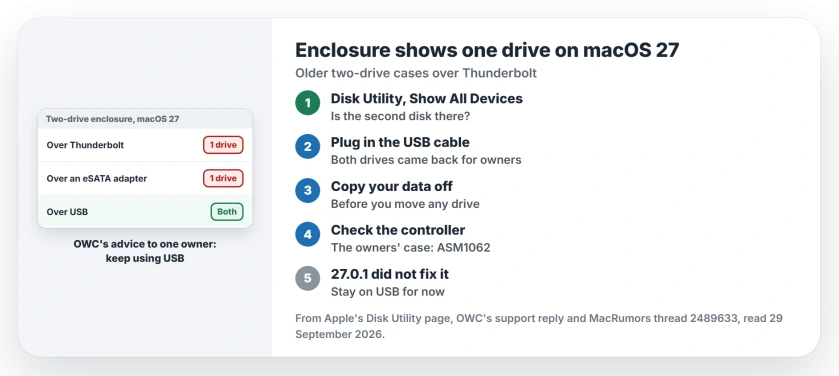
Status: macOS 27.0.1, checked 29 September 2026. One owner says 27.0.1 did not fix it. Switching to USB brought every drive back for owners, and OWC told one of them to keep using USB.
1. Check whether the second drive is there at all
Open Disk Utility first. On its Disk Utility page, Apple says to "choose View > Show All Devices (if available)", so every disk shows, not just mounted volumes.
A reply in the thread also suggested checking the Thunderbolt section of System Information. The first poster did both: "One bay is not visible in macOS 27 via Thunderbolt, nor does the drive in that bay appear in Disk Utility."
If yours looks the same, the Mac is not seeing that bay at all. Repairing the disk will not help, because there is nothing for First Aid to reach.
2. Connect it over USB instead
The first poster noticed it early: "Everything works fine with USB3." Both drives mount through the enclosure's USB port on the same Mac, as reported by owners.
The owner with the rack confirmed it with an edit. They moved the rack from eSATA to USB 3, through the same adapter, and "now all drives and RAIDs are functional again".
OWC's support team gave the same advice by email: "As it appears to function via USB connectivity, feel free to continue using so." USB is slower than Thunderbolt. For backups and archives, that rarely matters.
3. Copy your data off before you move the drives
If you plan to replace the enclosure, copy everything off over USB first. One owner gave a stark warning about swapping drives between OWC enclosures.
In their words, when a drive went into another enclosure, "the firmware in the enclosure wiped the drive and you could recover nothing from the drive". That is one owner's account. A copy costs you only time.
4. Why OWC blames the chipset
OWC pointed the first poster to its own manual. The manual warns that "only HDD2 appears" over Thunderbolt on some very old versions of OS X, because of how the chipset was supported.
The support email added that "there could be an (outdated) chipset/controller compatibility issue" with an enclosure from 2015.
The rack owner had a sharper guess: "It looks like the SATA Port Multiplier support is dropped in the new MacOS drivers."
The first poster's enclosure uses an ASMedia ASM1062 controller. If yours has the same chip, it matches the owners here.
5. Do not wait on 27.0.1
On 29 September the first poster wrote: "For anyone wondering: no, macOS 27.0.1 did not fix the problem." Apple's note for that update lists no fixes by name.
Newer cases seem fine, if you want to replace yours. One owner runs two USB4 and Thunderbolt SSD cases from other brands with no trouble on macOS 27, so the trouble seems tied to older multi-drive designs.
When a single drive will not mount
If just one drive refuses to mount, our external drive mounting page covers the causes to check first. For an old FireWire drive on a new Mac, the FireWire page explains the adapter chain.
Why does my dual-drive enclosure only show one drive on macOS 27?
Over Thunderbolt or eSATA, older enclosures with shared SATA chipsets now show one drive. Owners suspect macOS 27 dropped support for them, and OWC points at the chipset's age.
Is the missing drive broken?
Almost certainly not. If it mounts over USB, your drive is fine, as it was for owners in the thread.
Does macOS 27.0.1 fix it?
Not for the owner who tested it on 29 September. Use the USB port until a later update says otherwise.
The Short Version
- Older two-drive enclosures show one drive on macOS 27.
- It happens over Thunderbolt or eSATA, not over USB.
- Open Disk Utility and choose Show All Devices.
- Connect the enclosure over USB instead.
- OWC told one owner to keep using USB.
- Copy your data off before swapping drives.
- The 27.0.1 update left it broken for one owner.
Where to Next
Swap the Thunderbolt cable for the enclosure's USB cable now, and check that both drives appear. Then run your backup once to be sure.
If a macOS update brings Thunderbolt back for your enclosure, leave a comment with the version. I will add it here the same day.

Isaac Smith is the founder and editor of PC Glance, a website that covers computers, laptops, and technology. He is a tech enthusiast and a computer geek who loves to share his insights and help his readers make smart choices when buying tech gadgets or laptops. He is always curious and updated about the latest tech trends.