
You long-press the power button on your Android phone, and Gemini answers where Google Assistant used to. I get how jarring that is. It is worse when the new one does not work where you live.
Google's answer is short. Once the change reaches your phone, there is no way back. You still decide what the power button does, and Hey Google is yours to set too.
What Google announced
A Google Community Manager posted the plan on 6 August 2026: "Starting on September 3rd, Google Assistant on your mobile device is being discontinued, and Gemini will be the voice assistant experience on Android."
It did not happen on one day. Google said it would "expect that this process may take a few weeks to reach everyone".
The key line comes next. Google states that once access is removed, you cannot "use or switch back to Google Assistant on your phone, tablet, or paired devices."
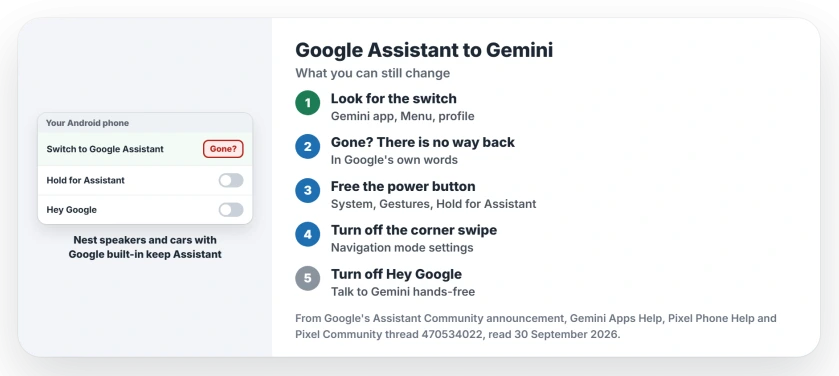
Status: checked 30 September 2026. Google began removing Assistant from phones on 3 September, over a few weeks. Once it is gone from your phone, Google says you cannot switch back.
1. Look for the switch while it lasts
Google's Gemini help page still describes the old route. It says: "You can switch to using Google Assistant as your primary assistant on your phone or tablet in your settings."
Open the Gemini app and tap Menu, then your profile picture. Look for Switch to Google Assistant. Pick it, then confirm in the "Switch to Google Assistant?" dialog.
If the item is there, it still works on your phone for now. If it is missing, the removal has reached your phone. No other setting brings it back.
2. Know where Assistant stays
Your phone loses it, but not every device. Google says: "These changes do not impact your Google Nest and Google Home smart speakers, displays, or other Google Assistant-enabled speakers and displays."
Cars with Assistant built in keep it too. In Google's words: "For cars with Google built-in, Google Assistant will continue to function beyond September 3, 2026."
Older phones may be spared. Google's 2025 blog post noted that on phones under Gemini's minimum requirements, "Google Assistant functionality will not change at this time."
Devices paired to your phone move with it. Google names "Watches running Wear OS", "Headphones or earbuds compatible with Gemini", and Android Auto when it runs from your phone.
3. Stop the power button opening Gemini
Rather not meet Gemini at all? Take it off the buttons. Google's Pixel gestures page puts the setting under Settings, then System, then Gestures.
On your phone, tap the press-and-hold option for the Power button there. Google's step for using the assistant is "Turn on Hold for Assistant". So turn it off. A long press then stops calling it.
Two more switches do the same job, if you want them off too. Swipe to invoke assistant lives in Settings, System, Navigation mode, then its settings. Hey Google sits in the Gemini app, under Talk to Gemini hands-free.
4. When Gemini does not work where you live
The worst case is user-reported, from a Pixel 9 Pro XL owner on Google's forum. In their words: "When I long- press the power button, Gemini comes up instead of Google Assistant."
They added: "Google Assistant used to work, but Gemini doesn't." Gemini is not offered in their country. So the button opened something useless.
A volunteer expert replied the same day that "Assistant has been shutdown". The only choice left, they said, was to "try to use Gemini."
Google's help page agrees that Gemini "may not be available for all languages, devices, accounts, or locations."
For this case I would turn off Hold for Assistant first. At least the power button then stops opening a screen that cannot help you.
5. Try your old commands on Gemini
Before you give up on it, give Gemini the jobs you used Assistant for. Google says it added the most requested ones, "such as playing music, setting timers, or taking action from your lock screen".
If one of your routines fails, note which one. That is the useful detail when you tell Google. It helps other owners too.
What will not bring Assistant back
Downloading it again is not an option. Google's 2025 post said the classic app would no longer be "available for new downloads on mobile app stores".
I would not factory reset for it either. Google removes access from its side, so a reset has nothing to restore.
Other Pixel problems this month
If your Pixel lost signal after Android 17, the Pixel No Service page has Google's September fix. And if Wi-Fi keeps switching itself on, the Pixel Wi-Fi page explains why.
Can I still switch back to Google Assistant on Android?
Only while Switch to Google Assistant still shows in the Gemini app menu. Google says that once availability is removed, you can no longer switch back.
When did Google Assistant stop working on phones?
Google began removing it on 3 September 2026, and said the process may take a few weeks.
Do Google Nest speakers still use Google Assistant?
Yes. Google says the change does not affect Nest and Home speakers and displays, and cars with Google built-in keep it too.
What if Gemini does not work in my country?
Turn off Hold for Assistant in Gestures, so the power button stops opening it. Google says Gemini is not available in every location.
The Short Version
- Google began removing Assistant from phones on 3 September.
- The removal takes a few weeks to spread.
- Once gone, Google says you cannot switch back.
- Check the Gemini menu for Switch to Google Assistant.
- Nest speakers and built-in car systems keep Assistant.
- Turn off Hold for Assistant to free the power button.
- Try your old commands on Gemini first.
Where to Next
Open the Gemini app menu now and look for Switch to Google Assistant. If it is there and you want it, use it today.
If it is gone, set the power button the way you like it. Then leave a comment naming the command Gemini gets wrong for you. Every fix that works goes onto this page.

Isaac Smith is the founder and editor of PC Glance, a website that covers computers, laptops, and technology. He is a tech enthusiast and a computer geek who loves to share his insights and help his readers make smart choices when buying tech gadgets or laptops. He is always curious and updated about the latest tech trends.