
A notice keeps popping up on your iPhone, and on your iPad too, offering a keyboard for your Apple Watch. You tap it. A text box opens. You have no idea what it wants. That is annoying when you never asked the watch for anything.
I read Apple's watch guide on entering text. Then I followed one owner's MacRumors thread, posted on 30 September, where they got rid of it.
What the pop-up is
The owner described it well: "This keeps popping up on my phone, and my iPad." Tapping it did not explain much. "When I click it to read what it is asking, it opens a text box."
A forum regular saw the cause: "Looks like your watch is going into some screen requiring text entry, and it's giving you the option of using your iPhone or iPad for easier typing."
That matches Apple's design. Apple says: "If your paired iPhone is nearby, you can use it to enter text."
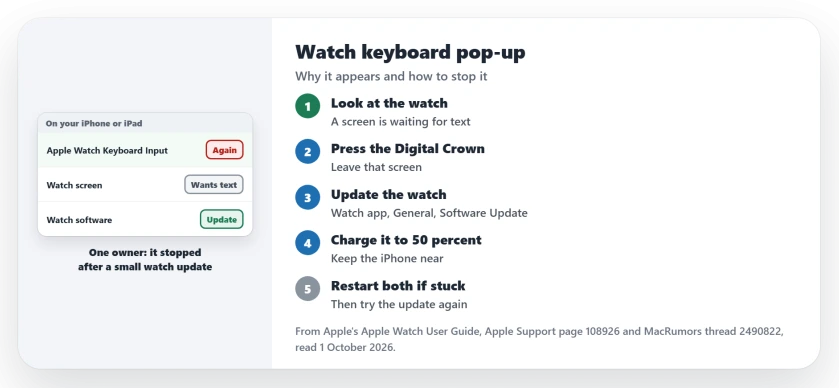
Status: checked 1 October 2026. The pop-up is Apple's Apple Watch Keyboard Input notice, sent when the watch waits for text. One owner stopped it for good by installing a small watch update.
1. Look at the watch first
The notice appears when the watch is waiting for typing. Raise your wrist. See what screen is open.
If you did not start it, press the Digital Crown to leave that screen. With it closed, the notice should stop.
2. Update the watch
This is what ended it. Confirmed by an owner: they installed a small watch update, and wrote: "it hasn't done it again since".
Apple's route starts on the My Watch tab of your iPhone's Watch app. Then: "Tap General, then tap Software Update."
Apple also asks you to "Make sure that your Apple Watch is at least 50 percent charged". Keep the phone close too. Apple's words: "Keep your iPhone near your Apple Watch throughout the update."
3. Typing your password into it may not help
The owner guessed the watch wanted a password. In their words: "I thought it just wanted my Apple password, but even when I'd type it in on the phone or iPad, it wouldn't do anything."
So I would not keep feeding it passwords. The update is what stopped it.
If it is the watch passcode that keeps coming back, the watch passcode page covers that separate fault.
4. Restart both if the update stalls
Apple lists two restarts when an update will not go through. Start with "Restart your Apple Watch", then "Restart your paired iPhone".
Then try the update again. Apple notes that the watch restarts by itself when the update is done.
5. Use the feature on purpose
Once the stray notices stop, the feature is handy. Apple says you can enter text on the watch by "dictating, scribbling with your finger, or typing on the onscreen keyboard."
For a longer reply, Apple's steps are short. "On Apple Watch, start dictating or entering text." Then: "On iPhone, tap the notification for Apple Watch Keyboard Input, then continue dictating or typing."
If your watch also misses notifications from the phone, the watch notifications page has the checks for that.
What is Apple Watch Keyboard Input on my iPhone?
It is Apple's notice that lets you type on your iPhone for your watch. It appears when a watch screen is waiting for text.
Why does the Apple Watch keyboard notification keep popping up?
A watch screen keeps asking for text. One owner saw it on both an iPhone and an iPad until a small watch update stopped it.
How do I stop the Apple Watch keyboard pop-up?
Leave the text screen on the watch with the Digital Crown, then update the watch in the Watch app.
The Short Version
- The pop-up offers your phone's keyboard to the watch.
- It means a watch screen is waiting for text.
- Check the watch, and press the Digital Crown to leave.
- Update in the Watch app, General, Software Update.
- Charge the watch to 50 percent and keep the phone near.
- Typing a password into it did not help one owner.
- Restart both if the update stalls.
Where to Next
Look in your iPhone's Watch app for a waiting update now. If there is one, install it tonight.
If the pop-up still comes back after updating, leave a comment with your watchOS version. Fixes owners confirm go onto this page.

Isaac Smith is the founder and editor of PC Glance, a website that covers computers, laptops, and technology. He is a tech enthusiast and a computer geek who loves to share his insights and help his readers make smart choices when buying tech gadgets or laptops. He is always curious and updated about the latest tech trends.