
You read a site in Japanese or Spanish in Safari, and every page waits for you to click Translate again. That is annoying when you read that site every day.
A member on MacRumors found a neat way around it on 29 September, and I read their thread with Apple's Safari and keyboard pages. Safari has no automatic switch, but it gets close.
What one owner wanted
The question was simple: "Is there anyway I can get Safari on MacOS to auto-translate webpages that aren't in English?" They follow Japanese accounts on x.com.
The site's own setting did not finish the job. In their words: "I have enabled automatic translation on x.com, but I still have to click show translation."
Later they noticed that some posts translated and "some are slipping through for some reason". So they wanted Safari to do it all.
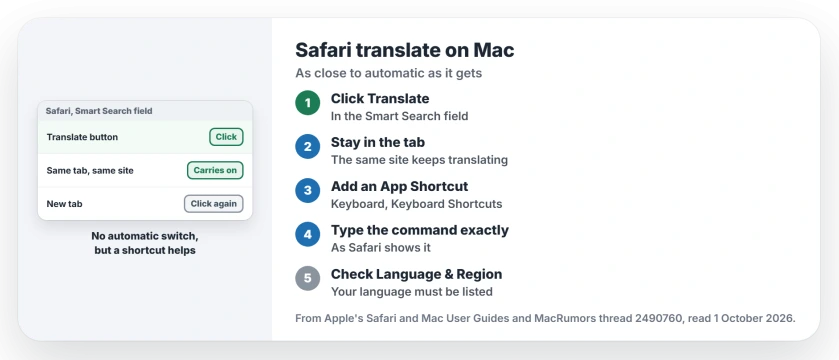
Status: checked 1 October 2026. Safari has no automatic translate switch. It keeps translating within one tab and site, and a keyboard shortcut makes the first click quicker.
1. Know what Safari can do
A member who answered put it plainly: "As far as I know, Safari doesn't have an auto-translate option." Apple's pages show no such switch either.
What Safari does have is a button. Apple's Safari guide says: "If the webpage can be translated, the Smart Search field displays the Translate button". Click it, then pick your language.
2. Translate once, then stay in the tab
Safari does keep going on its own, within limits.
Apple says that "after translating a particular webpage, other webpages in the same domain that you visit within the same tab may also be translated."
It stops at the edges, though. Apple says the automatic part ends when a page is in a different language, or when you move to a different site.
So open the foreign site in one tab, translate the first page, and keep browsing there, because a new tab means clicking Translate again.
3. Make a keyboard shortcut for it
This was the member's trick, user-reported but built on an Apple feature. They set one up under App Shortcuts in Keyboard settings to "trigger Translate into English with Ctrl + Cmd + T." The owner replied: "Excellent idea".
Apple's route starts in System Settings, then Keyboard, then Keyboard Shortcuts. Select App Shortcuts, click the Add button, and choose Safari from the Application menu.
Type the command name exactly as Safari shows it. Apple's rule is to enter it "exactly as the command appears in the app", then press your keys.
Pick keys that nothing else uses. Apple warns that a clash means "your new shortcut won't work".
4. Keep your own language in Language & Region
Safari translates into your preferred languages. Apple says: "If a webpage can be translated into one of your preferred languages, you can have Safari translate it."
If your language is missing from the menu, add it. Apple says that after you add it, "if a translation is available to that language, it appears in the Translate menu in Safari."
Another member gave the same advice and uses it all the time. They said it "works very well" for them, with one catch: it depends on your language being available.
5. Know what leaves your Mac
Spotting the language stays local. Apple says: "This determination is made entirely on your device."
Translating does not. Apple says Safari "sends the webpage's contents (including the full text) to Apple's servers for translation." It adds: "After the translation is complete, Apple discards the contents of the webpage."
So for private pages, I would think twice before translating them in Safari.
If the Translate app on your Mac keeps picking the wrong language, the Mac Translate page fixes that. And for Safari windows in place of tabs, see the Safari windows page.
Can Safari automatically translate pages on a Mac?
Not with a switch. After you translate one page, Apple says other pages on the same site in the same tab may be translated too.
How do I make a keyboard shortcut to translate in Safari?
In System Settings, open Keyboard, then Keyboard Shortcuts, then App Shortcuts. Add Safari, type the translate command exactly as it appears, and pick your keys.
Why is there no Translate button in Safari?
Apple says the button only shows when the page can be translated into one of your preferred languages. Check Language & Region.
The Short Version
- Safari has no automatic translate switch.
- Click the Translate button when it shows.
- Stay in the same tab and site after translating.
- A new tab or site needs a fresh click.
- Add an App Shortcut for the translate command.
- Keep your language in Language & Region.
- Translated pages go to Apple's servers.
Where to Next
Open the foreign site in one tab, translate it once, and keep reading there. Then set up the shortcut so the first click is a key press.
If a shortcut will not take, name the exact command your Safari shows in a comment. Fixes that work go onto this page.

Isaac Smith is the founder and editor of PC Glance, a website that covers computers, laptops, and technology. He is a tech enthusiast and a computer geek who loves to share his insights and help his readers make smart choices when buying tech gadgets or laptops. He is always curious and updated about the latest tech trends.