
You put iOS 27 on your iPhone to get the new AirPods equalizer, and the setting is nowhere to be found. That is annoying when it was the feature you wanted most. I would check your AirPods model first, then their firmware.
Apple lists Custom EQ for AirPods among the iOS 27 changes. The control itself arrives with new AirPods firmware, and only some models get it.
Which AirPods get the equalizer
Only some models qualify, as documented by Apple in its firmware notes. Apple says the new Equalizer control lets you "adjust the low, mid, and high frequency response on AirPods 4 and later, AirPods Pro 2 and later, and AirPods Max 2".
So AirPods Max 2 qualify, as do AirPods 4 and AirPods 5, and both the second and third AirPods Pro. AirPods 3 and older, the first AirPods Pro and the first AirPods Max do not.
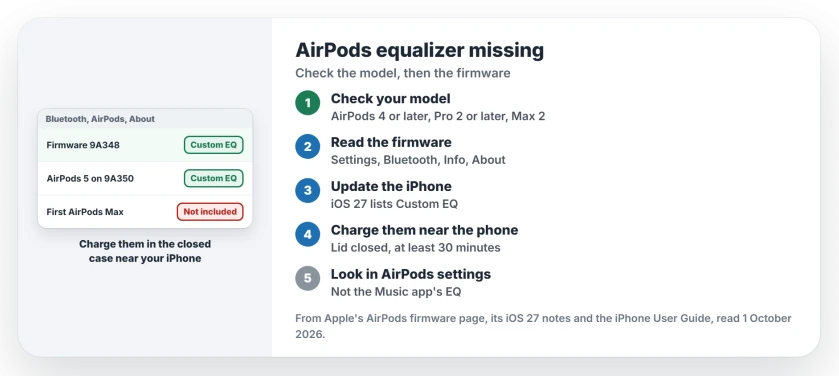
Status: checked 1 October 2026. Apple's new AirPods equalizer comes with firmware 9A348 on AirPods 4 and later, AirPods Pro 2 and later, and AirPods Max 2. AirPods 5 list 9A350.
1. Check your model against Apple's list
Not sure which AirPods you own? Apple's firmware page links to its guide for telling the models apart.
The first AirPods Max stay out, USB-C or not. Apple lists them on firmware 7E108 or 6F25, so the new version does not reach them.
2. Read the firmware number
Apple's firmware page gives the steps. Open Settings, then Bluetooth, then the Info button beside your AirPods, and scroll down to About.
You want to see 9A348 there, though AirPods 5 show 9A350 instead, the version Apple lists for them.
3. Update the iPhone first
Apple's firmware steps start on the phone. Update it to the latest iOS, then make sure Bluetooth is on and your AirPods are connected.
Apple lists "Custom EQ for AirPods" among the iOS 27 changes. So get your phone onto iOS 27 before you judge the AirPods.
4. Get the new firmware onto your AirPods
Apple states that firmware arrives by itself: "Firmware updates are delivered automatically while your AirPods are charging and in Bluetooth range of your iPhone, iPad, or Mac that's connected to Wi-Fi".
You can push it along. Connect your iPhone to Wi-Fi and the charging case to power, put the AirPods in the case, close the lid, and keep them near the phone.
Then wait, because Apple says: "Wait at least 30 minutes for the firmware to update". Open the lid to reconnect them, and check the number again.
AirPods Max 2 work a little differently. Apple says to plug the cable "into the bottom-right earphone", keep them in range, and wait the same 30 minutes.
If the number will not change, Apple's advice is to reset your AirPods and try the update again.
5. Look in AirPods settings, not the Music app
Apple puts the new control "in AirPods settings". So look there, with your AirPods connected.
Do not mix it up with the Music app's EQ. Apple's iPhone guide keeps that one under Settings, Apps, Music, and it only shapes what the Music app plays.
If your AirPods Pro 3 hiss or their noise cancellation feels weak, the AirPods Pro 3 hissing page helps you choose between a fix and an exchange. And if the volume keeps dropping by itself, see the AirPods volume page.
If your AirPods ran the summer beta and will not leave 9A347a, the AirPods beta firmware page has the switch that owners used.
Why is there no EQ for my AirPods on iOS 27?
Check the model and the firmware. Apple's equalizer comes to AirPods 4 or later, AirPods Pro 2 or later, and AirPods Max 2, on firmware 9A348.
Do the first AirPods Max get Custom EQ?
No. Apple names AirPods Max 2 only, and lists the first AirPods Max on older firmware, 7E108 for USB-C and 6F25 for Lightning.
How do I update my AirPods to firmware 9A348?
Update your iPhone, then leave the AirPods charging in their closed case near it, on Wi-Fi, for at least 30 minutes. Then check the version again.
The Short Version
- The equalizer needs AirPods 4 or later, AirPods Pro 2 or later, or AirPods Max 2.
- The first AirPods Max and AirPods 3 are left out.
- Check the firmware under Settings, Bluetooth, Info, About.
- You want 9A348, or 9A350 on AirPods 5.
- Update the iPhone to iOS 27 first.
- Charge the AirPods in the closed case near the phone for 30 minutes.
- Look in AirPods settings, not the Music app.
Where to Next
Put your AirPods on charge next to your iPhone, wait half an hour, and check the firmware number again. If it says 9A348, open AirPods settings and look for the Equalizer.
If your model is on Apple's list and the control still is not there, write your model and firmware number in a comment. I add each case to this page as it comes in.

Isaac Smith is the founder and editor of PC Glance, a website that covers computers, laptops, and technology. He is a tech enthusiast and a computer geek who loves to share his insights and help his readers make smart choices when buying tech gadgets or laptops. He is always curious and updated about the latest tech trends.