
Your Mac crawls each time you switch apps on macOS 27, and Activity Monitor shows WindowServer near the top. That is annoying when an open document takes seconds to come back. I would check one display setting before anything else.
One owner on MacRumors fixed exactly this with a single change in Displays. Apple's own guide explains why that setting can cost speed.
What the owner saw
Their 2021 MacBook Pro was "almost unusable since upgrading to Golden Gate", the name Apple gives macOS 27, and switching apps was the worst part.
In their words: "It takes SEVERAL seconds, sometimes 30 to pull up a doc already opened". Activity Monitor put WindowServer first, with kernel_task and WindowManager next.
They also had Parallels, Chrome and Office apps open. So the Mac was busy.
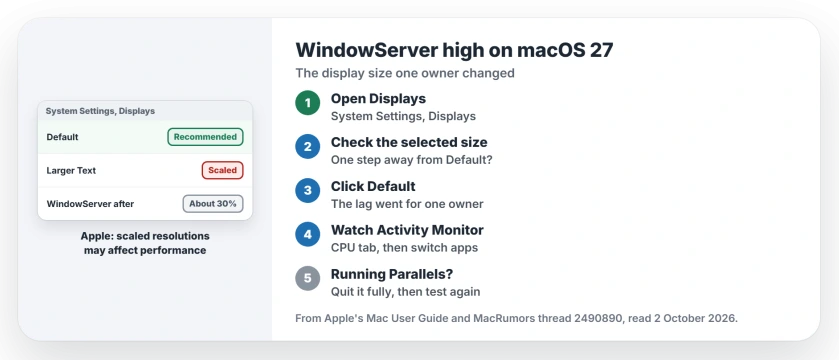
Status: checked 2 October 2026. Apple says a scaled resolution may affect performance. One owner's app switching lag on macOS 27 went away when they set the display back to Default.
1. Check the display setting
Open the Apple menu, choose System Settings, then click Displays in the sidebar, which sits quite far down the list on some Macs.
Look at which size is selected. The owner had it one step away from Default, on the option to its left, which makes text larger.
2. Pick Default
Click Default and give your Mac a moment. That is all the owner did before writing: "This seems to fix the problem".
The difference was big for them, because with Chrome, Parallels and a large Excel file open they called it "a night and day difference".
3. Know why the setting matters
Apple is open about the trade-off, and its guide says: "Using a scaled resolution may affect performance."
It also says that "While it's best to use the default resolution", you can pick another size to make text larger or smaller. So you can keep a bigger size if you need it, but expect the Mac to work harder.
4. Watch WindowServer afterwards
WindowServer will still use some CPU on your Mac. After the change, the owner saw it in "the 30% range", yet the lag had gone.
Open Activity Monitor, click CPU, and switch between your usual apps a few times. If the stutter has stopped, leave the setting where it is.
5. Still slow? Quit the virtual machine
Another member had an idea for busy setups like this one. This part is user-reported advice, not a confirmed fix: quit Parallels "fully first (menu bar Quit, not just pause the VM)".
If it is still slow after that, the same member suggested one start in safe mode to see whether switching clears. Apple's guide covers safe mode for display trouble too.
If your whole Mac is slow and not just app switching, the slow Mac page goes through Apple's five causes. And if apfsd tops Activity Monitor instead, the apfsd page covers that process.
Why is WindowServer using so much CPU on macOS 27?
On one MacBook Pro, a display set one size away from Default made app switching crawl, and Default fixed it. Apple says a scaled resolution may affect performance.
Does a scaled resolution slow down a Mac?
Apple says it may. Its display guide warns that a scaled resolution may affect performance and calls the default resolution the best choice.
Do I lose anything by switching to Default?
Text and windows go back to the size Apple picks for your display. If that feels too small, you can choose a larger size again and accept the speed cost.
The Short Version
- WindowServer high and app switching slow on macOS 27?
- Open System Settings, Displays.
- Check whether a larger or smaller size is selected.
- Click Default.
- Apple says scaled resolutions may affect performance.
- Watch WindowServer in Activity Monitor afterwards.
- Still slow with Parallels? Quit it fully.
Where to Next
Open Displays now and check whether Default is selected. If it is not, pick it and switch between your busiest apps.
If Default changes nothing on your Mac, name your model and the top process in Activity Monitor in a comment. I will look for the next cause and add it here.

Isaac Smith is the founder and editor of PC Glance, a website that covers computers, laptops, and technology. He is a tech enthusiast and a computer geek who loves to share his insights and help his readers make smart choices when buying tech gadgets or laptops. He is always curious and updated about the latest tech trends.