

You delete or move a Gmail message in the new Outlook for Windows, and it is still sitting in Gmail's inbox. That is annoying when you end up cleaning your inbox twice. I would do those moves in Gmail itself for now.
More than 40 people have marked the main question on Microsoft's Q&A board as theirs since late September. Microsoft's moderators describe a one-way sync problem and give a stopgap.
What owners see
The thread starter put it plainly. In their words: "when I delete or move messages in Outlook, the messages remain in the Inbox folder in Gmail".
The other direction still works. They added that "moving and deleting on the Gmail side will update correctly into Outlook, but not the opposite".
A second thread shows another side of it. That owner saw "read messages started reappearing unread, and deleted messages were not deleted".
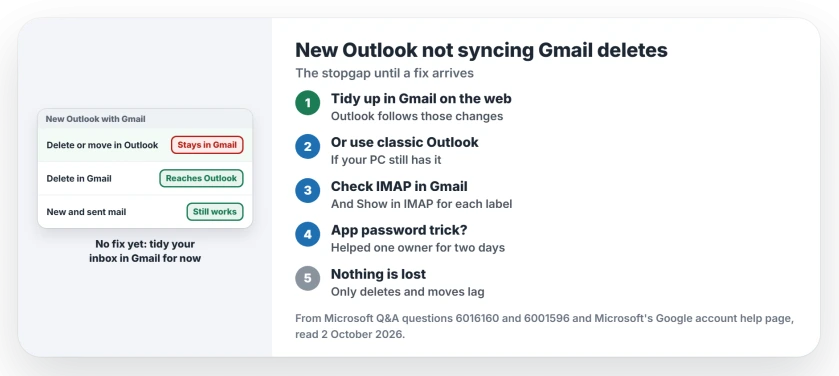
Status: checked 2 October 2026. No fix yet. Microsoft's moderators suggest managing deletes and moves in Gmail on the web, or using classic Outlook for a while.
1. Delete and move your mail in Gmail for now
This is the stopgap reported on Microsoft's Q&A board by its own moderator.
It reads: "As a temporary workaround, manage message moves, deletions, and archives directly from Gmail Web, since those changes are still syncing into Outlook correctly."
Keep reading mail in Outlook if you like. Do your clearing up at gmail.com in a browser, and Outlook follows.
2. Or go back to classic Outlook for a while
A second moderator offered another route on the older thread: "I suggest switching to Classic Outlook temporarily, if it is available on your PC."
It needs classic Outlook still installed. You can switch back to the new one once a fix arrives.
3. Check Gmail's IMAP settings once
Microsoft lists these checks on its Google account help page. It says: "IMAP must be enabled in Gmail before you can connect your account."
In Gmail's settings, open the Labels tab as well. Microsoft says: "Make sure that Show in IMAP is selected for Inbox, Sent Mail, Trash, and All Mail."
Do not expect much from this step. Owners on the thread had both settings right and still saw the fault, so treat it as a check, not the cure.
4. Do not count on the app password trick
One owner went back to classic Outlook and made a Google app password for it. Then they switched to the new Outlook again, and it worked at first.
It did not last. After two good days, they wrote that "items in Gmail are not moving to the Trash again after I delete them in Outlook".
5. Know what still works
New mail keeps arriving in Outlook as normal. One owner noted: "Messages sent from Outlook dutifully show up as sent messages on other devices."
So nothing is lost. Only your deletes and moves stay behind in Gmail until you repeat them there.
On a Mac or phone, a different Outlook fault wants the account added back, and the add your account page has Microsoft's fix.
When the new Outlook refuses to open at all, the Outlook won't open page covers that. And if its search comes up empty, see the Outlook search page.
Why is the new Outlook not deleting emails in Gmail?
Owners report that deletes and moves made in the new Outlook stopped reaching Gmail in late September, while Gmail's own changes still reach Outlook. There is no fix yet.
How do I fix Gmail sync in the new Outlook?
For now, do your deletes and moves in Gmail on the web, as Microsoft's moderator suggests. Classic Outlook is the other stopgap.
Does removing and re-adding the Gmail account help?
Not for the owners on the thread. They removed and re-added the account and still had the fault.
The Short Version
- New Outlook deletes and moves are not reaching Gmail.
- Changes made in Gmail still reach Outlook.
- Over 40 people report the same problem.
- Do your deletes and moves in Gmail on the web.
- Or use classic Outlook for a while.
- Check Gmail's IMAP and Show in IMAP settings once.
- An app password helped one owner for only two days.
Where to Next
Open Gmail in your browser now and clear the messages you already deleted in Outlook. From here on, tidy your inbox there.
If deletes start syncing again on your PC, say what changed in a comment. I will pass the news along on this page.

Isaac Smith is the founder and editor of PC Glance, a website that covers computers, laptops, and technology. He is a tech enthusiast and a computer geek who loves to share his insights and help his readers make smart choices when buying tech gadgets or laptops. He is always curious and updated about the latest tech trends.