

I am sorry if Outlook on your Mac or phone keeps saying it is having trouble syncing and wants your account added again. You can re-add it, but Microsoft's own workaround points somewhere you would never look: your favorite contacts.
Microsoft lists this as a known fault in Outlook for Mac and in Outlook on iPhone and Android. Its page, last updated in October 2025, still says investigating.
Which message do you see?
On a phone, Outlook says it is having trouble syncing your address and ends with "Please add your account again." On a Mac, the line ends with "Please remove and add your account again."
Microsoft says both apps "intermittently stop syncing" with these errors. So it comes and goes.
An owner on Microsoft's board kept re-adding an account. In their words: "Have deleted and reinstalled the account multiple times."
The Microsoft moderator who answered gave this exact message its own fix: "delete Favorites contacts, then re-test sync".
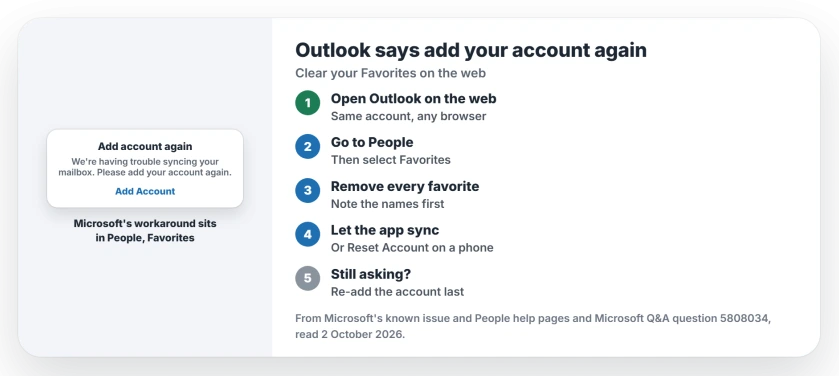
Status: checked 2 October 2026. Open at Microsoft since 2025. Its workaround: sign in on the web, delete every contact under Favorites in People, then let the app sync.
1. Sign in to Outlook on the web
Microsoft's known issue page starts there: "Open the Outlook web app." Use a browser on any computer.
Use the account that shows the error. If you have several accounts in Outlook, do this for that one only.
2. Open People, then Favorites
Next, go to the People pane and select Favorites under your mailbox. Microsoft's People help explains who sits there: "People you have added as favorites appear in Favorites".
Microsoft adds that favorites with an email address also show in the navigation pane in Mail. So you may know them as the names pinned with your folders. That list is the target.
3. Remove every favorite
Microsoft's last step is short: "Delete all Favorites contacts." Clear every one of them.
An accepted answer on Microsoft's board gives the clicks. Select the name under the star, not its checkbox, then choose Remove from favorites in the toolbar.
Ours: note the names first, so you can star them again later. If the message comes back with the list empty, delete those contacts themselves, after you save their details.
4. Let the app sync, or reset it on a phone
Leave Outlook open on your Mac or phone for a few minutes. It needs that time to sync the change.
Old addresses in your suggestions are a separate list, and the suggested email page explains where the X went.
On a phone, the same moderator's first step for a stuck account is Reset Account. In Outlook's settings, tap the account, then Reset Account, and let the sync finish.
Re-adding the account comes last
If none of that holds, do what the message asks. Remove the account, then add it back.
Microsoft's mobile help adds one thing to clear first: the phone's old sync partnership. Its Outlook.com sync page shows how to remove it, and then you re-add the account.
Ours: on a Mac, Outlook downloads your mail again after you re-add an account, so start it on a good connection.
What re-adding does not fix
Re-adding is the obvious move, since the message asks for it. The owner who did it again and again still had a stuck account, which is why the favorites come first here.
Classic Outlook on a Windows PC asking for a password, with a box that vanishes, is a different fault. Signing out of Office is the first step for that one.
If the Outlook app on your iPhone closes the moment it opens, the Outlook crash page has that fix. And if you use Apple's Mail app instead, the Mac Mail account page covers its own sync gap.
Why does Outlook keep asking me to add my account again?
It is on Microsoft's known issue list for Outlook for Mac and its phone apps, still under investigation. Its workaround is clearing your Favorites contacts in Outlook on the web.
How do I fix having trouble syncing in Outlook for Mac?
Sign in to Outlook on the web, open People, then Favorites, and remove every favorite. Then wait. Outlook on your Mac needs a few minutes to sync.
Will removing favorites delete my contacts?
Remove from favorites only takes a person off that list. Microsoft's page says delete, so save their details first if you go that far.
The Short Version
- Outlook for Mac and phones can stop syncing.
- The message asks you to add your account again.
- It is on Microsoft's known issue list.
- Its workaround sits in Outlook on the web.
- Open People, then Favorites.
- Clear every favorite contact.
- Re-add the account only as a last step.
Where to Next
Sign in to Outlook on the web now and look under People, then Favorites. Note the names first. Then clear the list.
If the message returns with no favorites left, tell me which app and version you use. I will update this page as owners report back.

Isaac Smith is the founder and editor of PC Glance, a website that covers computers, laptops, and technology. He is a tech enthusiast and a computer geek who loves to share his insights and help his readers make smart choices when buying tech gadgets or laptops. He is always curious and updated about the latest tech trends.