

I feel for you if Outlook on your iPhone opens and then shuts within seconds, because work mail and your calendar vanish with it. Update the app before you try anything else. For most owners, that ended it.
More than 30 people have pressed the same-question button on one Microsoft Q&A thread since 23 September. A few still crash with several accounts added, and there is a way around that too.
Which crash do you have?
The first owner to post put it simply: "When I open the IOS Outlook app, it will crash and close after a few seconds." That was on iOS 27, with every update installed.
Microsoft lists a separate crash for phones behind on iOS. In Microsoft's words, customers on Outlook 5.2635.1 "on older versions of iOS may experience an issue where Outlook becomes unresponsive during startup or crashes when launched".
Owners on iOS 27 traced theirs to the next build. One wrote: "Seems to be an issue with 5.2637.0." So which fix you need depends on how far behind your iPhone is.
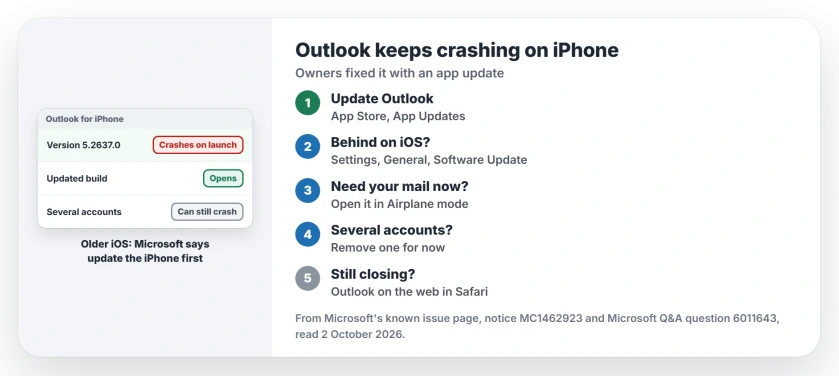
Status: checked 2 October 2026. Updating Outlook from the App Store ended the crash for owners on 5.2637.0. A few owners with several Microsoft accounts still crash on 5.2638.0.
1. Update Outlook from the App Store
Apple's steps: open the App Store, then tap the My Account button or your photo. Tap App Updates, find Outlook and tap Update.
This worked. That first owner came back four days later: "updated the app and no longer having the issues." Another owner wrote: "Update fixed it for my phone."
A report passed on from Reddit named the build that fixed it as 5.2637.1. That one is user-reported and second-hand, so check for any newer build too.
2. Behind on iOS? Update the iPhone
For the 5.2635.1 crash, Microsoft's known issue page has one workaround: "update the device to the latest available version of iOS." Go to Settings, General, Software Update.
Microsoft's admin notice MC1462923 explains the timing. Outlook for iOS now supports only iOS 26 and iOS 27. It says Outlook "will no longer receive updates on devices running iOS 18 or earlier".
If your iPhone stops at iOS 18, see section 5. The app will not get better there.
3. Open it in Airplane mode for your mail
Two owners on 5.2637.0 found one way to keep it open. In their words, "the app crashes immediately unless opened in Airplane mode".
Swipe down for Control Center, tap the plane, then open Outlook. Ours: it fetches nothing new that way, but mail already on the phone is readable. Use it to grab an address or a meeting time.
4. Several accounts? Remove one for now
After the update, a few owners still crashed. They share one thing: several Microsoft accounts in the same app.
One owner found the culprit: "if I remove my personal account. The app works." Another confirmed it: "Works fine when only have one account added but crashes when multiple accounts added".
Ours: removing an account from the app does not delete its mail, which stays on the server. Remove it in Outlook's settings, then add it back after the next update.
5. Read mail on the web meanwhile
A Microsoft moderator's fallback was clear: "please use Outlook on the web as a temporary workaround to access your email and calendar". Open outlook.com in Safari and sign in.
Ours: Apple's own Mail app takes Outlook.com accounts too, through Settings, Apps, Mail, Mail Accounts. That gives you notifications while the Outlook app is down.
This matters most on older iPhones. Microsoft's notice warns that on iOS 18, "over time, the app may stop syncing email and calendar data."
What did not stop the crash
Restarting the iPhone, even several times, did not help owners on 5.2637.0. One owner set a user up on a new phone, and it still crashed there.
A shortcut passed around the board, holding the Outlook icon, opening the calendar and switching to Mail, did nothing for the one owner who tested it on 5.2638.0. Microsoft's crash steps also suggest offloading the app.
If Outlook opens but wants your password on every launch, the Outlook password page covers that loop. And for the phone update itself, the iOS 27.0.1 page says what it changes.
Why does Outlook keep crashing on my iPhone?
Outlook build 5.2637.0 crashed on launch for owners on iOS 27, and an older build crashes on older iOS. A newer Outlook build fixed it for most of them.
How do I stop Outlook closing as soon as I open it?
Update Outlook in the App Store first. If you still crash and have several accounts in it, remove one for now, or open the app in Airplane mode to read your mail.
Does Outlook still work on iOS 18?
For now, but it gets no more updates there. Microsoft warns that it may stop syncing over time, so plan on Safari or Apple's Mail app for that account.
The Short Version
- Outlook 5.2637.0 crashed on launch for owners.
- Updating the app from the App Store fixed it.
- On older iOS, Microsoft says update the iPhone.
- Airplane mode keeps it open to read mail.
- Several accounts can still crash it.
- Removing one account works for now.
- Outlook on the web covers the gap.
Where to Next
Go to the App Store now and update Outlook, then open it once on Wi-Fi. If it stays open, add your accounts back one by one.
If it still closes with only one account added, tell me your Outlook build and iOS version. I will keep this page in step with each new build.

Isaac Smith is the founder and editor of PC Glance, a website that covers computers, laptops, and technology. He is a tech enthusiast and a computer geek who loves to share his insights and help his readers make smart choices when buying tech gadgets or laptops. He is always curious and updated about the latest tech trends.