
I am sorry if a Bad Image box from OneDrive.Sync.Service.exe greets you every time your PC starts, because it will not close on its own. Reset OneDrive first, and check one setting before you uninstall anything.
Since April, the same-question counts across Microsoft's Q&A forum add up to more than 140. Owners on S mode laptops who uninstalled OneDrive could not get it back.
Where the box comes from
The box names a file inside OneDrive's own folder, such as Codecs\8.1.2\avutil-60.dll or avcodec-62.dll under AppData. Windows says the file "is either not designed to run on Windows or it contains an error". The status code is 0xc0e90002.
An adviser on Microsoft's board explains the folder: "This is a recent issue with the codecs OneDrive uses for image and video viewing and playback." So the broken part belongs to OneDrive, not to Windows or to your files.
One owner sees it often: "The error pops up about 4 times when starting the PC." Reports in April named a folder called 8.0.0.54. Since August they name 8.1.2.
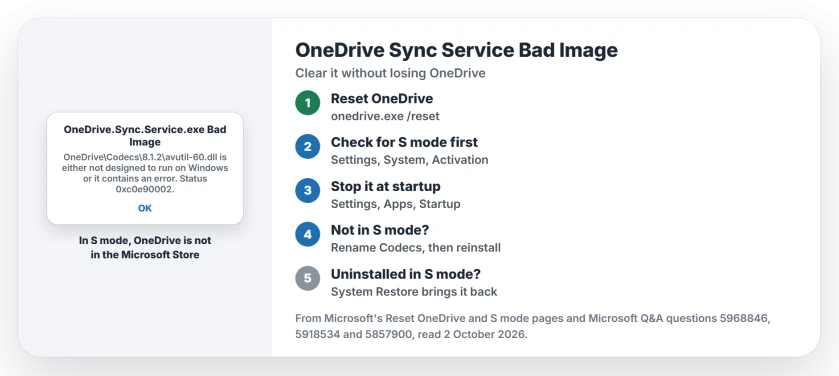
Status: checked 2 October 2026. Microsoft has not listed a fix. A reset clears the box for about a day, and turning OneDrive off at startup stops it. In S mode, do not uninstall OneDrive.
1. Reset OneDrive to clear the box
Microsoft's Reset OneDrive page gives the command. Hold the Windows key, tap R, paste %localappdata%\Microsoft\OneDrive\onedrive.exe /reset and select OK.
If Windows cannot find it, Microsoft offers two more paths: C:\Program Files\Microsoft OneDrive\onedrive.exe /reset, then the same path under Program Files (x86). Then start OneDrive from the Start menu.
Microsoft is reassuring here: "You won't lose any data by resetting OneDrive." It does cut your sync connections. If you synced only some folders, pick them again.
Owners rate this step highest. One owner's answer about it has more than 30 helpful marks, with a plain warning: "It's not a permanent fix". In another thread they wrote that it "worked for 1 day" before the box came back.
2. Check for S mode before you uninstall
Most answers on the board say to uninstall OneDrive and reinstall it. In S mode, that is a trap. An S mode PC installs apps only from the Microsoft Store.
One owner explained that their laptop "can only download apps from the official Microsoft Store". Another found that "OneDrive is not part of the Microsoft Store". A third, after uninstalling: "I should not have uninstalled."
To check, open Settings, then System, then Activation. Microsoft's S mode page sends S mode owners to that screen, where a Switch to Windows 11 Pro section sits.
Leaving S mode would let you reinstall OneDrive, but think hard first. In Microsoft's words: "Switching out of S mode is one-way."
3. Stop OneDrive from starting with Windows
A Microsoft moderator gave an S mode owner a gentler step. Open Settings, then Apps, then Startup, and turn Microsoft OneDrive off. Restart the PC.
In the moderator's words: "This should stop the damaged OneDrive component from loading and displaying several errors each time Windows starts." Your files stay safe online.
Ours: nothing syncs while OneDrive is off, so use OneDrive on the web in your browser for now. The owner who got this advice went another way, so no owner has reported on it yet.
4. Not in S mode? Rename Codecs, then reinstall
On a normal Windows PC, uninstalling is safe. An adviser's route: uninstall Microsoft OneDrive from Settings, Apps, Installed apps. Then rename the Codecs folder and reinstall OneDrive from Microsoft's download page.
The folder is %localappdata%\Microsoft\OneDrive\Codecs. In the adviser's words, "rename the following folder to Codecs.old". A second adviser said why: "so that OneDrive creates a new one".
No owner has confirmed this route yet, so treat it as the next step, not a proven fix. Renaming instead of deleting means you can put the old folder back.
A Microsoft moderator adds one warning: "Avoid manually deleting the DLL or downloading a replacement DLL from another website."
5. In S mode, System Restore or a wait
If you already uninstalled OneDrive in S mode, System Restore is the way back. A moderator says it "can restore the working OneDrive installation without removing S mode". Pick a restore point from before the errors began.
One owner did exactly that: "I did a system restore on my computer so I got OneDrive back". The error came back with it, though. Expect to need step 3 afterwards.
Another owner left it alone. In their words: "After awhile I stopped getting the error message and it seems fine now." OneDrive updates itself almost every week, so a later build may have replaced the files. That last part is our guess.
What did not help
Uninstalling in S mode left several owners without OneDrive at all. An AI answer suggested a disk check, and a moderator suggested sfc /scannow. No owner said either one helped.
If OneDrive syncs badly once the box is gone, the OneDrive sync page sorts out file name problems. And if you would rather stop using it, turning OneDrive off keeps your files.
What is OneDrive.Sync.Service.exe Bad Image?
It is OneDrive failing to load one of its own video files, from a Codecs folder in AppData. Your files are not damaged, and you can keep working while you fix it.
How do I fix error 0xc0e90002?
Reset OneDrive with the onedrive.exe /reset command first. If the box keeps coming back and your PC is not in S mode, rename the Codecs folder and reinstall OneDrive.
Can I reinstall OneDrive in S mode?
Not from the Microsoft Store, owners found, because OneDrive is not listed there. System Restore can bring it back, or you can keep it and turn it off at startup.
The Short Version
- The box comes from OneDrive's own Codecs folder.
- Your files are safe.
- Reset OneDrive first; it clears the box for about a day.
- Check for S mode before you uninstall.
- Turning OneDrive off at startup stops the boxes.
- Not in S mode: rename Codecs, then reinstall.
- In S mode, System Restore brings OneDrive back.
Where to Next
Run the reset command now, then look at Settings, System, Activation before you remove anything. That one check keeps you out of the S mode trap.
If the box still returns, tell me the folder number in your message, 8.1.2 or another. I will add each new fix that owners confirm.

Isaac Smith is the founder and editor of PC Glance, a website that covers computers, laptops, and technology. He is a tech enthusiast and a computer geek who loves to share his insights and help his readers make smart choices when buying tech gadgets or laptops. He is always curious and updated about the latest tech trends.