

I am sorry to say the Copilot button you pay for is missing or grayed out in classic Outlook because of a Microsoft fault, not your plan. Microsoft confirmed it on its known issue page and is still investigating.
Home owners on Microsoft 365 Premium hit it too, not only businesses. Copilot still works elsewhere, and Microsoft names a setting to try inside classic Outlook.
The update that took the button
Microsoft names the trigger: "After classic Outlook for Windows updates to build 20026.20182 and higher, you no longer have Copilot Chat or Copilot entry points in Outlook."
It hits basic and paid Copilot licenses alike. The signs vary. The button over the ribbon is gone, or Copilot sits in Add Apps, but "selecting Open does nothing".
One home owner on Microsoft 365 Premium had updated Outlook and signed in again, and the button stayed gray. Microsoft's reading of the cause: Outlook cannot find an email address in the profile, so Copilot's settings never save.
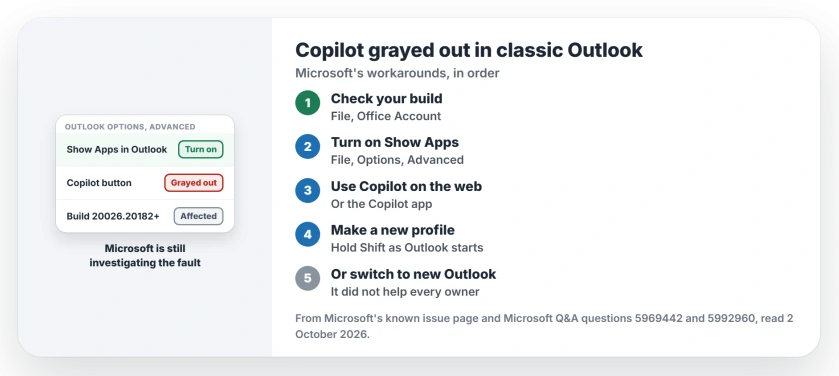
Status: checked 2 October 2026. No fix yet; Microsoft's team is investigating. Its workarounds: turn on Show Apps in Outlook, switch to the web version or new Outlook, or make a new profile.
1. Check your Outlook build
In classic Outlook, choose File, then Office Account. Microsoft's version page says: "The Outlook version and build number is under Product Information."
A build of 20026.20182 or later with Copilot gone matches this fault. The home owner from earlier was on build 20326.20044.
If your build is older, the fault is somewhere else. Microsoft's known issue page links a license check for that case.
2. Turn on Show Apps in Outlook
For classic Outlook itself, Microsoft adds one setting. Select File, then Options. Select Advanced, and under Outlook panes, "check the box for Show Apps in Outlook."
Ours: restart Outlook afterwards and look at the app bar on the left. That bar is where the setting puts your apps.
No owner on Microsoft's board has said yet whether this brought the button back. It takes a minute and is easy to undo.
3. Use Copilot in Outlook on the web
Microsoft says: "Copilot remains available from other entry points". It names Outlook on the web and the standalone Copilot app.
One owner hit a snag there: "I can't go to the OWA because it wants me to create an outlook alias". Ours: that prompt comes when your Microsoft account uses another provider's email.
Microsoft's other route, the Copilot app, is the fallback then.
4. Make a new Outlook profile
Microsoft lists a new profile as a workaround too. Its profile page starts simply: "Hold Shift while starting Outlook." Then choose Options, then New, name the profile and add your account.
Keep the old profile. Microsoft suggests ticking Prompt a profile to be used, so you can pick either one at start.
Ours: the cause Microsoft describes sits inside the profile, which is why a fresh one can help. An adviser on the board warns it is hit and miss.
New Outlook, if you can switch
Microsoft's first workaround is new Outlook, the newer app that is replacing classic Outlook. Microsoft supports running both on one PC, so you can go back.
It did not help every owner. One home owner wrote: "I did try seeing if I used the new outlook if that would help, and it doesn't".
A business owner saw a related gap: Copilot missing from shared mailboxes. In their words: "This issue only occurs in Outlook Classic." New Outlook and the web showed it.
What has not brought it back
The usual steps, an adviser noted, "have not consistently resolved the issue": a new profile, clearing the cache, signing in again, and restarting Outlook and Windows. So do not spend an afternoon on them.
If Office will not sign you in at all, the error 1001 page covers that fault. And if classic Outlook refuses to start, the page on Outlook not opening has the fixes.
Why is Copilot grayed out in classic Outlook?
A classic Outlook update, build 20026.20182 and later, broke the Copilot buttons. If Copilot works for you in Outlook's web version, your license is fine.
How do I get the Copilot button back in Outlook?
Turn on Show Apps in Outlook under File, Options, Advanced, then restart Outlook. If it stays gone, use Copilot on the web until Microsoft ships a fix.
Will a new Outlook profile bring Copilot back?
Sometimes. Microsoft lists it as a workaround, but an adviser calls it hit and miss, so keep your old profile in place.
The Short Version
- A classic Outlook update broke the Copilot buttons.
- Microsoft is still investigating.
- Check for build 20026.20182 or later.
- Turn on Show Apps in Outlook first.
- Copilot still works on the web.
- A new profile helps some people.
- New Outlook did not help every owner.
Where to Next
Check your build under File, Office Account now, then tick Show Apps in Outlook and restart. Copilot on the web is your fallback while you wait.
If the button comes back for you, tell me which step did it. I will add every route that owners confirm.

Isaac Smith is the founder and editor of PC Glance, a website that covers computers, laptops, and technology. He is a tech enthusiast and a computer geek who loves to share his insights and help his readers make smart choices when buying tech gadgets or laptops. He is always curious and updated about the latest tech trends.