
Word, Excel or Outlook asks you to sign in, and every attempt ends at "Something went wrong" with 1001 in brackets. The web versions work, but the desktop apps do not.
That is stressful when your files are waiting. I would restart once, then work through the sign-in parts Windows keeps.
More than 400 people marked one question about this error on Microsoft's Q&A board. Microsoft keeps a known issue page for it, and owners found two fixes Microsoft does not list.
What causes error 1001
Microsoft's known issue page says the error appears "When users attempt to sign into Microsoft 365 desktop applications". In its first scenario, the error "is caused by security software impacting the WAM plug-in".
WAM is Windows' sign-in helper for Office. Microsoft's troubleshooting article adds that "the security software might block Web Account Manager (WAM) plug-ins", and that obsolete security drivers can cut its connection.
It also explains why one account fails and another works: "This means that although one user might experience problems, another user on the same device might not."
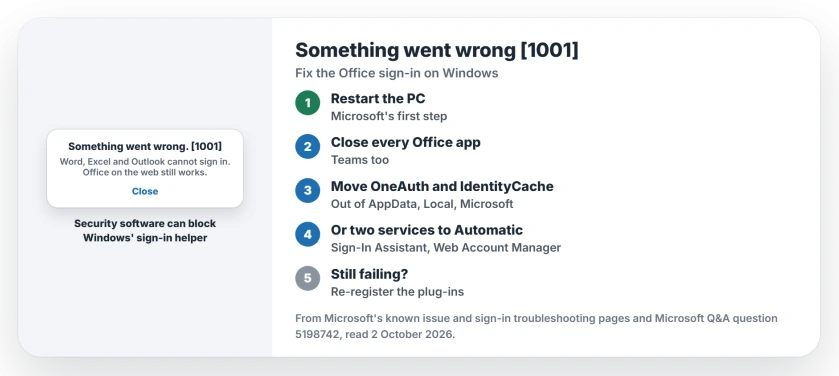
Status: checked 2 October 2026. Microsoft says a restart often helps and lists a PowerShell repair. Owners fixed 1001 by resetting two sign-in folders or two Windows services.
1. Restart the PC first
Microsoft says to start simple: "Rebooting the device often helps to mitigate the issue." Restart rather than shut down, then open one Office app and sign in.
2. Move the two sign-in folders out
This owner fix drew more than 30 helpful marks. Close every Office app and Teams, then open the Run box and go to %localappdata%\Microsoft.
Then, in their words: "Cut/paste the OneAuth and IdentityCache folders out of the Microsoft folder and paste it onto your desktop." Start Outlook and sign in.
If it still fails, close Outlook and copy the folders back, and "when it asks if you want to overwrite, say NO". Then sign in again. Microsoft's own article names both folders as sign-in data its security exclusions should cover.
3. Set two services to Automatic
A second owner went "around in circles" before finding this. "My fix was to place two services on Automatic and then restarted them."
The two are Microsoft Account Sign-In Assistant and Web Account Manager, both in the Services app. Their result: "As soon as I did this, my name appeared on the Excel and Word headers".
4. Re-register the sign-in plug-ins
Microsoft's repair for a broken or blocked WAM plug-in is two PowerShell commands, run as your normal user rather than as an administrator:
Add-AppxPackage -Register "$env:windir\SystemApps\Microsoft.AAD.BrokerPlugin_cw5n1h2txyewy\Appxmanifest.xml" -DisableDevelopmentMode -ForceApplicationShutdown
Add-AppxPackage -Register "$env:windir\SystemApps\Microsoft.Windows.CloudExperienceHost_cw5n1h2txyewy\Appxmanifest.xml" -DisableDevelopmentMode -ForceApplicationShutdown
Microsoft's article says to watch for 48 hours afterwards. If 1001 comes back, it says to work with your security software's maker on exclusions for those sign-in folders.
5. Use Office on the web meanwhile
While you work through this, Microsoft's workaround is short: "To work around this issue use Outlook Web Access (OWA), Office Web Applications, or mobile applications."
Your files and mail are untouched. Only the desktop sign-in is stuck.
If Office 2016 or 2019 vanished after an update instead, the KB5002907 page has the repair and reinstall steps.
If the apps sign in but the title bar says Unlicensed Product, the Unlicensed Product page starts with which account is signed in.
What owners found did not help
One owner had Office removed and reinstalled twice. It changed nothing. Being fully up to date did not help them either.
If Outlook itself will not start rather than sign in, the Outlook start-up page sorts that by symptom. Ours: to test whether 1001 follows your Windows account, the user account page shows how to add a second one.
What does Something went wrong 1001 mean in Office?
The Office desktop apps cannot complete your sign-in through Windows' sign-in helper, WAM. Microsoft blames security software in one scenario and roaming user profiles in another.
How do I fix error 1001 in Outlook?
Restart, then move the OneAuth and IdentityCache folders out of %localappdata%\Microsoft and sign in again. Setting two sign-in services to Automatic fixed it for another owner.
Will reinstalling Office fix error 1001?
Not on its own. One owner reinstalled twice with no change. The fixes that worked target Windows' sign-in parts, not Office itself.
The Short Version
- Error 1001 is a failed Office sign-in.
- Security software often blocks Windows' sign-in helper.
- Restart first, as Microsoft suggests.
- Move OneAuth and IdentityCache out, then sign in.
- Or set two sign-in services to Automatic.
- Microsoft's PowerShell commands re-register the helper.
- Use Office on the web until it is fixed.
Where to Next
Restart your PC now and try one Office app. If 1001 appears again, close everything and move the two folders as described.
If you are still stuck after all four, name your security software for me. I will list each conflict that turns up.

Isaac Smith is the founder and editor of PC Glance, a website that covers computers, laptops, and technology. He is a tech enthusiast and a computer geek who loves to share his insights and help his readers make smart choices when buying tech gadgets or laptops. He is always curious and updated about the latest tech trends.