
I am sorry if Word or Excel suddenly shows Unlicensed Product while you are paying for Microsoft 365, because most of the buttons stop working. Check which account Office is signed in with before anything else.
Microsoft's own steps start there, and so does its note on the error you get when the Update License button fails.
What the title bar is telling you
Microsoft explains the words: "If Microsoft 365 or Office activation fails, you'll get Unlicensed Product or Non-commercial use / Unlicensed Product in the title bar". In that state, "most features of Microsoft 365 or Office are disabled".
Your documents are not lost, because Office simply cannot match your copy to a paid plan right now.
If your Office 2016 or 2019 broke after the 24 September update, the KB5002907 page covers that cause.
One owner with an active Microsoft 365 Personal plan saw it in Excel first. Then every Office app showed it, and the sign-in box only spun.
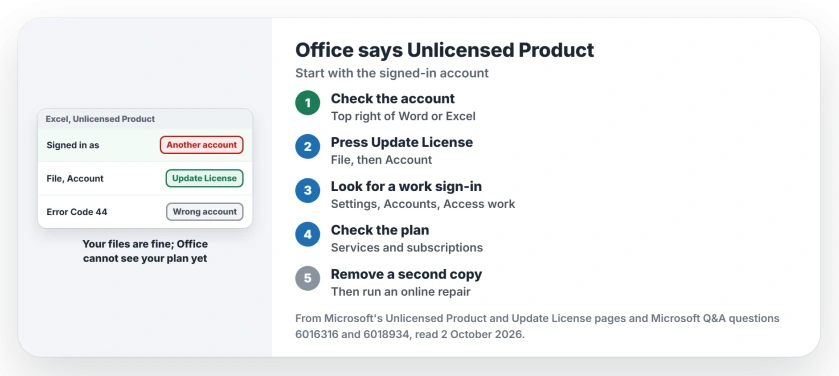
Status: checked 2 October 2026. Microsoft's order: use the account that holds the plan, press Update License, check the plan is active, then remove any second copy of Office.
1. Use the account that pays for it
Look at the name at the top right of Word or Excel, which must be the Microsoft account that holds your plan. Ours: write that address down, since a reinstall asks for it again.
Microsoft's Unlicensed Product page is direct: "Please try signing in using all your personal email addresses in case you bought Office using a different email address."
Not sure which one? Sign in to Microsoft's Services & subscriptions page at account.microsoft.com/services. The account that lists your plan is the one Office needs.
2. Press Update License
In Word or Excel, select File, then Account. Under Product Information, select Update License.
Office refreshes a license by itself, though Microsoft allows "up to 72 hours for new purchases or entitlements to be reflected", and the button saves you that wait.
If it fails with Error Code 44, Microsoft says that is "almost always caused by being signed in with an account other than the one that has the license". Go back to step 1.
3. Look for a work or school account
Your Office may also be tied to an old work or school sign-in you forgot. One owner kept being told to use a work or school sign-in on a home PC.
The adviser's explanation: that owner's email came through GoDaddy, and "GoDaddy is a reselling Microsoft's product, but only commercial product". In other words, a GoDaddy mailbox counts as a work account.
The same adviser had them check Windows Settings, then Accounts, then Access work or school, for an account to disconnect. That owner was still checking when the thread went quiet.
If that page offers no Disconnect for an account you can no longer sign in to, these steps take it off Windows first.
4. Check the plan has not lapsed
On Services & subscriptions, look under Subscriptions and under Cancelled subscriptions. Microsoft warns that an expired plan shows "We couldn't find any Office products" when you sign in.
Renew it there if it has lapsed. Then restart your Office apps, as Microsoft's page says. If it still will not activate, move on.
5. Remove a second copy, then repair
Two copies of Office can fight over activation. Microsoft: "Having two installs can cause activation conflicts."
In Control Panel, open Programs and Features and search for office. Uninstall the version you do not use, then restart.
Still unlicensed? Microsoft suggests an online repair next. Check the PC's date, time and time zone too: "If these settings aren't correct, Microsoft 365 or Office activation might fail."
What did not help
For the owner whose sign-in box spun, a system file scan found and repaired some files, and the error stayed. The adviser moved on to a Windows repair install, which keeps your files but takes time.
Keep working while you sort it
An adviser suggested Excel on the web at office.com to meet a deadline meanwhile. If Office shows error 1001 instead, the error 1001 page covers that sign-in fault.
And for a quick test in a clean setup, the Windows user account page explains adding one more account to test in.
Why does Office say Unlicensed Product when I have a subscription?
Microsoft's first step is the account Office is signed in with, which must hold your plan. An expired plan or a second copy of Office comes next on its list.
How do I remove Unlicensed Product from Word?
Use the account that holds your plan, then select File, Account, Update License. Restart Word when it asks you to.
Does Update License fix Unlicensed Product?
It often does if the right account is signed in. If the button shows Error Code 44, Microsoft says the wrong account is almost always the cause.
The Short Version
- Unlicensed Product means activation failed.
- Your files are fine.
- Use the account that holds the plan.
- Press File, Account, Update License.
- Error 44 means the wrong account.
- Check the plan has not expired.
- Remove a second copy of Office.
Where to Next
Open Word now, check the account name at the top right, then press Update License. That pair is where Microsoft's own steps begin.
If the title bar still says Unlicensed Product after all five steps, tell me what Update License reports. I will add the fixes owners confirm.

Isaac Smith is the founder and editor of PC Glance, a website that covers computers, laptops, and technology. He is a tech enthusiast and a computer geek who loves to share his insights and help his readers make smart choices when buying tech gadgets or laptops. He is always curious and updated about the latest tech trends.