An Outlook certificate error means the app can't verify the mail server's identity. Finish signing in to Wi-Fi first. A warning naming the wrong server or an expired certificate needs a repair by your mail provider or IT team.
The exact warning matters. A Certificate Error notification in Outlook's status bar, a classic Outlook security alert, and an error opening an encrypted message don't all need the same repair. Read the details before accepting anything.
In this guide
1. Check whether the network needs a sign-in
Hotel, airport or guest Wi-Fi can interrupt email until you sign in. Open a familiar public website in your browser, complete any network login, then close and reopen Outlook.
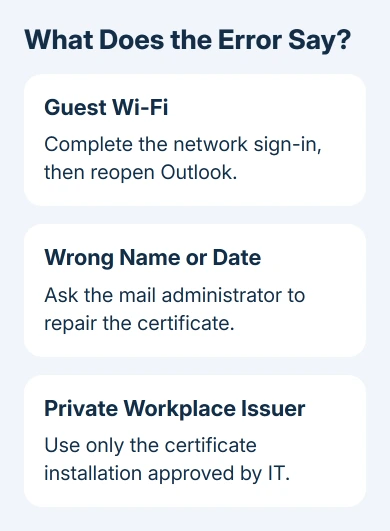
Microsoft recommends the connection check first in its certificate troubleshooting instructions. If normal internet access works and Outlook still reports a certificate error, the network or mail service may need a repair.
Try the same account on another trusted connection, such as your phone's hotspot. Reopen Outlook after switching. If the alert disappears, tell IT: that comparison points toward something on the original network.
Don't install a guest network's certificate just to get email working. I'd compare connections before changing Outlook settings; it's quick and avoids changing your account settings for a network problem.
For a Wi-Fi connection that works only after opening a browser, the network sign-in page checks explain the captive-portal problem on an iPhone. On a computer, finish the network's own login before testing email again.
2. Read the certificate's actual complaint
Open the warning's details without approving the connection. In Outlook versions that show Certificate Error on the status bar, select that notification.
Check the server names, then choose Show certificate errors when that control is offered.
In a classic Outlook alert, open View Certificate if offered. Note the server name, the dates the certificate is valid, and whether the warning rejects the name, date or issuer. Each complaint needs a different response.
A name mismatch means the contacted server isn't covered by the certificate. An expired certificate has passed its valid date. An untrusted signing authority means your computer doesn't trust whoever issued the certificate.
Compare the details with your provider's published server settings or workplace instructions. Don't guess a replacement server from the certificate. Outlook needs to reach the right mail service and verify its certificate.
After a repair, Outlook should reconnect without presenting the same warning. Dismissing the window doesn't fix the certificate problem. Check a fresh launch and a normal mailbox refresh.
3. Send name mismatches and expired certificates to IT
A wrong name usually needs a change on the server, its certificate or the records that direct Outlook to it. Entering your password again won't fix those problems. Send the warning details to the person who manages the mailbox.
Autodiscover finds Outlook's account settings. In one known fault, it contacts a domain whose web server supplies a certificate for another name. That can trigger a setup warning despite a correct password.
The Autodiscover mismatch repair depends on the organization's setup. Its administrator can correct the certificate's covered names or the server configuration. That isn't a reason to disable checking on a personal computer.
To help IT choose the service to inspect, report when the alert appears: at startup, during account setup or when mail refreshes. Include whether coworkers see it and whether changing networks affects it.
For an expired server certificate, ask the provider to renew and install the replacement on the affected mail service.
If the warning names a network security appliance instead, include that name in the report so IT can check its inspection certificate.
4. Install a workplace certificate only when IT approves it
A workplace mail server may intentionally use a self-signed certificate. That differs from an unexpected certificate on a public mail service. Confirm with IT that the named server and certificate belong to your organization.
Where the Outlook notification offers the documented route, open Certificate Error > Show certificate errors.
If the only complaint is an untrusted signing authority, choose View Certificate, then Install Certificate if your administrator has enabled it.
Follow your organization's installation instructions and restart Outlook if needed. That button is only available in certain cases.
It isn't available for a certificate that's invalid because of its date or hostname, and the documented exception isn't for Microsoft 365 servers.
Don't force the option into existence with registry changes copied from a forum. Your administrator handles installing these certificates. If the button is absent, send IT the details; the alert alone isn't a reason to trust the issuer.
If the approved certificate is installed but Outlook still complains, reopen the details. A remaining name or date error needs its own server repair. Trusting an issuer doesn't correct a certificate issued for another host.
5. Keep certificate faults separate from other Outlook errors
A server warning differs from a problem decrypting one signed or encrypted message. A browser certificate alert while opening webmail belongs to that browser connection. Tell support which app displays the message.
Classic Outlook's proxy-server error can also name certificate problems. Send the complete error number as well as the target server. The RPC or HTTPS connection guidance explains those errors according to which certificate check failed.
If the certificate alert has gone but mail still won't send or arrive, follow the remaining Outlook send/receive error. It can identify an account or data-file fault that a server certificate repair wouldn't address.
For a persistent certificate error, ask your mail provider or workplace IT to verify the certificate's dates, names, trust chain and the server Outlook reaches. Include the network comparison and warning details.
Avoid deleting your account while you're waiting for that mail-service repair.
The Short Version
Finish any guest Wi-Fi sign-in, then read the certificate's specific error. Wrong names and expired certificates need a server or network repair. Install a self-signed workplace certificate only through the approved IT procedure.
Checked November 13, 2026.