
You start a drive and Google Maps speaks in a new voice you never picked, which is annoying when all you need is the next turn. I would try one voice setting first, then a step that works on Android only.
Owners found both in a busy Google Maps Help Community thread. The question about the new voice has 530 upvotes and 72 replies, and it asks how to get the old voice back.
What owners are hearing
The question opened at the end of August with "Looks like Google has changed the voice for directions", and the poster said they preferred the old one. The poster searched the settings for another voice and heard the same one each time.
The complaints are about tone. One owner called out the "vocal fry and inflections", and several asked for a man's voice instead.
A volunteer's first answer was blunt: "There is no direct option to bring back the old voice on Google Maps". Owners kept testing anyway, and two things worked.
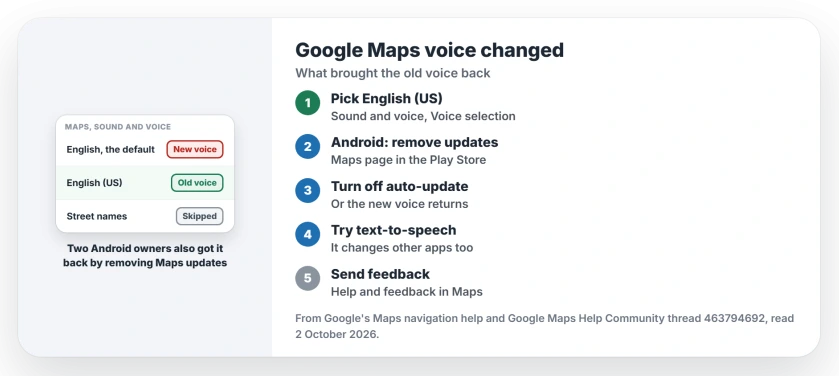
Status: checked 2 October 2026. No Google switch for the old voice. Owners got it back with English (US), or on Android by removing Maps updates. Nothing has worked on iPhone yet.
1. Pick English (US) instead of the default
Kris B 7723 found the settings route: open Maps settings, go to Navigation, then "scroll down to the English options and select English US to replace the default English".
They added a caution: "This brought back the old voice, but I don't know for how long".
There is a trade-off too. Another owner warned that "the ENGLISH(US) does not have street names", so you may hear turns without road names.
Google's own Maps navigation help shows the same menu on Android phones. There you open Sound & voice, then Voice selection, and pick a language from the list.
2. On Android, remove the Maps updates
The second fix came from an Android owner, who said to "uninstall all updates" for Maps in the Play Store and "Turn off auto update". They kept street names with "Default (English) [says street names]".
A second owner replied to that post: "This worked for me as well".
cfanatic, a Diamond Product Expert volunteer in the thread, explained what the rollback costs you. It "regresses the google maps version to one that came with device when out of box new", so you lose newer features and fixes.
Ours: turn off auto-update from the three-dot menu on the Maps page in the Play Store. If you skip that step, Maps can update itself and bring the new voice back.
If the older Maps then keeps closing on you, the Android app crash page starts with its cache.
3. Try your phone's own voice settings
Google says: "You might be able to switch to another voice from your phone or tablet's text-to-speech settings". It also warns: "This changes the voice in other apps too".
No owner in the thread said this step brought the old voice back. Treat it as a test.
4. On iPhone, there is no rollback
iPhone owners cannot remove an app update, and the ideas tried there failed. One wrote: "FWIW the incognito mode idea did not work on my iPhone 16".
Tausique, a volunteer, apologized to iOS users for an earlier answer. Their conclusion: if steps "like changing Siri voices or offloading the app" fail, the change is server-side.
Ours: the English (US) choice from step 1 sits inside Maps itself. So on an iPhone, that is the one setting to try.
If you would rather switch apps, the Apple Maps directions page covers getting its voice working.
5. Send feedback from Maps
cfanatic's advice to the whole thread: "if you would like google to listen to users, you would need to send feedback as a first step". Kurt357 already had: "I have sent feedback".
Ours: in Maps, tap your profile picture, then Help & feedback, and say what you miss about the old voice.
What did not work
- Picking another voice from the list, which the thread starter tried first.
- Incognito mode on an iPhone 16.
- Deleting the Maps app, which a volunteer called needless.
Why did the Google Maps voice change?
A volunteer in the thread says Google replaced all of its earlier navigation voices with new ones. Google has not said why in the thread.
Can I get the old Google Maps voice back?
Two owner routes worked: English (US) in the voice settings, and on Android, uninstalling the Maps updates. Neither is an official switch.
Does English (US) still say street names?
Not according to one owner, who found that the English (US) voice skips them. The Android rollback, by contrast, kept street names on the default English voice.
The Short Version
- Google Maps switched voices at the end of August.
- Try English (US) under Sound & voice.
- English (US) may skip street names.
- On Android, uninstall the Maps updates.
- Then switch off auto-update for Maps.
- Nothing has worked on iPhone yet.
- Send feedback so Google hears it.
Where to Next
Open Maps settings now, switch to English (US), and take a short drive to hear it. If you miss the street names, I would try the Android rollback next.
If Google adds the old voice back as a choice, I will note it here. Tell me which route worked on your phone.

Isaac Smith is the founder and editor of PC Glance, a website that covers computers, laptops, and technology. He is a tech enthusiast and a computer geek who loves to share his insights and help his readers make smart choices when buying tech gadgets or laptops. He is always curious and updated about the latest tech trends.