
You restart your Acer Chromebook Plus Spin 714, and since the August update it loops through an install and a crash. That is frustrating on a premium machine. I would recover it to a beta version and hold updates off for now.
That pairing is what got owners going again. Their Chromebook Help Community thread has 54 upvotes and 145 replies, and they link the fault to the karis model of Google's rex board.
How the loop shows up
Before the update, the thread starter's Spin 714 had run well for two years.
In their words: "right after the latest update chrome OS 151.0.7922.141 it kept going into a continuous bootloop of installing the system update and then crashing and then trying again".
They also found the odd part: "As long as I don't shutdown the computer it works just fine". The loop starts at the next restart. That is when the update tries to finish.
One poster called it a fault "specific to the rex board / Karis platform". So this advice is for the Spin 714 owners in that thread.
If your laptop stays on but its picture flickers, try the Chromebook screen checks for that different symptom.
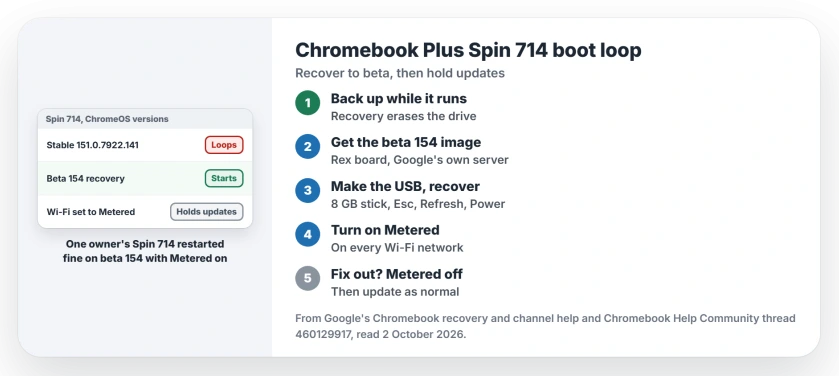
Status: checked 2 October 2026. No stable fix yet, and Acer told an owner a patch is coming. Owners recover to beta 154, then turn on Metered so the bad update stays away.
1. Back up while it still runs
If your Spin 714 is running right now, leave it on and copy your files off first. Every step after this one wipes the drive.
While you are at it, the Chromebook basics page shows where to find your model's update date.
Google says recovery "permanently erases everything on your Chromebook's hard drive, even your downloaded files". One owner who went through it: "I did lose some downloaded files but that's the way it goes".
2. Get the beta recovery image
A normal recovery works, but it does not last. The thread starter recovered to an older version, and as soon as the Chromebook downloaded the current update, the loop was back.
The Recovery Utility will not let you pick a version either. On 2 October one owner wrote: "The tool doesn't give me an option. Just tells me to select my model and then hit create".
So owners used beta images. A site called cros.tech lists Google's recovery files for the rex board, and its download links point to Google's own server. On 2 October it offered beta 154.0.8037.40 and 154.0.8037.15.
CTL, another Chromebook maker, explains the Recovery Utility's gear menu, where Use Local Image takes a file you already have. Its help adds that zipped images "will need to be extracted to allow access to the .bin file".
3. Make the USB and recover
You need a USB stick of at least 8 GB that you don't mind erasing, per Google's Chromebook recovery help. Write the beta image to it with the Recovery Utility on another computer.
Before you pull the stick out afterwards, the USB stick page covers the safe eject rule.
Then put the Spin 714 into recovery. Hold Esc and Refresh, press Power, and choose the USB drive.
JoAnn Brereton did exactly this: "I just loaded up from the Beta channel USB key and things seem to be okay now! It took only one cycle".
Another owner, chiPersei, installed "Version 154.0.8037.40 (Official Build) beta (64-bit)" and was "up and running for now".
4. Turn on Metered before you restart
A beta alone did not always hold. Derek Lohuis recovered to an earlier beta, then a new one arrived: "Google just pushed a beta update and I am now stuck in boot looping again".
C SUN found the lock. On beta 154.0.8037.15, they "turned on metered network in network settings to prevent auto download of updates". Then: "Tested a Restart and the machine came back up, thank goodness".
Ours: open Settings, then Network, pick your Wi-Fi network and switch Metered on. Repeat it for every network your Chromebook joins, at home and at work.
5. Tell Acer about your Spin 714
JoAnn Brereton called Acer's US support line. In their words: "They acknowledge the issue is known to them and that they are working on a patch". Acer gave them case 1821860US.
Owners also starred the Chromium bug reports linked in the thread. chiPersei: "I starred the bugs as suggested".
When the fix lands, switch Metered off
Don Stuessy, who has followed the thread for weeks, gave the exit plan: "If the fix is announced all i would do in your case is turn the metered option off so you get the beta auto updates as normal".
You can stay on beta after that. Going back to stable is a bigger step: Google warns that moving to a more stable channel "will delete everything from your Chromebook", so back up again first.
What did not help
Before finding the thread, the starter tried "removing battery, to powering off/on 30 times, to recovery via Internet and USB". Each recovery held only until the next automatic update.
One poster warned that resets and battery pulls cannot solve it. In their reading, the fault "lives in the lower-level firmware payload" that arrives with the update.
Why does my Chromebook Plus Spin 714 keep boot looping?
An update from mid-August, ChromeOS 151.0.7922.141, makes this model loop when it restarts. One poster ties it to firmware that came with the update.
Can I roll my Chromebook back to an older version?
Recovery can put an older or a beta version on, and it erases the drive. Without Metered switched on, the faulty update comes straight back.
Is Acer fixing the Spin 714 boot loop?
Acer told one owner on 11 September that it knows about the fault and is working on a patch. On 2 October, cros.tech still showed this model's stable channel on 151.0.7922.141.
The Short Version
- The August update loops the Spin 714 on restart.
- Back up first while it still runs.
- Recovery erases the whole drive.
- Owners recover to a beta 154 image.
- Then turn on Metered for every network.
- Acer says a patch is coming.
- Switch Metered off once the fix is out.
Where to Next
If your Spin 714 still starts, back up today and plan an hour for the USB recovery. Turn on Metered as soon as it comes back up.
If you try it, tell me which beta you used and whether it held. I will add it here, along with the day the stable fix arrives.

Isaac Smith is the founder and editor of PC Glance, a website that covers computers, laptops, and technology. He is a tech enthusiast and a computer geek who loves to share his insights and help his readers make smart choices when buying tech gadgets or laptops. He is always curious and updated about the latest tech trends.