

You start typing a name in Outlook and an old or misspelled address pops up, with no X to remove it any more. That is frustrating when one wrong click sends mail to the wrong person. I would check which Outlook and account you use first.
Microsoft removed the X on purpose on 31 March 2026. On Microsoft's Q&A board, 100+ people have flagged one question about it as theirs, with 30+ and 20+ on two more.
Why did the X disappear?
Microsoft announced it in message center notice MC1234566. The feature it retired let you hide a suggestion by "selecting the X next to a name in the To/Cc/Bcc suggestions list".
The notice is blunt about what follows: "Hidden contacts may reappear, with no replacement feature provided". So addresses you removed years ago can come back too.
The 100+ question puts it in one line: "There is no 'X' to select when the address comes up". That comment alone has 100+ votes.
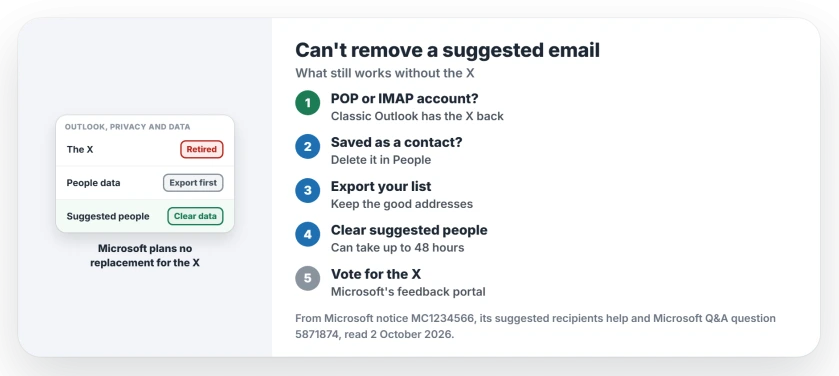
Status: checked 2 October 2026. Microsoft retired the X on 31 March and plans no replacement. You can only clear the whole suggestions list, after saving the addresses you want to keep.
1. Classic Outlook with POP or IMAP? The X is back
There is one exception. Microsoft's known-issue page says that around 1 June, classic Outlook restored the X "if your account is an Exchange On-Premises mailbox or is configured using POP/IMAP".
For Outlook.com and other Exchange Online accounts, Microsoft says the X "might appear to remove AutoComplete entries, but those suggestions will return after further use or troubleshooting".
2. Delete the address from People if it is saved
Some suggestions come from your own contacts. Microsoft says a saved contact "will still be suggested under suggested contact search unless that contact is deleted".
So open People, search for the wrong address, and delete or correct that contact. The People favorites page shows another place old contacts hide.
3. Save the addresses you want to keep
A volunteer, Hornblower409, wrote the workaround that a moderator recommended. In their words: "Now the only method to get rid of a incorrect or out of date Autocomplete entry is to erase the whole list".
Before erasing it, export it. In the new Outlook, or Outlook in your browser, open Settings, General, Privacy and data, Suggested people, and download your expanded people data. That gives you a suggested_people.csv file.
Remove the bad addresses from that file, then import it into People as contacts. Their own warning: "The Import process is not that smart", so expect duplicates.
One owner ran into a problem: "the wrong entries do not show up in the exported list, so I could not fix them". Check your file before you rely on it.
4. Clear the whole suggestions list
In the same Suggested people section, choose Clear data and turn off. Microsoft's suggested recipients help also covers personal accounts: the Privacy page for your Microsoft account has a People suggestions switch.
Hornblower409 adds: "It can take up to 48 hours for your Autocomplete List to be cleared". Switch suggestions back on afterwards, and the list starts again from the people you email next.
An independent advisor summed it up: "Right now the only workaround they give you to get rid of incorrect emails is to totally wipe your whole suggested people list".
5. Vote for the X to come back
Owners are asking Microsoft to restore it through its feedback portal. In July, Hornblower409 noted that "there has been no official response to the numerous request to have it reinstated". Add your vote there.
What did not help
In classic Outlook, before the June change, one owner tried everything in Options: "I have tried turning off and back on in Options, I have tried (many times) deleting the list from Options, no change".
They also found that "arrow down to select then hit delete doesnt work". Those reports are user-reported, and Microsoft's own page now explains why.
If a wrong suggestion has already sent mail to the wrong person, recalling it only works in one narrow case.
Why can't I delete a suggested email address in Outlook?
Microsoft retired the X, which it called Contact Masking, on 31 March 2026. It says no replacement is planned, so single suggestions can no longer be removed.
How do I clear Outlook's suggested email addresses?
In the new Outlook, or Outlook in a browser, open Settings, General, Privacy and data, then Suggested people. Choose Clear data and turn off. Export the list first if you want to keep any addresses.
Will Microsoft bring the X back?
Microsoft's notice says there is no replacement. It did restore the X in classic Outlook for POP, IMAP and on-premises accounts, but not for Outlook.com.
The Short Version
- Microsoft removed the X on 31 March 2026.
- No replacement is planned.
- POP or IMAP in classic Outlook: the X is back.
- Delete wrong addresses saved in People.
- Export your suggestions before clearing them.
- Clear data and turn off wipes the list.
- Clearing can take up to 48 hours.
Where to Next
Check whether the wrong address is a saved contact first, because deleting it there is quick. If it is not, export your suggested people, keep the good ones as contacts, and clear the list.
If an address still comes back after all that, tell me which Outlook and account type you use. I will check it and note the answer on this page.

Isaac Smith is the founder and editor of PC Glance, a website that covers computers, laptops, and technology. He is a tech enthusiast and a computer geek who loves to share his insights and help his readers make smart choices when buying tech gadgets or laptops. He is always curious and updated about the latest tech trends.