
You start a video on a website in Chrome on your Android phone, and the screen dims and then goes dark while it plays. That is maddening when the video is the reason you picked the phone up. I would check your Chrome version first.
Google's Chrome team logged it as a bug in Chrome 154 and fixed it. The fixed version reached Google Play on 29 September, so a phone that has not updated yet still has the fault.
Why the screen goes dark
Two threads on Google's Chrome Help Community describe it, with 14 and 12 upvotes. One owner put it plainly: "my screen keeps fading even when I'm in fullscreen mode".
The other noticed it start "suddenly", and turning on Screen attention made no difference. Google's bug record names the fault exactly: "Chrome Beta lets Android screen time out during active video playback".
The fix is a change Google titled "Allow video playback wake locks regardless of permissions policy". A wake lock is what keeps your screen on while a video plays.
Chrome 154 broke that for some players. It refused the lock for players in a frame from another site or in picture-in-picture, "in cross-origin iframes or Picture-in-Picture windows" in the fix's own wording.
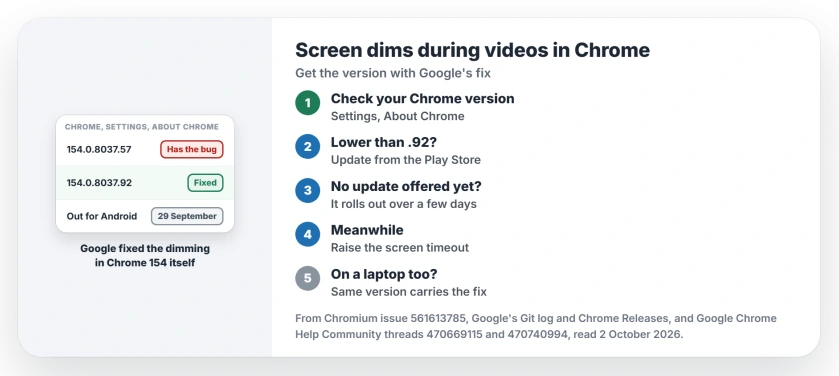
Status: checked 2 October 2026. Google fixed it in Chrome 154.0.8037.92 for Android, released 29 September; the update reaches phones over a few days.
1. Check your Chrome version
Open Chrome, tap More (the three dots), then Settings, then About Chrome. Google's Update Google Chrome help gives the same route.
The owner with the fading screen was on a build from 22 September, the day Google released 154.0.8037.57 without this fix. That build still dims.
If the number reads 154.0.8037.92 or higher, your Chrome already carries the fix. Lower means update.
2. Update Chrome from Google Play
Google says Chrome "should automatically update based upon your Play Store settings". Waiting is optional.
Open the Play Store, tap your profile icon, then Manage apps & device. Under Updates available, find Chrome and tap Update. Restart Chrome afterwards, then play the same video again and leave the phone alone past your usual screen timeout.
3. No update yet? Two stopgaps
Google's release note for this build says: "It'll become available on Google Play over the next few days". So your phone may not see it on day one, because Google spreads an update across phones in stages.
A volunteer expert on the thread told owners to "Keep checking there is an update coming". I would check once a day rather than reinstalling anything.
Ours, until it arrives: raise the screen timeout in your phone's Display settings for the length of the video. Set it back afterwards, because a long timeout costs battery while the screen sits on.
Or watch in the site's own app where there is one, since the first owner said it "doesn't happen when I watch video in Youtube".
On a laptop or Chromebook
Google's bug record lists "Android, Linux, Mac, Windows, ChromeOS". So if your laptop dims or sleeps during a Chrome video, it may have the same fault, and the same version number carries the fix.
On a computer, type chrome://settings/help in the address bar and Chrome checks for its update itself. A Mac that starts its screen saver in other apps too has a different cause.
What did not help
Clearing Chrome's cache did not help, and neither did Screen attention. Both are user-reported.
A volunteer posted a longer list: full screen, unrestricted battery use, clearing browsing data, updating Android System WebView. One reply on that thread reads "None of these have worked for me", so you can skip them.
That fits a bug inside Chrome. Only a new build reaches it.
Why does my phone screen turn off while watching videos in Chrome?
A Chrome 154 bug stopped some video players from keeping your screen awake. Google fixed it in Chrome 154.0.8037.92, released for Android on 29 September 2026.
Which Chrome version fixes the screen timeout?
Version 154.0.8037.92 and anything newer, including 154.0.8037.126, which followed on 1 October and carries the fix too.
Is Screen attention supposed to stop this?
It keeps the screen on while you look at it, but one owner had it on and the screen still dimmed, so the Chrome update is the fix.
The Short Version
- Chrome 154 let Android screens dim during videos.
- Google fixed it in 154.0.8037.92, released 29 September.
- Check your version under Settings, About Chrome.
- Update Chrome from the Play Store.
- The rollout takes a few days.
- Cache clearing changed nothing for owners.
- Laptops on Chrome 154 get the same fix.
Where to Next
Check your Chrome version now. If it is lower than 154.0.8037.92, get the Play Store update and play the same video again.
If the screen still dims after the update, tell me your phone and your Chrome number, so I can add it to this page.

Isaac Smith is the founder and editor of PC Glance, a website that covers computers, laptops, and technology. He is a tech enthusiast and a computer geek who loves to share his insights and help his readers make smart choices when buying tech gadgets or laptops. He is always curious and updated about the latest tech trends.