
You search on Google and get a page saying its systems have detected unusual traffic from your computer network. It is annoying after a normal search. I would solve the check once, then look at your VPN or private browsing.
Google explains the message on its own help page, and most of the causes sit on your network rather than in your browser. One owner's case on Google's community board shows the less obvious one.
Why Google shows it
Google says that if a network you use, VPN networks included, "seems to be sending automated traffic to Google Search", you may see this page. It is a guard against robots, not a punishment.
The traffic does not have to be yours. Google lists people who share your network, your VPN or your internet provider as possible sources.
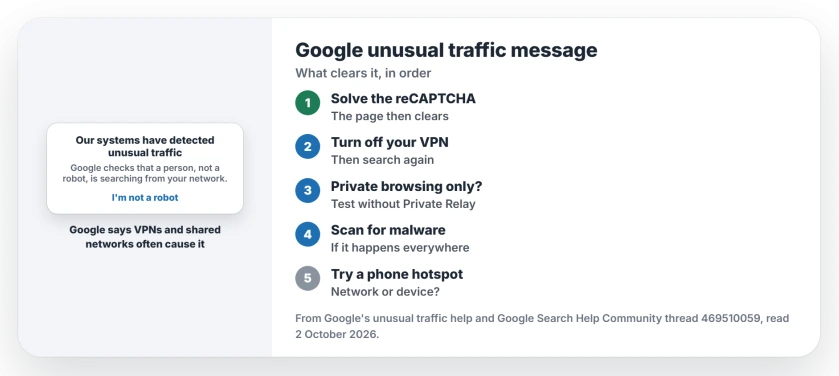
Status: checked 2 October 2026. Google says to solve the reCAPTCHA, then check your VPN, your network and your PC for malware. One owner saw it only in Safari private browsing.
1. Solve the reCAPTCHA once
The page usually shows a check box or a picture puzzle. Google says: "After you solve it, the message goes away, and you can use Google again". That is often the end of it.
If you see no puzzle at all, Google's unusual traffic help says to check that your browser is supported by reCAPTCHA.
2. Turn off your VPN and test again
Google is blunt about VPNs: "Some VPNs and tunnel services cause all traffic to be blocked because they make it impossible for Google to tell the difference between abusive and non-abusive traffic".
I would turn the VPN off and search again. If the message goes, change the VPN server or provider, and our VPN page explains what you give up without one.
3. Private browsing? Check iCloud Private Relay
One owner on Google's board had an unusual pattern, in their words: "This is ONLY occurring in private browsing mode on Safari by the way". They added: "Normal safari works fine".
They had already removed their VPN, and searches on Bing worked from the same device. A reply suggested Apple's privacy features instead, since "iCloud Private Relay can give websites a different IP address".
That reply's advice: "Try temporarily turning off iCloud Private Relay and test Google again". It is a suggestion, not a confirmed fix, so test it yourself; our Private Relay page shows where that switch lives.
4. Scan your PC for malware
Google warns that "Some malware can cause Google to show this message". If the page appears on every network you use, scan the computer before anything else. Scan once, then search again.
5. On a shared network, ask the owner
At a school, office or café, someone else on the same connection may be causing it. Google says you could see the message if others on the same network "are sending automated searches to Google".
The cause may not be you. Ours: try your phone's mobile hotspot for a few searches. If Google behaves there, the problem is the network you were on, not your computer or your account.
What did not help
On Google's board, the owner tried the obvious step first: "I deleted my VPN". The message stayed anyway, because their trigger was private browsing rather than the VPN.
Their result is user-reported, and the Private Relay idea is still only a suggestion from another member of the board. Google's own steps are the ones it documents.
Why does Google say unusual traffic from my computer network?
Google thinks something on your network, your VPN or your provider is sending automated searches. It shows a check to confirm a real person is searching, then lets you carry on.
Is the unusual traffic message a virus?
Not on its own. It is Google's own page, but Google says malware on your PC can trigger it, so scan if it keeps coming back.
Why does it only happen in private browsing?
For one owner on Google's board, it only appeared in Safari private browsing on their device. A reply pointed to iCloud Private Relay, which can give Google a different address to judge.
The Short Version
- Google thinks your network sent automated searches.
- Solve the reCAPTCHA to clear it.
- VPNs often trigger it.
- Private browsing and Private Relay can too.
- Rule out malware with a scan.
- Shared networks can trigger it for all.
- Try a phone hotspot to compare.
Where to Next
Solve the check once, then switch off your VPN and search again from the same browser. If it only happens in private browsing, test with iCloud Private Relay off.
If the message keeps coming back on every network, tell me your browser and device. I will dig into it and update this page with what turns up.

Isaac Smith is the founder and editor of PC Glance, a website that covers computers, laptops, and technology. He is a tech enthusiast and a computer geek who loves to share his insights and help his readers make smart choices when buying tech gadgets or laptops. He is always curious and updated about the latest tech trends.