
You open Settings, choose Slideshow for your desktop background, and it jumps straight back to Picture or Solid color. The Browse button flashes up and vanishes before you can click it.
I would skip Settings for this one. An older Windows panel still sets a slideshow, and owners got their pictures cycling again through it.
10+ people on Microsoft Q&A have marked it as their question too, and the fix there has 30+ helpful votes.
What owners describe
The asker put it in one line: "When I select personalize to change the desktop to a slideshow it reverts back to picture."
Yours may fall back to a plain color instead. One owner wrote: "When selected, it immediately goes back to color." Picking a single picture still works.
For one owner it began suddenly, after the slideshow had run without a hitch. Nothing in their folder had changed.
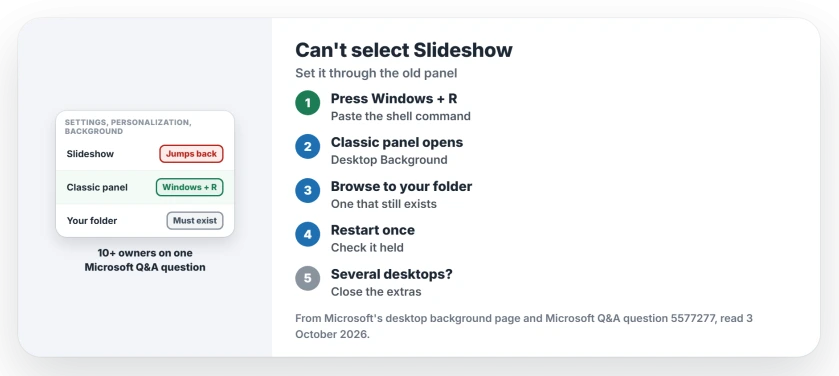
Status: checked 3 October 2026. No fix from Microsoft yet. Owners got a slideshow back through the classic Desktop Background panel; 10+ share the question.
1. Open the old Desktop Background panel
Press Windows + R, paste this line, and press Enter:
shell:::{ED834ED6-4B5A-4bfe-8F11-A626DCB6A921} -Microsoft.Personalization\pageWallpaperIt opens the Desktop Background window from older versions of Windows. The owner who shared it fixed their PC by "opening the classic wallpaper editor and changing slideshow to an existing folder".
It has collected 30+ helpful votes on the thread since March. Two owners came back the next day, one saying it "works perfectly" and the other: "That solved my issue."
2. Point it at a folder that still exists
Choose Browse, pick the folder that holds your pictures, and save the change. A folder on your own drive is the simplest choice.
Ours: the key word in that fix is existing. If your pictures moved, the slideshow may still point at the old place.
One owner's folder had moved without warning. It sat on the Desktop, "but Windows (NOT ME) changed that to OneDrive". OneDrive can quietly move your Desktop folder, so check where yours lives now.
3. Restart once and check it held
For one owner the panel worked, then stopped: "This worked for me once, and after rebooting, back to the same old problem."
They still called the shell command a workaround. I would restart once after setting it. If it falls back, run the command again and pick the folder a second time.
4. Use one desktop, not several
Microsoft's own desktop background page has a line few owners see. Under multiple desktops it says: "Slideshow as a background isn't supported."
Ours: with several desktops open in Task View, close the extras, then try Slideshow again. None of the owners tested this, so it is a check rather than a proven fix.
5. Set the timing and shuffle
Microsoft says Slideshow lets you "set the interval for how often the images change, and if you want to shuffle the pictures". The old panel may not give you both.
One owner found it would not set the timing or shuffle for them. Ours: once the slideshow runs, look under it in Settings, Personalization, Background. We could not test whether those settings stick on an affected PC.
What did not help
Clicking faster. Several owners tried to reach Browse before it vanished, and one wrote that it is IMPOSSIBLE in capitals. A single picture works, but that only gives you one picture.
If your background went black rather than refusing a slideshow, the August update caused that one, with a different fix.
Why does my slideshow keep switching back to Picture?
Microsoft has not said. Owners describe Settings dropping the Slideshow choice the moment they pick it, while the old Desktop Background panel still accepts it.
Can I still reach the classic Desktop Background window?
Press Windows + R and run the shell command in step 1. It opens the classic panel, where Browse stays on screen long enough to use.
Why did my wallpaper slideshow stop after a restart?
One owner found the classic panel fix lasted only until a reboot. They kept using the command anyway, because it still brought the slideshow back.
The Short Version
- Settings can drop the Slideshow choice instantly.
- The old Desktop Background panel still sets it.
- Run the shell command from Windows + R.
- Point it at a folder that still exists.
- OneDrive may have moved your pictures.
- Restart once and check it held.
- Microsoft says slideshow is unsupported with multiple desktops.
Where to Next
Press Windows + R now, run the command, and pick your pictures folder in the panel that opens. Then restart and see whether the slideshow is still running.
Did yours fall back after a restart? A comment with your Windows version tells me how often this fix holds.

Isaac Smith is the founder and editor of PC Glance, a website that covers computers, laptops, and technology. He is a tech enthusiast and a computer geek who loves to share his insights and help his readers make smart choices when buying tech gadgets or laptops. He is always curious and updated about the latest tech trends.