
You picked a folder in Google Photos on your Windows PC, and nothing uploads. Or the Back up folders button flickers, and the folder picker never opens. Often it is working, just slowly.
Since 10 August 2026, Google Drive for desktop no longer backs up to Google Photos, so many Windows owners moved to this browser feature. I would give it smaller folders. Big ones are where it stalls.
The thread about it on Google's Photos help forum has 13 upvotes and 20 replies.
What owners describe
The asker pays for 2 TB and keeps photos on a local D: drive. In their words, "no new photos are uploaded", and when they try to pick another folder, "the folder selection dialog doesn't appear at all".
It happened in Chrome and in the installed Photos web app alike. Another owner saw the button flicker: "Nothing happens when clicked." Their folder held 73 GB and 60,000 files.
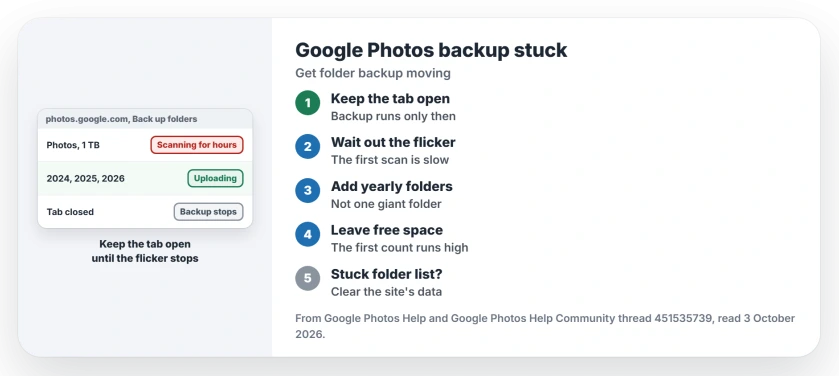
Status: checked 3 October 2026. Google has not fixed the slow first scan. Owners got uploads moving with smaller folders and a tab left open; 13 upvotes on the thread.
1. Keep the tab open and let the scan finish
Google's backup help for computers says it plainly: "To allow backup, keep the Google Photos tab open on your browser or have the Photos Web App running." Close it and backup stops.
Your flickering button is not a crash. A volunteer contributor on the thread explained that "it's scanning the selected folder", and the window has to stay open until it stops.
On 2 October the same volunteer put a size on it: about 3 to 5 minutes for an 8 GB folder, longer for bigger ones. In their words, "This may appear as 'not working' but it is actually working".
One owner with a 1 TB folder waited it out: "About 6-7 hour later, Photos finally responded and lets me add more folders".
2. Back up yearly folders, not one giant one
That same owner found the fix that got files moving: "I ended up removing the top folder, and adding the individual yearly folders".
It worked. In their next words, "That meant files were finally being uploaded well". As they noted, folders from past years are unlikely to change much.
You can also copy the volunteer's variant. They made a new, empty main folder and drag in only the subfolders they are working on.
3. Leave room for the first pass
There is a second trap. The volunteer described it: "The initial scan does not take account of photos already existing online or the selected compression choice."
So the first count can ask for more space than your plan has left. They added: "The storage headroom must currently be equal to the scanned folder for the first pass to work."
Google itself says that "Any content that has already been backed up will not be reuploaded." Ours: the real upload is small, so the count is the problem, and smaller folders keep it under your free space.
4. Stuck folder list? Clear the site's data
When the button will not respond at all, the volunteer's reset is this: "If the UI is not responding you can clear any entries from Back up folders by deleting the on-site data in the browser you are using".
The volunteer's route in Chrome is chrome://settings/content/siteData: search it for photos.google.com and delete that entry. Ours: this can sign you out of Google in that browser. Have your password ready.
An owner saw the same from another side. "With an incognito window the folder can be set again but the same behavior repeats."
5. Use Chrome or Edge
Google's rule is short: "To automatically back up folders, you must use a Chromium-based browser such as Chrome or Edge." Firefox will not show the option.
If you only need a one-off copy of your phone's pictures, a cable is still the quickest route.
What did not help
Even a fresh copy of Windows did not cure it. The asker tried that. The installed web app showed the same fault as Chrome for them.
One owner with 300 GB of photos still saw the button blinking on 2 October. Google is aware, the volunteer says, but has not shipped a fix.
Why is Google Photos not backing up my folder on Windows?
With a big folder, the first scan can run for hours, and the page looks frozen until it ends. Owners got uploads going by adding smaller folders and leaving the tab open.
Does Google Drive for desktop still back up to Google Photos?
No. Google says Drive for desktop ended Google Photos backup on 10 August 2026. Folder backup now runs from photos.google.com in Chrome or Edge.
Do I need to keep the Google Photos tab open?
Yes. Google says backup runs while the tab or the Photos web app stays open. Close it, and the selected folders stop backing up until you return.
Your phone works differently: Android's own backup treats Photos as a separate switch.
The Short Version
- Drive for desktop stopped backing up to Google Photos on 10 August 2026.
- Folder backup now runs in Chrome or Edge.
- Big folders stall the first scan for hours.
- Keep the tab open until the flicker stops.
- Add yearly folders instead of one giant one.
- The first scan wants free space for the whole folder.
- Clearing the site's data resets a stuck folder list.
Where to Next
Remove your biggest folder from Back up folders and add one year's folder instead. Leave the tab open. Check the status at the top of your library later.
Stuck too? Post your folder size as a comment, so I can see where the scan starts to choke.

Isaac Smith is the founder and editor of PC Glance, a website that covers computers, laptops, and technology. He is a tech enthusiast and a computer geek who loves to share his insights and help his readers make smart choices when buying tech gadgets or laptops. He is always curious and updated about the latest tech trends.