
Your screen shows "Getting Windows ready. Don't turn off your computer." with spinning dots under it. An hour goes by, then two, and nothing changes.
Before you touch the power button, I would look at one small light. If your drive is still working, the safest move is to wait. If it has gone quiet for hours, an offline restart is what owners used to get through.
One Microsoft Q&A thread on this screen counts 4,600+ people with the same question. Several more carry hundreds each.
What the PC is doing behind the dots
Windows is finishing something it started before the restart: an update, a reset, or setup after a full shutdown. You cannot see a percentage, so it looks frozen even when it is not.
Microsoft says nothing about a time limit, only this: "The time required to download and install updates depends on connection speed, network settings, and the size of the update."
Owners report waits far longer than they expected. One reply on the big thread simply says the screen "has been running for the last 2 days".
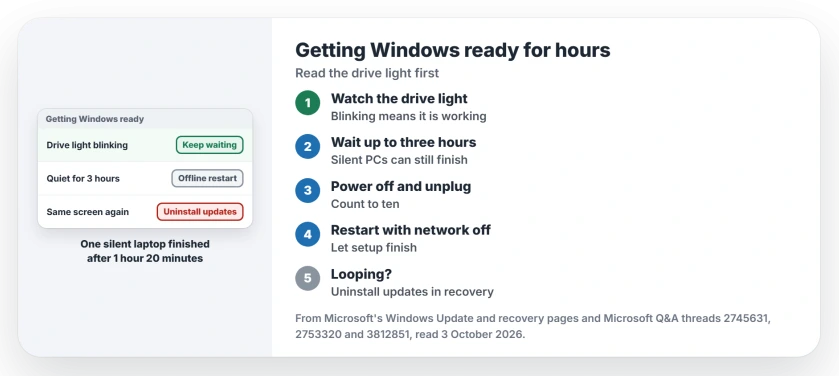
Status: checked 3 October 2026. Microsoft gives no time limit. Owners got through by waiting while the drive was busy, then by an offline restart.
Watch the drive light, then decide
Most desktops and many laptops have a small drive activity light. On the 4,600+ thread, the accepted answer from a Windows Insider MVP, with 400+ helpful votes, starts there.
"Check to ensure there is disk activity" is their first step. "If there is, keep waiting." They draw the line at "If setup goes beyond 2 to 3 hours, try the following steps."
No light on yours? Put your ear near the fan, or feel whether the laptop base is warm. Neither is proof, so I would give it the full three hours anyway.
A silent PC can still finish. One owner wrote "I hear literally nothing happening, no CPU heat, no fan sounds" and was sure it had frozen. It "finally booted up by itself after 1 hour and 20 minutes".
The offline restart that gets it moving
Three quiet hours gone? The same accepted answer gives the steps. Press and hold power until the screen goes dark, pull the plug, and count to ten.
On a laptop with a removable battery, take it out too. Then cut the network: "Disconnect it from the Internet (unplug Ethernet and/or turn off Wi-Fi)."
Start your PC with the network still off and let it finish setup. Ours: the point is that Windows completes what it already has, rather than fetching anything new.
An owner with a Lenovo X1 Tablet added one detail, with 50+ helpful votes. "Holding down the power button for 10 sec, disconnecting the power source, network, the docking station and letting it rest for 10 minutes seems to have worked."
When it lands on the same screen again
If you get the same screen again, the update itself is failing. Hold the power button as the dots appear, two or three times, and Windows opens the recovery screen instead.
Choose Troubleshoot, Advanced options, then Uninstall updates. Microsoft's recovery options page says of that route: "Your files and apps are not affected." It also warns: "Some updates can't be uninstalled."
A restore point is your other way back. An owner on a 400+ thread got out of the loop this way: "I was able to get back into my PC buy using my system repair disc and running system restore."
Check first that System Restore was ever switched on, because many PCs ship with it off.
After a reset you stopped halfway
One asker "cancelled the reset while it was at 87% complete" and got this screen on the next start. The advice there, with 60+ helpful votes, was Startup Repair from the recovery screen.
Ours: the asker never said whether it worked. If yours is the same, run the reset again from Troubleshoot, Reset this PC, with Keep my files chosen.
Why a full shutdown can trigger it
Shift plus Shut down powers your PC off fully, so pending update work runs then. One owner did not expect that, writing "since on normal shutdown, this wouldnt happen".
Ours: that is expected. A normal shut down on Windows is closer to hibernating, so the update work waits for the next full one.
What did not help
Forcing your power off every few minutes. Each cut interrupts the install, and it starts again on the next boot.
The update troubleshooter can make it worse while an update is still pending. An owner reported: "The troubleshooter said that there was a pending restart scheduled which sent my PC into an unending loop of Getting Windows ready."
If yours is stuck at a percentage inside Settings rather than on this screen, that is a different stall, with its own normal pause points.
How long should Getting Windows ready take?
Microsoft gives no figure. The accepted answer on the big thread says to wait up to two or three hours while the drive is busy, and one owner's PC finished after 1 hour and 20 minutes of silence.
Can I switch the PC off while it says this?
After hours with no drive activity, owners did it and got through. I would never do it in the first hour, or while the drive light still blinks steadily.
Why does my laptop update when I am not using it?
Windows tries to restart outside your active hours. Microsoft adds: "We recommend keeping devices like laptops and tablets plugged in when you're not using them."
The Short Version
- The screen shows no progress, but work may be happening.
- Watch the drive light before you do anything.
- Wait up to three hours while it blinks.
- Silent is not dead: one PC finished after 1 hour and 20 minutes.
- Then restart with the power and network unplugged.
- A loop calls for Uninstall updates in recovery.
- A restore point works if System Restore was on.
Where to Next
Check the drive light now and write down the time. If it is still blinking, leave it. If three quiet hours pass, do the offline restart.
How long did yours take in the end? Leave the hours in the comments, with your Windows version, because the real times help the next reader decide.

Isaac Smith is the founder and editor of PC Glance, a website that covers computers, laptops, and technology. He is a tech enthusiast and a computer geek who loves to share his insights and help his readers make smart choices when buying tech gadgets or laptops. He is always curious and updated about the latest tech trends.