
You chose Reset this PC, waited, and got There was a problem resetting your PC. No changes were made. Nothing was wiped, nothing was fixed, and a second try ends the same way.
I would install every pending update before the next attempt. One owner's reset worked only after that, and two settings in the reset itself matter as well. A clean install is the last step, not the first.
On Microsoft Q&A, 2,100+ people share one question about this message. A newer one from January 2026 has 30+.
Why the reset gives up
Reset rebuilds Windows from recovery files on your drive, inside the recovery environment. If those files are damaged, or recovery itself is switched off, it stops before touching anything.
An adviser on the 2,100+ thread sums it up in one line: "Since the reset did not complete, your Recovery Image is corrupt". The fixes are about giving the reset better files, or a working recovery environment.
There is also a trap in the waiting. Microsoft's reset page warns: "Manually attempting to restart the device yourself during this process could cause the reset to fail."
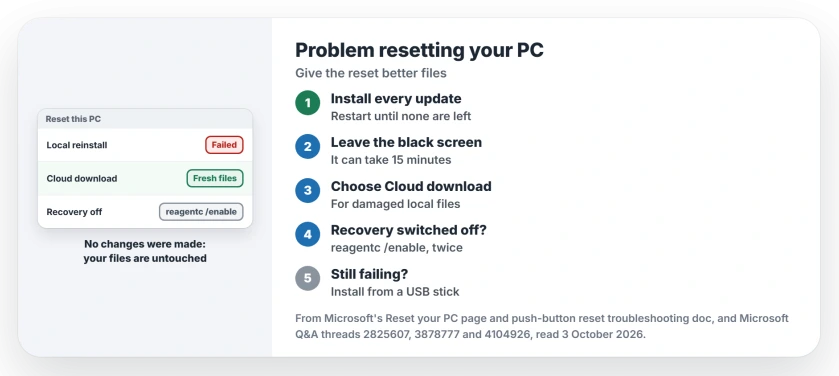
Status: checked 3 October 2026. Owners got resets working after installing updates. Microsoft adds Cloud download for damaged local files and a recovery repair command.
Install every update, then reset
One owner on a 30+ thread tried commands and Safe Mode with no luck. Then, before leaving for work: "I decided while I go to work to let it run all the updates because why not?"
It worked. "When I got home and ran all the updates, I was able to reset it again!" Go to Settings, Windows Update, and keep installing and restarting until nothing is left.
Ours: updates also refresh the files Windows uses to rebuild itself, which fits what that owner saw. Then try the reset again.
Leave the black screen alone
Microsoft is specific about how long a reset can look dead: "During the resetting process, it's possible that your screen might go black for a long period of time (occasionally upwards of 15 minutes)".
Ours: give it at least half an hour before you go near the power button. Plug a laptop in first, because a flat battery stops a reset just as surely.
If the power did go mid-reset and setup now keeps restarting into an error box, one registry value got owners through.
Choose Cloud download this time
Reset asks where to get Windows from. Microsoft says of Cloud download: "It's useful if your local files are corrupted or missing." That describes a reset that failed from local files.
It fetches several gigabytes, so keep your PC on a stable connection. Cloud download and local reinstall differ in more ways than speed, and the damaged-files case is the one where Cloud download earns its time.
It does not always work. One asker on a 100+ thread hit the same error "using both options locally and through cloud". For them, the problem sat deeper than the files.
Switch recovery back on
The reset runs inside the recovery environment, so check that yours is enabled. In a Command Prompt opened as administrator, type:
reagentc /infoMicrosoft documents one reset failure where recovery's boot entry gets deleted. Its fix: "To correct this issue, run the Reagentc /enable command twice from an administrator command prompt."
Your first run reports an error, which Microsoft expects. Then: "When Reagentc /enable runs for the second time, WinRE will be enabled." Try the reset again afterwards.
Repair the disk and the system files
On the 100+ thread, an adviser's next step has 100+ helpful votes: "Now run chkdsk /spotfix command. Then re-run dism /online /cleanup-image /restorehealth command."
Both need administrator rights. Neither touches your files. The asker never reported back, so it is a reasonable step with no confirmed result.
When nothing makes it run
Installation media is the reliable route. Make a Windows USB stick on another PC, start from it, and install fresh.
An adviser on the 2026 thread says the same, since "If the reset process fails, it could mean that your recovery image is corrupted."
Selling the PC? That asker was "Trying to factory reset my computer to sell it". A clean install wipes it too, but a reset alone may leave more behind than you think.
The registry rename on the big thread
The most voted answer on the 2,100+ thread renames two registry files from recovery before resetting again. It has 80+ helpful votes.
Ours: I would leave it alone. If it goes wrong, Windows will not start, and you are making installation media anyway. Back up your files first if you try it.
What did not help
Running the reset again straight away. Without a change to updates, recovery or the download source, it stops in the same place.
Startup Repair, for the 100+ asker. It answered with "startup repair couldn't repair your pc" and left them where they started.
Why does Reset this PC say no changes were made?
It stopped during its checks, before deleting anything. Your files and apps are exactly as they were, so you can fix the cause and try again without losing anything.
Does Cloud download fix a failed reset?
Often, when the local recovery files are the problem. Microsoft says it is useful when local files are corrupted or missing. It did not help one asker whose problem sat elsewhere.
Can I reset my PC from the recovery screen instead?
Yes, under Troubleshoot, Reset this PC, when recovery is working. One asker had no reset option there at all, which points back at recovery itself.
The Short Version
- No changes were made: nothing was wiped.
- Install every pending update, then try again.
- Leave a black screen alone for half an hour.
- Pick Cloud download if local files are damaged.
- Run reagentc /enable twice if recovery is broken.
- chkdsk /spotfix and DISM are safe checks.
- Installation media is the last, reliable step.
Where to Next
Install everything Windows Update offers now, restarting as often as it asks. Then run Reset this PC again with Cloud download chosen.
Which one got yours through: updates, Cloud download or the reagentc fix? A comment naming your Windows version helps me put the commonest fix first.

Isaac Smith is the founder and editor of PC Glance, a website that covers computers, laptops, and technology. He is a tech enthusiast and a computer geek who loves to share his insights and help his readers make smart choices when buying tech gadgets or laptops. He is always curious and updated about the latest tech trends.