
Windows setup or a reset gets most of the way, then a box says "The computer restarted unexpectedly or encountered an unexpected error." You click OK, the PC restarts, and the same box is back.
I would change one value from that very screen before making any USB stick. Owners got past the loop with it. The ones it failed got out by starting again from fresh installation media.
Two Microsoft Q&A questions carrying this message have 100+ people each waiting on an answer.
Why setup refuses to carry on
Owners report the same trigger on both big threads: the power went halfway. One laptop ran its battery flat during a reset. On another thread an owner wrote that "during installation the computer switch off".
An adviser there sums it up: "When your PC is shut down during an installation, that corrupts the installation and so it will not continue."
Ours: setup keeps a record of the stage it reached, and it reads that record after the crash. The value you can change is part of it, so it only helps when the files themselves survived.
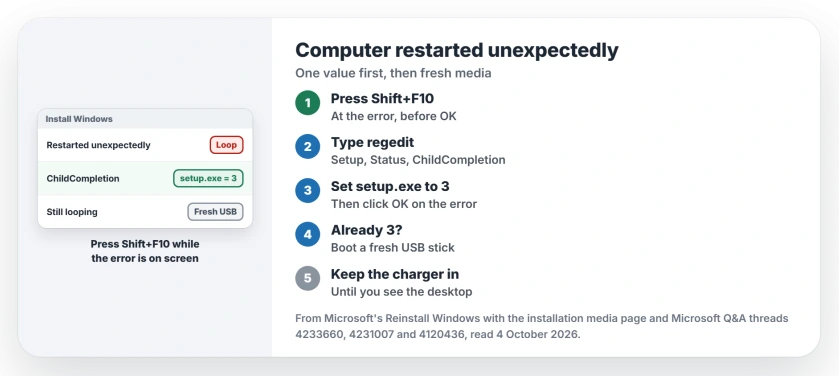
Status: checked 4 October 2026. Owners got past the loop by setting setup.exe to 3 under ChildCompletion, or by booting a fresh USB stick and starting over.
Set setup.exe to 3 from the error screen
Leave the error on screen. Press Shift and F10 together. Some laptops also need the Fn key. A black Command Prompt window opens on top of setup.
Type regedit and press Enter. In Registry Editor, open HKEY_LOCAL_MACHINE, then SYSTEM, Setup, Status and ChildCompletion.
Double-click setup.exe on the right. The answer that 10+ people marked helpful puts it simply: "In Value data, change to 3". Click OK and close both windows.
Then click OK on the error itself. The same answer promises this: "Now when you click on Ok in the message the Windows installation should start".
A Dell N5010 owner confirmed it on another thread: "this helped me install win 10 on my dell N5010". It needs no second computer, which is why you try it first.
When the value is already 3
Three is not magic, though. A later owner on that Dell thread found the value set to 3 already, and wrote: "i still cant continue win10".
A January 2026 asker with an HP Pavilion got the same result: "I tried REG EDIT sat the value to 3 but no help".
Ours: if 3 changes nothing for you, the install itself is damaged, and a registry edit cannot repair files. I would stop editing at that point and go to fresh media.
Start again from a fresh USB stick
The asker of the 100+ reset thread could not reach recovery at all. An adviser told them to build installation media on another PC and boot from it.
Then, "rather than installing Windows 10, select 'Repair this Computer' to gain access to the Recovery Environment". From there they started a new reset.
Their reply the next morning: "it worked perfectly". The stick gives you the recovery menu back.
Microsoft agrees on its reinstall page, and wants the media built "On a working PC".
Its page opens this case with "If your PC doesn't start and you don't have a recovery drive or a repair disc", then points you to the Media Creation Tool.
If you meant to wipe the PC anyway, a clean install from the same stick is the other exit. Our reinstall guide covers the reset route and the clean route.
Keep the power on this time
A flat battery started it for one asker and a sudden switch-off for another. Ours: plug the charger in before you begin, and leave it in until you see the desktop.
I would unplug extra drives and docks as well. A second drive can stop setup at the partition screen, and you want this attempt to be clean.
If setup loops after 100%
A different loop looks much the same. One asker wrote: "After 100% it's automatically restarting and windows isn't installing".
The adviser there blamed the boot order: "This is because you have configured your BIOS boot order to boot from the installation USB." Pick the internal drive from the boot menu at that restart, or pull the stick out.
What did not help
Clicking OK and restarting, for every asker. The message asks you to do exactly that, and the same box comes straight back.
Fresh partitions, for the HP Pavilion owner: "i deleted the partitions and have windows create a new one but no help". In May 2026 a second owner said they "tried the clean, and still have the same issue".
A September 2026 asker hit the error on a one-year-old HP Victus after an automatic repair loop. Recovery options failed there too, and the adviser's last suggestion was a clean install from a stick.
Ours: if a clean install from new media also fails, run your PC maker's drive test before trying again. Both HP threads end without a fix.
What does changing setup.exe to 3 do?
Ours: it edits setup's own progress record, so setup moves past the stage it thinks failed. It is a nudge, not a repair. That is why it rescues some PCs and does nothing for others.
Can I fix this without another computer?
Sometimes. The registry change needs only the keyboard. If it fails and recovery will not open, you need installation media, and Microsoft says to make that on a working PC.
Will I lose my files?
A new reset started from recovery lets you choose what to keep again. A clean install from the stick erases the drive you install on. So copy anything you can reach first.
The Short Version
- The loop starts when setup is cut off, often by power.
- At the error, press Shift+F10 and type regedit.
- Set setup.exe under ChildCompletion to 3, then click OK.
- Already 3, or no change? Boot fresh installation media.
- Keep the charger plugged in until the desktop appears.
- Looping after 100%? Boot from the internal drive.
Where to Next
Press Shift+F10 at the error now and look at the setup.exe value before anything else. If it already reads 3, start making the USB stick on another PC.
Did the value change get you through, or did you need the stick? Put your PC model in a comment, since the HP cases are still open.

Isaac Smith is the founder and editor of PC Glance, a website that covers computers, laptops, and technology. He is a tech enthusiast and a computer geek who loves to share his insights and help his readers make smart choices when buying tech gadgets or laptops. He is always curious and updated about the latest tech trends.