
You update your Mac, open Terminal and connect to a server over SSH like always. It still logs you in. But three lines of WARNING print first, about a post-quantum key exchange and sessions recorded now to be decrypted later.
I take it as a note about the server, not your Mac. On Ask Different, two answers silenced it with a few lines in the SSH config file, and OpenSSH's own page shows how to do it for one server only.
The question has 9,106 views since February.
What the warning is telling you
The asker, an owner of a MacBook Air, saw it right after updating to macOS 26.3. In their words: "It still logs me in, but I get this warning". This is what prints:
** WARNING: connection is not using a post-quantum key exchange algorithm.
** This session may be vulnerable to "store now, decrypt later" attacks.
** The server may need to be upgraded. See https://openssh.com/pq.html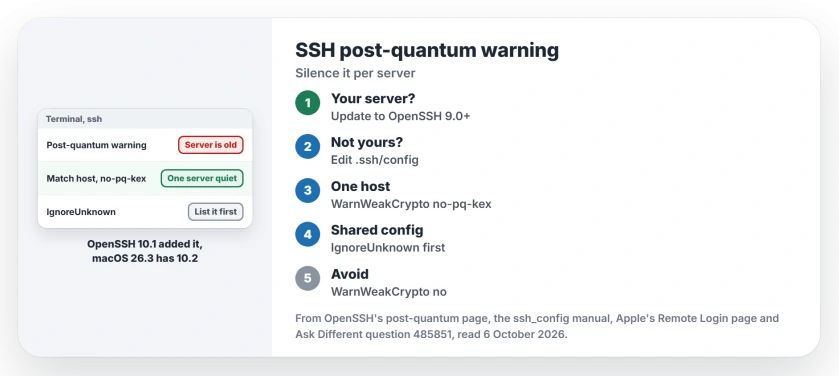
Status: checked 6 October 2026. After macOS 26.3, SSH warns about a post-quantum key exchange. The server is old; update it, or silence the warning for that host in your SSH config.
The new part is on your side. The same owner ran ssh -V and got OpenSSH 10.2, and OpenSSH's page says "OpenSSH 10.1 will warn the user when a non post-quantum key agreement scheme is selected".
The server is the one falling short. OpenSSH puts it simply: "the server you connected to did not offer one of the two post-quantum key agreement algorithms".
1. Update the server, if it is yours
OpenSSH calls this the real fix: "The ideal solution is to update the server to use an SSH implementation that supports at least one of these". Version 9.0 or later is enough.
If the server already runs that, OpenSSH says to check whether its KexAlgorithms setting switched them off.
I would do this first whenever the server is yours. Ours: a NAS, a router or a web host often runs SSH you cannot update yourself. Then the maker's firmware decides, and step 2 is the practical route.
2. Silence it for that server only
OpenSSH's advice is "We recommend doing this selectively". Its example goes in your SSH config file, with your server's name in place of the sample one:
Match host unsafe.example.com
 WarnWeakCrypto no-pq-kex
The file is .ssh/config in your home folder. Open it in Terminal with the next line, paste the two lines, then press Control-O to save and Control-X to leave.
nano ~/.ssh/configThe manual explains the flag: "Warnings about connections that don't use a post-quantum key exchange may be disabled using the no-pq-kex flag". Every other server still warns you.
3. Or quiet it for every server
The accepted answer used a version for all hosts. Confirmed by an owner, since the asker accepted it:
Host *
 IgnoreUnknown WarnWeakCrypto
 WarnWeakCrypto no-pq-kex
The order matters. The manual says "It is recommended that IgnoreUnknown be listed early in the configuration file as it will not be applied to unknown options that appear before it".
Ours: that only counts when an older Mac or PC shares the same config file. Its SSH has never heard of WarnWeakCrypto, and without IgnoreUnknown it would stop with an error.
Skip the shortcut of WarnWeakCrypto no. The manual is clear that "no will disable all warnings", and I would rather see the others.
When the server is another Mac
A Mac can be the server too. Apple says so on its Remote Login page: "Turn on Remote Login to access your Mac from another computer using SSH". Its SSH comes with its macOS version.
Ours: if the warning names one of your own Macs, run ssh -V on that Mac. Anything older than OpenSSH 9.0 does not offer one by default. Updating its macOS is the fix.
Is the warning a sign of an attack?
No. OpenSSH writes that "quantum computers of sufficient power to break cryptography have not been invented yet". The risk is that recorded traffic could be read years from now.
Ours: for a home server on your own network, silencing it is a choice about that future risk. It is not a break-in. Terminal fixes for printing look similar, as the disabled CUPS web interface on macOS 27 shows.
A newer Mac meeting an older machine causes other friction too. macOS 27 and an older Mac's shared drives covers the file sharing side.
The Short Version
- OpenSSH 10.1 added the warning, and macOS 26.3 has 10.2.
- It means the server offered no post-quantum key exchange.
- Updating the server to OpenSSH 9.0 or later fixes it.
- Or add WarnWeakCrypto no-pq-kex for that host.
- List IgnoreUnknown first if older SSH shares the file.
- WarnWeakCrypto no hides every warning, so skip it.
Where to Next
Open Terminal now and add the Match host lines for the server that warns you. Then connect again to check the warning is gone.
Which server was it for you, a NAS, a router or a web host? Tell me in the comments.

Isaac Smith is the founder and editor of PC Glance, a website that covers computers, laptops, and technology. He is a tech enthusiast and a computer geek who loves to share his insights and help his readers make smart choices when buying tech gadgets or laptops. He is always curious and updated about the latest tech trends.