
You connect with PuTTY or FileZilla, and it stops at "Couldn't agree on host key algorithm". Then it lists what the server offers, usually rsa-sha2-512, rsa-sha2-256 and an ecdsa name.
I would not change the server first. That list is the clue. Every name on it is a method your PuTTY is too old to speak, and a current PuTTY speaks all of them.
Its 2021 Super User thread has 119,548 views.
Why the server and PuTTY have nothing in common
Servers stopped offering the old ssh-rsa method around 2021, when OpenSSH changed its defaults. OpenSSH 8.8 says "This release disables RSA signatures using the SHA-1 hash algorithm by default".
Your RSA host key still works, signed with SHA-2 instead, and old clients lost out.
PuTTY learned those newer methods in two steps, as documented by the vendor.
Its change log lists elliptic-curve support, the ecdsa and ed25519 names, in 0.68 from February 2017, and "Support for RSA key algorithms using SHA-2 instead of SHA-1" in 0.75 from May 2021.
The asker checked the methods with the ssh command on their Linux machine, which proved nothing about PuTTY. grawity's answer: "PuTTY and ssh (OpenSSH) are two completely separate programs".
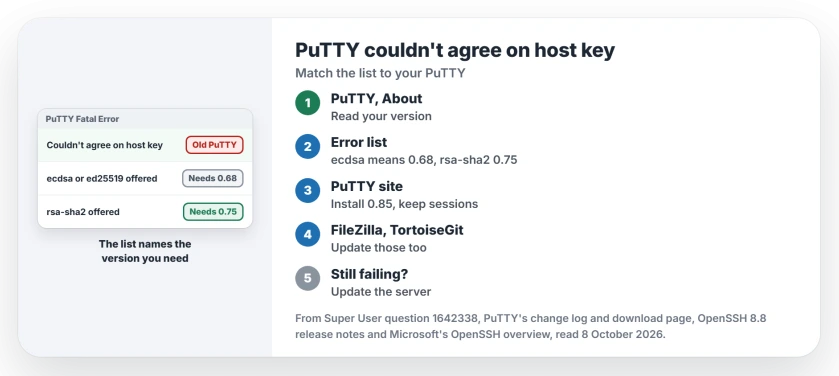
Status: checked 8 October 2026. ecdsa and ed25519 host keys need PuTTY 0.68 or later, rsa-sha2 needs 0.75 or later. Update PuTTY, or the app that carries its code. The current release is 0.85.
Ours: PuTTY's download page shows 0.85, released 16 August 2026, the build to install today. FileZilla 3.65.0 is on this laptop.
Its fzsftp.exe describes itself as "SFTP module for FileZilla based on PuTTY's psftp component". The file holds rsa-sha2-512, rsa-sha2-256, ecdsa-sha2-nistp256 and ssh-ed25519.
1. Read your PuTTY version against the list
Open PuTTY and click About at the bottom of the configuration window. Then compare that version number with the names the error printed:
- If the list has ecdsa or ssh-ed25519 and your PuTTY is older than 0.68, that is the gap.
- If the list holds only rsa-sha2-256 and rsa-sha2-512, you need 0.75 or later.
- Current PuTTY and still the error? Check which program failed, then the server.
2. Update PuTTY, or the app that carries it
Install the current PuTTY from the PuTTY site, keep your saved sessions, and connect again. One commenter on Super User had a user on PuTTY 0.67 with this error, and wrote that "they fixed with current PuTTY 0.83".
Check every other program on your PC that speaks SSH for you. The asker found their real problem was FileZilla, which, in their words, "uses Putty for connecting".
Update FileZilla in that case. Updating PuTTY alone changes nothing for it, because FileZilla carries its own copy of the code.
TortoiseGit also ships its own PuTTY files, and our page on the PuTTY key format too new error covers how owners replaced them.
3. When updating PuTTY did not help
An owner on that thread went from PuTTY 0.73 to 0.80 and still got the error. What fixed it was on the other end: they updated the server's packages with apt.
So when a current PuTTY fails with the same list, look at the server next. If you run it, update it. If you do not, send the full error text to whoever runs the server for you.
Whatever you do, I would leave ssh-rsa off. Turning it back on to suit an old PuTTY weakens the server. OpenSSH's own notes call re-enabling RSA/SHA1 something to do "only as a stopgap measure until legacy implementations can be upgraded".
Or skip PuTTY with Windows' own ssh
Windows 10 and 11 carry an OpenSSH client of their own, separate from PuTTY. On Windows 11 it is usually there already. Microsoft says in its OpenSSH overview that it came as an optional feature from Windows 10 build 1809.
On this laptop, ssh -V reports OpenSSH_for_Windows_9.5p2, which speaks every method in the asker's list. Try ssh user@server from a terminal as a quick test of whether the server or PuTTY is the old side.
If ssh then connects but refuses your password or key on a Windows server, our SSH permission denied page is the next step.
The Short Version
- The error means the server offers newer host key methods than your PuTTY knows.
- ecdsa and ed25519 need PuTTY 0.68, rsa-sha2 needs 0.75. Current is 0.85.
- Update PuTTY, or FileZilla and TortoiseGit, which carry PuTTY code.
- If a new PuTTY fails, update the server.
- Never re-enable ssh-rsa for an old client.
Where to Next
Check About in PuTTY first, then the list of names in the error. Still failing on a current PuTTY? Post the full error line and your version as a comment, and I can check whether the server is the old side.

Isaac Smith is the founder and editor of PC Glance, a website that covers computers, laptops, and technology. He is a tech enthusiast and a computer geek who loves to share his insights and help his readers make smart choices when buying tech gadgets or laptops. He is always curious and updated about the latest tech trends.