
OpenSSH Server runs on your Windows PC, the connection reaches it, and every login ends with Permission denied, please try again. Yet another account on that PC gets in.
I would look at what kind of account fails before touching sshd_config. Owners traced it to the account: a Microsoft account signed in with a PIN, or an administrator whose key sat in the wrong file.
One Microsoft Q&A question on the error shows Same question (80+), and an administrator key thread adds 50+.
Why does one account get in and another not?
Windows itself checks an SSH password. One asker's server log said "windows authentication failed" with error 1326. Their local account logged in fine.
Keys follow different rules again. Microsoft's OpenSSH key management page says the file's name and location "depend on whether the user account is a member of the local administrator group or a standard user account".
So the account type decides your fix. A Microsoft account with a password fails one way, and an administrator with a key fails another.
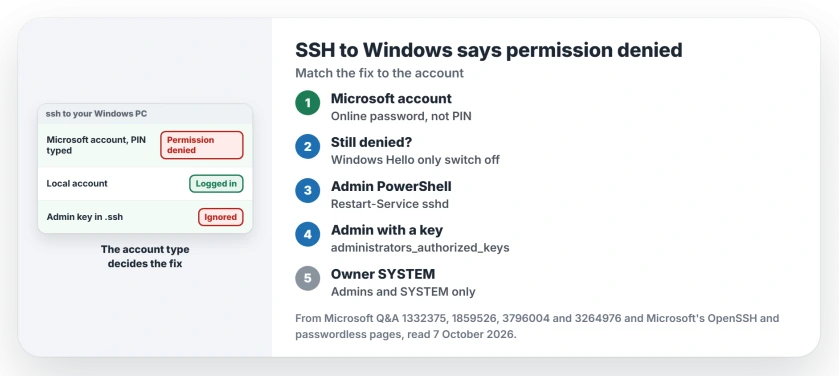
Status: checked 7 October 2026. SSH logins to Windows failed for Microsoft accounts signed in by PIN, and for administrators whose key was not in a SYSTEM-owned administrators_authorized_keys.
Ours: this laptop has only the client. Its C:\Windows\System32\OpenSSH folder holds ssh.exe, scp.exe and nine other files, but no sshd.exe, and no sshd service exists.
You add the server as an optional feature, and this page assumes you did.
1. A Microsoft account: use the account password, not the PIN
If you sign in to Windows with a PIN, SSH still wants your Microsoft account's password. The asker worked it out: "We need to use the online password".
Their PIN had produced the error 1326 line. In their words, the fault was "not seen with the local account".
For the user name, they used the short name whoami printed after the backslash.
2. The Hello-only sign-in setting
Online password still failing? Check one setting. Open Settings, then Accounts, then Sign-in options.
Under Additional settings, find the switch that only allows Windows Hello sign-in for Microsoft accounts. An owner posting in March 2026 had it on, and their password logins failed.
With it off, after locking and unlocking the PC and restarting sshd, "my password based ssh login attempts succeeded".
They were candid about the extra steps: "I'm unsure whether the lock/unlock or the service restart steps are necessary". Both are quick, so I would do both, from an administrator PowerShell.
Restart-Service sshdMicrosoft's passwordless page says that switch moves "all features on your device that require your Microsoft account and password" to Windows Hello.
Ours: SSH sits outside that, so it keeps asking for a password that sign-in no longer accepts. The same switch breaks Remote Desktop logins, and our Remote Desktop PIN page covers that side.
3. An administrator using a key: the other file
For an administrator, the key in your own .ssh folder is ignored. Microsoft says of administrators_authorized_keys in C:\ProgramData\ssh: "You must use it instead of the user-specific file within the user's profile location".
Your file's permissions matter too. An asker on the 50+ thread had the key in the right file and still got Permission denied.
Their own solution, under a SOLVED title, was that the file "needs to be owned by SYSTEM, on top of having access permissions only by SYSTEM and Administrators group".
Microsoft gives you the permissions command. Run it in an administrator prompt.
icacls.exe "C:\ProgramData\ssh\administrators_authorized_keys" /inheritance:r /grant "Administrators:F" /grant "SYSTEM:F"Microsoft's version for other languages swaps Administrators for the group's number, *S-1-5-32-544. To set the owner, open the file's Properties, then Security, then Advanced, and change Owner to SYSTEM.
Read the server's own log
The client only ever says Permission denied, but the server knows why. By default, sshd logs through Windows' own event tracing, Microsoft's configuration page explains.
Another asker found their failed logins in the Windows logs that way, marked as an invalid user.
For a plain text log you can read, set SyslogFacility to LOCAL0 in C:\ProgramData\ssh\sshd_config and restart sshd. Logs then land in C:\ProgramData\ssh\logs, which is how the first asker found error 1326.
Switch it back once you have your answer.
When a second account works and yours does not
The 80+ thread has exactly that: one administrator account rejected with the right password, and a freshly made one let straight in. The asker never posted a fix.
Ours: if the account that works is local and the failing one is a Microsoft account, steps 1 and 2 are where to look. If neither login reaches a password prompt, our ping page checks the firewall side first.
If you sign in from PuTTY instead and it rejects your .ppk file as too new, save the key again in PuTTYgen as version 2.
And if Windows cannot find the ssh command at all, before any server answers, check whether you opened the 32-bit PowerShell.
Which user name do I type for a Microsoft account?
The asker on the Microsoft account thread used the short name from whoami, the part after the backslash, with the online password.
The Short Version
- Permission denied on a Windows SSH server usually comes down to the account type.
- A Microsoft account needs its online password, not the PIN.
- Windows Hello only sign-in blocked password SSH logins for an owner.
- Administrators' keys go in C:\ProgramData\ssh\administrators_authorized_keys, owned by SYSTEM.
- File logging shows the reason the client hides.
Where to Next
First, try the online password with the short user name. If that fails, check the Windows Hello switch.
Key login still refused for an administrator? Paste the sshd log line for that attempt into a comment, and I'll read it.

Isaac Smith is the founder and editor of PC Glance, a website that covers computers, laptops, and technology. He is a tech enthusiast and a computer geek who loves to share his insights and help his readers make smart choices when buying tech gadgets or laptops. He is always curious and updated about the latest tech trends.