
You try to add .NET Framework 3.5, a language's typing pack or the OpenSSH server, and Windows stops with 0x800f0954. Normal updates may be installing without trouble.
The code means Windows looked for the feature's files where its update policy points, and found nothing. I would check that policy before downloading anything.
A Microsoft Q&A question about the code from August 2019 shows Same question (500+). A 2023 thread about .NET 3.5 adds 200+.
What 0x800f0954 means
Microsoft's OpenSSH install troubleshooting article gives the code its internal name, CBS_E_NO_OPTIONAL_CONTENT_FOUND_ON_UPDATE_SERVERS. The same failure hits any optional feature.
Its explanation fits every case: "Windows can't locate the .cab files that it must have in order to install the features".
The causes it lists are a PC cut off from the internet, Group Policy managing updates, or an update server such as WSUS.
Home PCs rarely set any of those. One of Microsoft's community support staff put it this way: "This often happens if your system is connected to a domain or has certain Group Policy settings that block access to Windows Update".
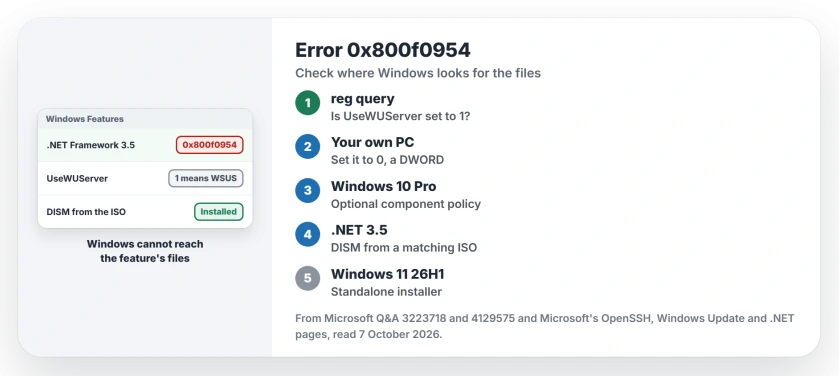
Status: checked 7 October 2026. 0x800f0954 means Windows could not fetch a feature's files from its configured source. Check for a WSUS policy, or install .NET 3.5 from a matching ISO.
Ours: on this laptop the Windows Update policy key, HKEY_LOCAL_MACHINE\SOFTWARE\Policies\Microsoft\Windows\WindowsUpdate\AU, does not exist at all.
That is the normal state for a home PC with no management, so if your PC has the key, that is your first clue.
1. Look for a leftover update server policy
Open Command Prompt and run this. It only reads:
reg query "HKLM\SOFTWARE\Policies\Microsoft\Windows\WindowsUpdate\AU" /v UseWUServerIf it reports that it cannot find the key or value, no update server is set. Skip to step 3.
If it shows 0x1, your PC is told to use an update server.
Microsoft's settings page describes that value: "Set this value to 1 to configure Automatic Updates to use a server that is running Software Update Services instead of Windows Update".
If a company or school manages your PC, that setting belongs to its administrator, so ask them. On your own PC, set UseWUServer to 0 in Registry Editor, then restart the Windows Update service from an administrator prompt:
net stop wuauserv
net start wuauserv
The 500+ thread's accepted answer has you create UseWUServer as a string value. Microsoft lists it as REG_DWORD, so edit the existing value or make a DWORD.
Two askers on Q&A set it to 0 and saw no change. One wrote "I have already modified the registry key to 0; however, it did not resolve the issue". The value only matters if it was 1.
2. Windows 10: the policy's download option
Windows 10 Pro has a policy for this.
In the Local Group Policy Editor, open Computer Configuration, Administrative Templates, System, then Specify settings for optional component installation and component repair.
Set it to Enabled and tick Download repair content and optional features directly from Windows Update instead of Windows Server Update Services. Then retry the feature.
Windows 11 needs it less. Microsoft says the option is usually not needed from 22H2 on, and that it and its neighbor "were removed in Windows 11, version 24H2". From 24H2 on, enabling the policy makes Windows Update the default source.
3. .NET 3.5: install it from a Windows ISO
The installation media can supply the files. Download the ISO for your exact Windows version from Microsoft, double-click it to mount it, and note its drive letter.
Microsoft insists you "strictly use sources from the same corresponding Windows operating system version". Then run this in an administrator prompt, with your drive letter in place of D:
DISM /Online /Enable-Feature /FeatureName:NetFx3 /All /LimitAccess /Source:D:\sources\sxsMicrosoft explains the switch you need: /LimitAccess is there "to prevent DISM from contacting Windows Update/WSUS". A volunteer moderator gave the same route in short: "Just download the ISO, mount the ISO, and run that DISM command".
An owner on the 200+ thread confirmed it in January 2025, in their words: "In my case, .net 3.5 installation only works via Powershell", with the ISO mounted. I have used Microsoft's command instead.
4. Windows 11 26H1: no feature to turn on
Windows 11 26H1 changed the rules. Microsoft says that "Starting with Windows 11 26H1 (build 28000), .NET Framework 3.5 is only available as a standalone installer".
On those builds, you will find nothing to tick in Windows Features. Download Microsoft's standalone installer for 26H1 instead.
What if nothing on this page clears it?
One asker on Windows 11 tried bypassing WSUS and an offline install from a mounted ISO, and both failed. Another, on a managed Windows 365 PC, changed the registry with no effect.
Both were managed or unclear setups, and neither posted a fix.
If yours is a work PC, the update policy belongs to IT. If the same failure hits regular updates too, our Windows Update error codes page explains the missing source codes, such as 0x800f081f.
While the OpenSSH feature will not install, PuTTY is the common stand-in, and its key format too new message has a quick fix in PuTTYgen.
Does 0x800f0954 mean my Windows Update is broken?
Not by itself. Its internal name is about optional content, the extra packages a feature needs. A broken component store gives other codes, and our 0x800f0991 page runs the DISM and SFC repair in the order owners used.
The Short Version
- 0x800f0954 means Windows could not fetch a feature's files from its configured source.
- Check UseWUServer; 1 means an update server is set, and 0 is a DWORD.
- Windows 10: enable the optional component policy and tick the download option.
- .NET 3.5: install from a matching ISO with DISM and /LimitAccess.
- Windows 11 26H1: use Microsoft's standalone .NET 3.5 installer.
Where to Next
Run the reg query line first. Its answer tells you whether steps 1 and 2 apply at all.
Still failing with no policy set? Comment with the feature name and your Windows build, and I'll trace where its files should come from.

Isaac Smith is the founder and editor of PC Glance, a website that covers computers, laptops, and technology. He is a tech enthusiast and a computer geek who loves to share his insights and help his readers make smart choices when buying tech gadgets or laptops. He is always curious and updated about the latest tech trends.