
You can see the program in Task Manager, yet taskkill /F answers that it could not be terminated. The reason line says "There is no running instance of the task", even from an admin window.
I would stop retrying the same command. That line is misleading. The process you see is real, so the job is finding what holds it.
The Super User question about a stuck Chrome process, asked in February 2017, has 192,343 views. On Microsoft Q&A, an owner who asked Microsoft to fix taskkill in 2019 has 30+ others clicking Same question.
What the reason line really says
It is not about your process at all. Ours: when we decoded it on this laptop, certutil named it SCHED_E_TASK_NOT_RUNNING. That is a Task Scheduler error, so taskkill borrows wording built for scheduled tasks.
What it hides from you is simpler. Windows asked the process to end, and the process could not finish ending.
Microsoft says on its TerminateProcess page that "The terminated process cannot exit until all pending I/O has been completed or canceled". A program waiting on a drive, a share or a driver sits there half closed.
We tested the other case here. A test process ended by taskkill vanished from tasklist at once, even while another window kept it open. So a process that stays listed has not died yet, because it is stuck somewhere on its way out.
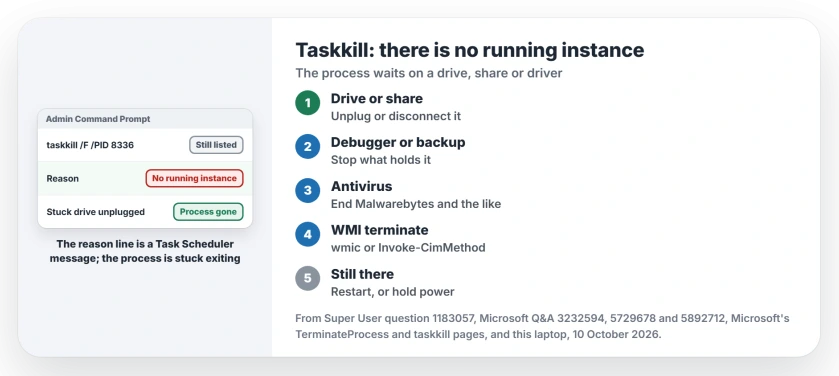
Status: Microsoft's TerminateProcess and taskkill pages, a Super User thread from 2017 to 2026 and Q&A owners, checked 10 October 2026. Freeing the stuck drive worked fastest.
1. Free the drive or share it was waiting on
Think back to where the program lived on your PC, or which file it opened last before it froze. A USB drive counts. So do a memory card, a mapped network drive and a cloud folder.
One owner found the pattern with an external drive that had stopped answering. Opening that drive in Command Prompt hung.
In their words, "Disconnecting the problem drive from USB seems to immediately solve the issue". The stuck process vanished with it.
Your own drive may already be unplugged. Another owner hit it after the drive was gone, and plugging it back did nothing for them. I treat this as the first test to run, not a sure cure for every case.
A network drive does it too. An owner in May 2026 had Explorer and other apps frozen by one. They turned Wi-Fi off from an admin prompt, and "all programs will be released and works fine" was their result.
netsh interface set interface name="Wi-Fi" admin=disableChange Wi-Fi to the name of your adapter. Switch it back on afterwards with admin=enable. Then check Task Manager again.
2. Close what has its hooks in the process
Some programs hold another program open on purpose, so it cannot leave until they let go. A debugger is the classic case. Security and backup tools that scan files as you use them do it as well.
Owners freed theirs this way, so check which of these you run:
- Visual Studio: one owner said "it was enough to just stop debugging in Visual Studio".
- JetBrains Rider: closing every Rider window took a stuck w3wp.exe with it.
- Malwarebytes: ending it released the last Chrome process for an owner.
- Macrium Reflect: another had to "pause my Macrium Reflect image backup".
Is the stuck program Outlook? Its own fault has steps on the page about Outlook that will not reopen, because Outlook can hang on a PST file in OneDrive.
3. Try the WMI route instead
Owners in both of those threads ended processes your taskkill could not touch with a WMI command. The 30+ asker found it worked from a normal window, not even an admin one.
wmic process where name="chrome.exe" call terminateChange chrome.exe to your program. One owner ended Ableton Live this way after taskkill gave the same reason line. The command printed Method execution successful.
Results were mixed. Two owners got a return value of 2. One wrote "It says it succeeds, but the process is still there", which fits a process stuck on a drive.
Ours: Windows 11 25H2 on this laptop has no WMIC.exe at all, and yours may lack it too. Microsoft is removing it, as our WMIC page explains, but PowerShell calls the same Terminate method in one line of its own.
Get-CimInstance Win32_Process -Filter "Name='chrome.exe'" | Invoke-CimMethod -MethodName TerminateNo owner in these threads confirmed the PowerShell line on a stuck process, as far as I could find. It is the same attempt in newer clothes.
When only a restart clears it
If none of that frees it, your process waits on something only a restart can cancel. A volunteer moderator on Q&A gave the same answer for a hung thread, which fits what TerminateProcess describes.
A restart can hang too. An owner with a java.exe holding network ports found Restart and Shut Down both failed. What worked was "Switching off the laptop by pressing the power button for few seconds".
Save your work in other apps first, since a forced power off closes everything without asking.
When it says Access is denied
Does yours say Access is denied instead? It can be the same stuck exit. Microsoft's TerminateProcess page says calls on a process that has already terminated fail with ERROR_ACCESS_DENIED.
It can also be a protected process. One Q&A asker hit it with a program called SAntivirus that even admin tools could not end. The advice they got was malware removal steps, not a better kill command.
The Short Version
- No running instance of the task is a Task Scheduler message, and the process still exists.
- Windows cannot finish ending a process that waits on a drive, share or driver.
- Unplug the stuck drive or disconnect the network share first.
- Close the debugger, antivirus or backup tool holding it.
- The WMI terminate method helped some owners; a restart clears the rest.
Where to Next
Freed yours? Leave me a comment naming what held it, a drive, a share or a program. Tell me the program too if it was not on this list.

Isaac Smith is the founder and editor of PC Glance, a website that covers computers, laptops, and technology. He is a tech enthusiast and a computer geek who loves to share his insights and help his readers make smart choices when buying tech gadgets or laptops. He is always curious and updated about the latest tech trends.