

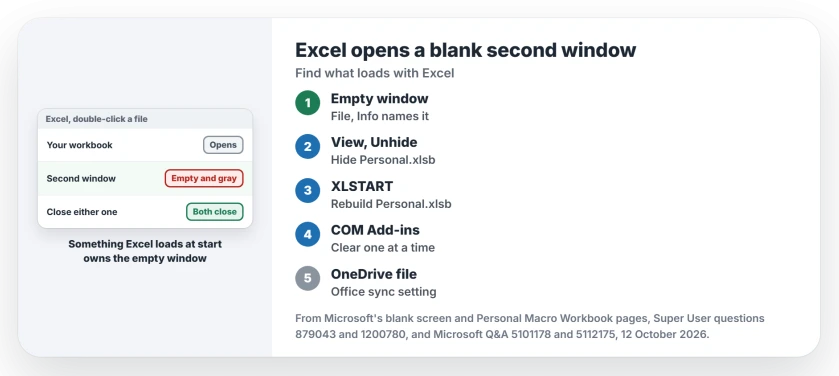
You double-click a workbook and Excel opens two windows: your file and an empty gray one. Close the empty window and your file closes with it.
Before you reinstall Office, give me two minutes. In the threads I read, the empty window traced back to something Excel loads every time it starts. You can usually name it from inside.
The Super User question from February 2015 has 294,183 views. A Microsoft Q&A version tied to OneDrive files holds 100+ under Same question.
What the blank window is
Both windows belong to one running Excel, which is why closing either closes both. One Microsoft Q&A owner described it as "a blank Excel window with no workbook loaded".
Something opened that window at startup before your file arrived, and two causes fill the threads: a Personal Macro Workbook and an add-in.
Name it first. Click File in the blank window, and the Info page shows what is open there. One owner found an add-in file called FUNCRES that way, and another used Open File Location to find their Personal.xlsb.
Status: reviewed 12 October 2026: Microsoft's blank screen article, its Personal Macro Workbook page, this laptop's Excel 16 setup and owner reports from two forums.
1. Check the Personal Macro Workbook
Microsoft says Personal.xlsb is "a hidden workbook stored on your computer, which opens in the background every time you open Excel". It lives in the XLSTART folder, and if it ever gets unhidden, it shows as a second window.
Go to View and click Unhide. If PERSONAL.XLSB is listed, show it, then click View, Hide and save it when Excel asks on exit. One owner had unhidden it long ago and forgotten.
If it is hidden and the window still appears, the file itself may be the problem. The accepted answer blamed "corruption in a personal macro workbook" and fixed it by moving PERSONAL.XLSB out of XLSTART.
Export your macros first. In the Visual Basic editor, right-click each module and choose Export File. Then remove the file. Record one macro into Personal Macro Workbook, so Excel builds a fresh one, and import the modules back.
Reported working by owners. That rebuild has a long trail. Two more owners confirmed removing the file, and a Microsoft Q&A owner in 2020 found the empty window gone after deleting it from XLStart.
Ours: this laptop's Excel looks clean. Its XLSTART folder is empty, and its one COM add-in, Microsoft Power Map, is switched off.
2. Turn off add-ins one at a time
Microsoft's blank screen article lists add-ins as a cause. Go to File, Options, Add-ins, choose COM Add-ins under Manage and click Go.
Clear one, then reopen your workbook by double-clicking it. Microsoft's rule: "If Excel loads the file, the add-in that you last turned off is causing the problem". Then repeat with Excel Add-ins.
A quick test first: hold Ctrl while you open the file and accept Safe Mode. One owner saw no empty window that way, which pointed at add-ins. Outlook has the same safe mode test for add-ins.
Reported working by owners. On Super User, turning off MySQL for Excel cleared it for four people, and other owners named Solver and an HP ALM add-in.
3. Files from OneDrive, a pin or the preview pane
A Microsoft Q&A owner got the extra window only for OneDrive files opened from the jump list. In OneDrive's settings, on what was then an Office tab, they ticked "Use office application to sync Office files that I open".
That box brings AutoSave with it. The owner did not like that and turned off AutoSave by default in Excel's Save options.
Another owner's file brought a blank window along only from a taskbar pin, which still pointed at an old OneDrive address after an account move. Saving the file again, then unpinning and pinning it, fixed it.
A 2017 asker stopped it by turning off File Explorer's preview pane, and an adviser on Microsoft Q&A listed the same step in 2020.
4. One workbook in two windows
Sometimes the second window is your own file. Microsoft's article puts this first: the workbook "may have inadvertently been saved as a hidden document", so check View, Unhide.
A 2024 owner found their file listed twice there. They showed both, closed one window and saved, and the file opened normally after that.
When nothing else stops it
If none of that works, I would run an Online Repair before anything bigger. Our page on the two Office repairs shows which one fixes more.
An owner whose company runs in-house add-ins found a stopgap. Any workbook placed in XLSTART stopped the blank window, and that book could be closed without closing Excel.
The Short Version
- Click File in the blank window to see what it holds.
- Hide or rebuild Personal.xlsb in XLSTART.
- Turn off COM add-ins one at a time.
- OneDrive files: check the Office tab in OneDrive's settings.
- Check View, Unhide for your own file twice.
Where to Next
Did the macro workbook or an add-in cause it on your PC? Post the add-in's name in a comment. I will list the names readers find.

Isaac Smith is the founder and editor of PC Glance, a website that covers computers, laptops, and technology. He is a tech enthusiast and a computer geek who loves to share his insights and help his readers make smart choices when buying tech gadgets or laptops. He is always curious and updated about the latest tech trends.