
You click a pinned app on your taskbar, and a second button for it appears at the far end. One icon launches the app. The other holds its window. Click the first one again and you may get a second copy of the same app.
I would unpin the old button and pin the one that appears while the app runs. It takes ten seconds. In the threads I read, it fixed the problem for owner after owner.
The Super User page about VMware Player doing this, from November 2010, has 87,011 views. One Microsoft Q&A copy, from 2009, has 50+ people with the same question.
Two buttons mean two different IDs
Windows groups windows under a taskbar button by an ID, a short name that tells it which app each window belongs to.
Your pinned button is a shortcut with an ID of its own, or one Windows works out from its target. The open window has one too.
Microsoft documents this on its page about app IDs, written for developers but plain enough to follow. The taskbar uses them "to associate processes, files, and windows with a particular application".
When the two IDs differ, even slightly, Windows draws two buttons for what you see as one app. That is all the second icon means.
A Microsoft Q&A helper gave the classic cause, and the asker marked it as the answer: the app "launches itself with different command switches or parameters than the original shortcut was created with".
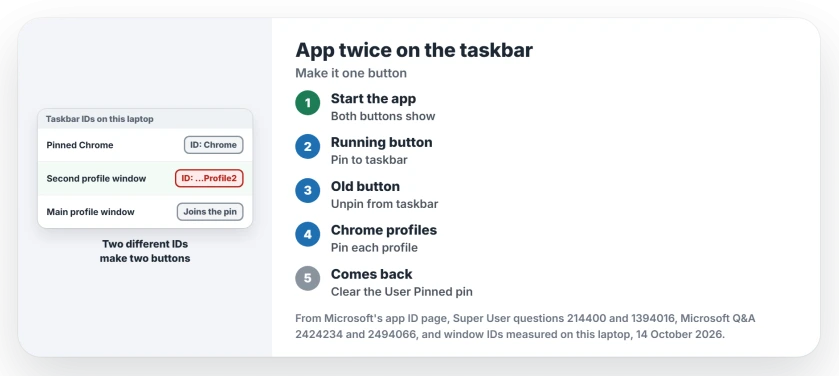
Status: as of 14 October 2026, pinning the running button still fixes it on Windows 11 version 25H2, and Chrome profile windows still carry their own ID.
Ours: this laptop has seven pinned shortcuts. Five carry an ID inside the shortcut, such as Chrome for Google Chrome and MSEdge for Microsoft Edge. Two carry none, so Windows works one out from the program each shortcut points at.
1. Pin the button that is running
- Start the app from its pinned button.
- Right-click the new button and select Pin to taskbar.
- Right-click the old button and select Unpin from taskbar.
- Drag the button back where you like it.
That order comes from the accepted Super User answer, which has stood since November 2010. Chaulky, who asked, said unpinning the original and pinning the running copy fixed VMware Player.
Owners report in the comments that the same fix worked for Outlook 2013 and for iTunes. A Microsoft Q&A asker had only Outlook doubling, and the swap worked there too.
A second cause sits in the same answer: a pin made from a shortcut to a file, not from the program. Pinning your running button avoids that as well.
2. Pin from Start instead
Outlook can double for another reason. One Super User answerer traced it to pinning Outlook before it had ever been opened for that user.
Their fix: close Outlook and unpin it. Then right-click Outlook in the Start menu, without opening it, and choose Pin to taskbar. A commenter said the same fault taught them to pin Outlook only after its first setup.
Microsoft's guidance asks apps that set their own ID to put it on every shortcut, Start menu included. So your Start menu entry is the shortcut built to match.
Chrome or Edge profiles get their own button
Use two Chrome profiles and you may see this even with Chrome pinned correctly. Windows from your main profile join the pinned button, because they carry the same plain Chrome ID. Windows from any other profile open a new one.
Ours: we read the ID set on each open window on this laptop, without changing anything. Windows from extra Chrome profiles carried IDs such as Chrome.UserData.Profile2 and Chrome.UserData.Profile3.
The pinned shortcut carries plain Chrome. That mismatch is your second button.
So pin each profile on its own:
- In Chrome, open Settings, then You and Google.
- Select Customize your Chrome profile.
- Turn on Create desktop shortcut.
- Close Chrome and unpin the old button.
- Pin the new desktop shortcut.
On Windows 11, Pin to taskbar may hide under Show more options when you right-click the shortcut. Chrome 154's own wording still includes that switch.
The Super User question on pinning a profile this way has 83,602 views since January 2019. One commenter confirmed the route on Windows 11, and another walked through it in 2025, noting that Chrome must be closed first.
Edge's pinned shortcut on this laptop names a profile on its command line too, the default one. So I would expect Edge profiles to split the same way.
Clear out the stale pin
If the duplicate keeps coming back, an old shortcut may still sit in the folder where Windows keeps your pins. One Super User answer deletes it there, and a commenter confirmed that on Windows 8.
%AppData%\Microsoft\Internet Explorer\Quick Launch\User Pinned\TaskBarPaste that path into the File Explorer address bar. Delete only the shortcut for your doubling app. Then pin the running button again.
Pins that return after a restart, even when you removed them, come from somewhere else. We traced that in the layout file that puts unpinned apps back.
Is it Windows 11 by design?
In January 2026 a Microsoft Q&A adviser told a Windows 11 Pro owner that two buttons are "by design". I would not accept that answer for an ordinary desktop app like VMware Player or Outlook.
The answers in these threads treat it as a mismatch, and owners who tried the swap mostly reported success.
Eclipse was the exception. One owner only fixed it by running Eclipse in Windows Vista compatibility mode, set on the program file's Compatibility tab.
If your doubled button also shows a blank or wrong icon, the icon cache needs clearing as well. See how to clear both icon caches on Windows 11.
The Short Version
- Two buttons for one app means the pinned shortcut and the running window carry different IDs.
- Start the app, pin the running button, unpin the old one.
- Or close the app and pin it from the Start menu.
- Chrome profiles get their own ID: pin each profile's own desktop shortcut.
- If it returns, delete the old shortcut in the User Pinned\TaskBar folder.
Where to Next
Eclipse needed a compatibility setting before it would behave, and one more owner said that setting broke parts of it. If your app still doubles after the swap, post its name as a comment. I can then read what its shortcut carries.

Isaac Smith is the founder and editor of PC Glance, a website that covers computers, laptops, and technology. He is a tech enthusiast and a computer geek who loves to share his insights and help his readers make smart choices when buying tech gadgets or laptops. He is always curious and updated about the latest tech trends.