
A file called nul has appeared in one of your folders, and nothing removes it. Delete does nothing. Command Prompt calls the name incorrect, and the folder holding it will not delete either.
I would remove it from Command Prompt with \\?\ in front of its full path. The prefix makes Windows skip the name check.
Greg Mattes found one on Windows XP in May 2011, and that Super User page has 58,745 views.
The newer source is code tools that run Linux-style commands on Windows: one GitHub issue about such a tool leaving nul files behind drew 235 reactions and 184 comments.
Windows still treats nul as a device
To ordinary Windows programs, nul is not a file name. It is the old DOS name for the null device, where unwanted output goes. Microsoft's naming rules reserve it along with CON, PRN, AUX, COM1 to COM9 and LPT1 to LPT9.
Microsoft documents the problem on its page about files that will not delete: "If the file name includes a reserved name in the Win32 name space, such as lpt1, you can't delete the file".
It adds: "This issue isn't a limitation of NTFS". So your disk can hold a file with that name, and some tools write one. Windows' usual delete commands cannot point at it.
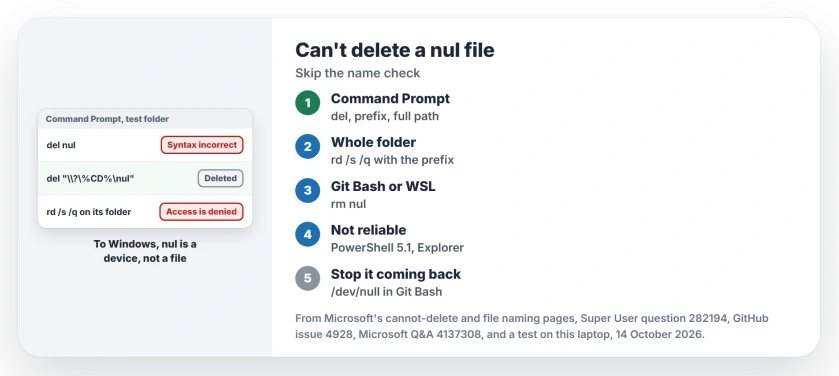
Status: build 26200 of Windows 11 Home, tested 14 October 2026. Plain del still refuses a file named nul; del with the prefix and the full path still removes it.
Ours: in a test folder on this laptop, Git Bash turned an echo command sent to nul into a real 19-byte file named nul. Then Command Prompt refused it twice.
Plain del nul printed "The filename, directory name, or volume label syntax is incorrect". Rename printed "The parameter is incorrect". The file sat there untouched.
1. Delete it with the prefix and the full path
Microsoft says the prefix tells Windows "to disable all string parsing and to send the string that follows it straight to the file system". Without parsing, nul is just a name again.
- Open Command Prompt. An ordinary window is enough for your own folders.
- Type del, then the full path in quote marks, starting with the prefix and the drive letter.
del "\\?\C:\Users\you\project\nul"Already in that folder? Then %CD% fills in the path for you, as one Super User commenter pointed out:
del "\\?\%CD%\nul"Greg Mattes accepted that answer in 2011 and wrote back that it worked. A Windows 11 owner on GitHub posted in February 2026 that a version of the same command finally removed theirs.
Ours: del with the prefix removed our nul file at once. No error, no prompt.
2. A whole folder that will not delete
A nul file blocks your whole folder too. One developer even built a small tool to fix the right-click Delete for exactly that.
Ours: plain rd /s /q on our test folder deleted the other file inside. Then it printed "project\nul - Access is denied" and left the folder in place. With the prefix, rd removed the folder and the nul file:
rd /s /q "\\?\C:\Users\you\project"Read the path twice first. rd /s /q deletes everything under it, and it never asks. For folders that are merely slow to delete, rd /s /q is also the fast route.
3. Or remove it with rm in Git Bash
If Git for Windows is on your PC, open Git Bash in that folder and type rm nul. Git Bash skips Windows' name checks, so the name means nothing special there.
Commenters confirmed it on Super User and several times on GitHub. One owner managed it with rm in WSL, Windows' Linux shell, after other routes failed.
Ours: rm in Git Bash removed our test file named con, another reserved name, at the first try.
Why PowerShell and File Explorer let you down
PowerShell. One Super User commenter found the prefix did nothing for them in PowerShell, though it "worked effectively in a standard terminal". Our test agreed.
Ours: in Windows PowerShell 5.1, plain Remove-Item said our con file did not exist. With the prefix, nothing printed and nothing changed.
One owner did succeed with Remove-Item and the prefix in PowerShell 6.1 or newer. That is the separately installed PowerShell, not the one built into your Windows.
File Explorer. One GitHub commenter found that Shift+Delete removed the file from the list. It returned when they reopened the folder. I would not trust Explorer here.
On Microsoft Q&A, an owner trying to delete a file starting with con got "invalid file handle" from Windows.
Where do these files come from?
In Command Prompt, output sent to nul vanishes. In Git Bash and similar Linux-style shells, the null device is /dev/null, and nul is an ordinary name. So a command meant for Command Prompt, run in Git Bash, creates a real file.
The GitHub issue reports nul files left by an AI coding tool, Claude Code, on Windows. One commenter traced them to the Windows form of the redirect being run inside Git Bash, which our test reproduces.
Writing your own scripts for Git Bash? Use /dev/null there and keep nul for Command Prompt. Fix the script, or the file keeps returning.
OneDrive refuses these names as well. One Microsoft Q&A owner saw a sync error about a file called NUl.xml at every sign-in on a brand-new laptop. Our page on the names OneDrive will not sync lists the rest.
Names that end in a dot or a space
The same trick removes files whose names end in a dot or a space. Microsoft's page lists them as their own cause: "the file name has a trailing space or a trailing period, or the file name is made up of a space only".
Ours: we made a file called report. with a trailing dot. Plain del answered that it could not find the file. The file stayed. With the prefix, del removed it.
The Short Version
- To Windows, nul is a device name, so ordinary delete commands cannot reach a file called nul.
- In Command Prompt, del with the
\\?\prefix and the full path removes it. - A stuck folder: rd /s /q with the same prefix, after checking the path.
- In Git Bash or WSL: rm nul works.
- Windows PowerShell 5.1 and File Explorer are not reliable here.
- In Git Bash scripts, send output to /dev/null, never to nul.
Where to Next
Reserved names come as a set: con, prn, aux, and the COM and LPT numbers. If one survives the prefix on your PC, I want to see it: put the exact name in a comment, with the folder it sat in.

Isaac Smith is the founder and editor of PC Glance, a website that covers computers, laptops, and technology. He is a tech enthusiast and a computer geek who loves to share his insights and help his readers make smart choices when buying tech gadgets or laptops. He is always curious and updated about the latest tech trends.